

Verve AI - Interview Copilot
Verve AI · Writing · Productivity · Leaning · AI Assistant · Business
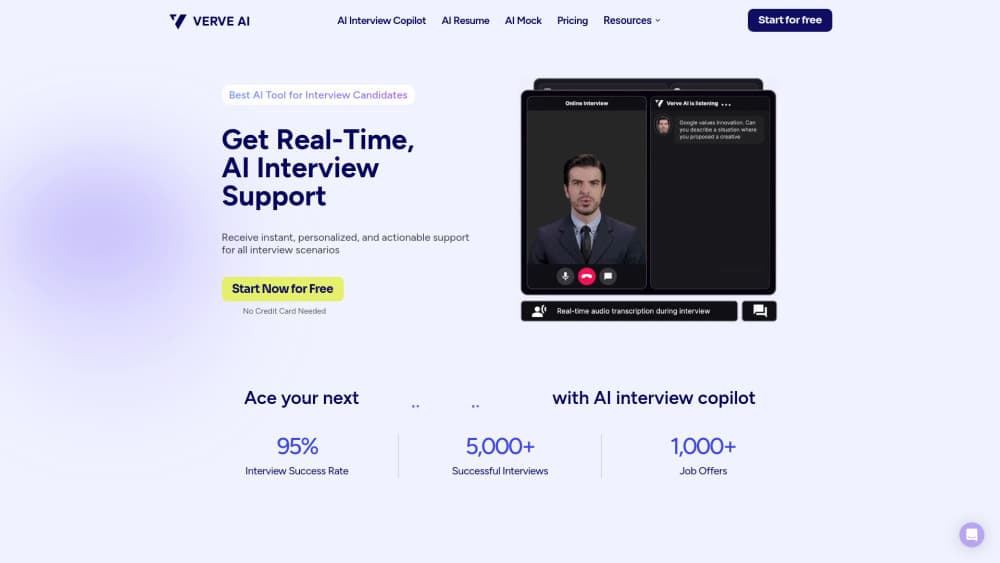
Verve AI is an interview copilot that listens to live interviews, transcribes them in 55+ languages, and suggests answers on screen that only you can see.
About Verve AI - Interview Copilot
What Is Verve AI
Verve AI is an AI interview assistant for people who freeze up in live interviews. It runs as a desktop app, a browser extension, or a mobile page, listens to the call, and writes short suggested answers based on your resume, your notes, and the question just asked. You read them on a small panel and say them in your own words.
The product covers behavioral screens, technical rounds, coding tests, and online assessments. Verve AI says it has 500K+ users and advertises under 300ms latency, which matters when the interviewer is waiting for you to start talking. There are also 14 extra tools around the edges: resume builder, cover letter builder, ATS checker, question banks, and mock interviews.
The catch is structural. Live sessions are capped on the free and Standard plans, the hidden overlay only works in the desktop app, and using any copilot during a proctored assessment can break the employer's rules. Treat it as a preparation and confidence tool, not a permission slip.
Getting Started
- Create a free account with an email address. No card is needed for the free plan.
- Build an interview profile by uploading your resume and pasting the job description, so answers match your real experience.
- Add company research, project notes, or STAR stories to the knowledge base for better context.
- Rehearse in the Playground or run an AI mock interview to hear how the suggestions sound out loud.
- Start a session before you join the call, keep the panel on a second screen or in transparent mode, and export the transcript when you're done.
Product Information
A quick look at Verve AI - Interview Copilot's pricing, supported platforms, and performance.
Best for
The users, tasks, and scenarios where this tool fits best.
Users
- First-time job seekers
- People returning after a career break
- Non-native speakers
- Engineers in live coding rounds
Tasks
- Answering behavioral questions under pressure
- Working through a coding prompt aloud
- Company-specific prep
Scenarios
- A Zoom or Teams interview on your laptop
- A phone screen while you're away from your desk
- The night before a final round
Key features
Real-Time Answer Suggestions
The copilot listens to the interviewer, transcribes the audio, and delivers real-time interview answers in a second or two. Suggestions pull from your resume and uploaded documents, so they sound like your background rather than generic advice. You can edit the prompt to control tone and length.
Stealth Mode on Desktop
Stealth mode keeps the overlay hidden from screen sharing on Zoom, Google Meet, Teams, and Webex. The window stays visible to you and invisible to everyone else on the call. It only works in the desktop app, so browser users don't get this protection.
Snap and Solve Screen Capture
A hotkey lets you drag a box around any question on screen, including a coding prompt or a take-home test. Verve AI reads the captured text and returns an approach, an explanation, or a code sketch. This is the feature that makes the tool useful as coding interview help rather than just conversation practice.
Personalized Interview Profile
You upload a resume, a job description, and supporting documents, and the copilot answers from that material. A knowledge base holds company research and STAR stories you've written yourself. Better input means fewer answers that miss your actual experience.
Mock Interviews and Question Banks
AI mock interviews simulate a full session with follow-up questions. Question banks cover 20 domains, including coding, system design, finance, product management, data science, consulting, and cybersecurity. Reports after each session point out vague answers and missed details.
Resume and Application Tools
The same account includes a resume builder, a cover letter builder, and an ATS checker. They're secondary to the live copilot, but they save a separate subscription if you're job hunting from scratch. Free users get limited access.
Pros and cons
Pros
- Fast suggestions: the advertised sub-300ms latency keeps the pause in a conversation short.
- Broad language coverage: 55+ languages for transcription covers interviews outside English.
- Honest free tier: three 15-minute sessions let you test the workflow without a card.
- Works across meeting platforms: Zoom, Meet, Teams, and Webex all run through the same overlay.
- Extra application tools bundled: resume, cover letter, and ATS checks in one account.
Cons
- Session caps bite: the free plan allows 15 minutes per session, and Standard stops at 60 minutes and five sessions a month.
- Stealth mode is desktop only: browser and mobile users lose the one feature most people come for.
- Monthly pricing climbs fast: Standard runs $44.99/mo month to month and Pro $84.99/mo, with the lower headline rates tied to annual billing.
- Rule risk in assessments: using a copilot during a proctored test can get your application disqualified.
Frequently asked questions
It listens to the call, transcribes the interviewer's questions, and shows short suggested answers on a panel only you can see. It can also read a question from your screen and propose a solution.
Related content
Explore related tools, skills, and articles for Verve AI - Interview Copilot.
Verve AI - Interview Copilot Alternatives

Google EmbeddingGemma 2
Google DeepMind · Writing · Image · CodingGoogle EmbeddingGemma 2 is a 740M-parameter open model that turns text, code, images, audio, and video frames into vectors in one 768-dimension space, running on phones and laptops.

MePersona
MePersona, Inc. · Writing · Productivity · MarketingMePersona is an AI unified inbox for creators. It learns your voice, drafts replies to fan messages from 12 platforms, and sends only what you approve.

Fluence
Yay Software (Yannick Huchard) · Writing · Voice & Language · ProductivityFluence is an Android app that reads PDFs, EPUBs, Word files and web articles aloud, follows each sentence as it speaks, and answers questions about the text on the phone itself.