

VibeCSS
VibeCSS · Coding
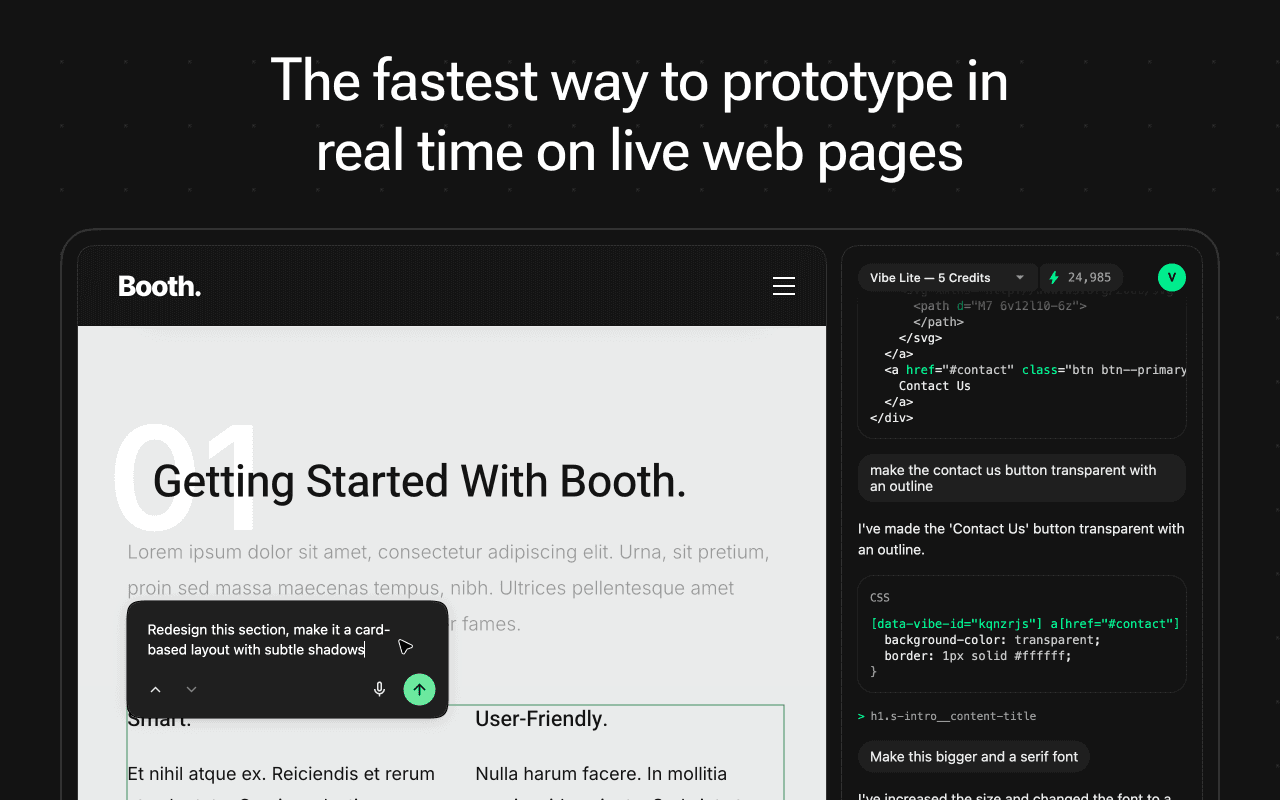
VibeCSS is an AI-powered CSS editor that runs as a Chrome extension and lets you restyle any website by typing plain-language instructions. Instead of writing selectors and property values by hand, you describe the change you want and the extension applies it to the page in real time. It suits designers, marketers, and anyone who wants to tweak a layout or test a visual idea without touching a stylesheet. No stylesheet required.
About VibeCSS
What Is VibeCSS
VibeCSS is a browser extension that adds an AI-driven editing layer on top of whatever page you're viewing. It reads the page's existing styles and turns your natural language request, such as making a headline larger or changing a button color, into the actual CSS rules that produce that result. The extension targets people who can describe what looks wrong or what they want to see, but who don't want to open developer tools and hunt for the right selector.
The main problem it solves is the gap between a visual idea and the code that realizes it. On a live site, making a small change usually means inspecting elements, finding the responsible rule, and testing values until it looks right. VibeCSS compresses that loop into a sentence. You can preview changes as you go and keep iterating until the page matches what you had in mind.
The biggest limitation is scope. Changes apply to the page in your browser session, so they act as a live preview rather than a permanent edit to a site you don't own. It's built for experimentation, prototyping, and quick visual adjustments, not for editing a production codebase. It also depends on the page loading normally and on the AI correctly guessing which element you mean. Vague instructions lead to results you'll want to refine.
Getting Started
- Install the VibeCSS extension from the Chrome Web Store and pin it to your toolbar.
- Open the website you want to adjust and click the VibeCSS icon to activate the editing layer.
- Describe the change in plain language, such as "make the header sticky" or "use a darker background."
- Review the update on the page and refine your instruction until it looks right.
- Copy the generated CSS if you want to reuse it elsewhere.
Product Information
A quick look at VibeCSS's pricing, supported platforms, and performance.
Best for
The users, tasks, and scenarios where this tool fits best.
Users
- Designers
- Front-end developers
- Marketers and content teams
Tasks
- Restyling a live page
- Prototyping ideas
- Learning CSS
Scenarios
- Quick visual reviews
- Copying proven styles
- Last-minute tweaks
Key features
Natural Language Editing
You describe a change the way you'd say it out loud, and VibeCSS turns that into working CSS for the page in front of you. No selector syntax. No property names to look up. This is the core of the tool, and it's what separates it from a traditional style inspector.
Real-Time Preview
Every instruction updates the page as you apply it, so you judge a change by looking at the result rather than by reasoning about code. You can stack adjustments one after another and revert anything that doesn't work. The feedback loop stays short, which makes it practical to explore several options in a few minutes. Want to compare two options side by side? Just try both.
Works on Any Website
VibeCSS operates on whatever page you have open. Blogs, dashboards, and storefronts are all fair game. It reads the site's existing styles and layers your changes on top, so you aren't limited to sites you built or control. That makes it useful for studying how other pages achieve a particular look. It works anywhere.
No Coding Required
The extension is aimed at people who don't write CSS. You can make a button rounder, tighten up spacing, or swap a font without knowing which properties control those details. Anyone who can describe a visual change can use it, which widens who gets to iterate on a design. It's a website style editor for people who don't write code.
Copyable Output
When a change looks right, you can take the generated CSS with you. That output is useful for pasting into your own project, sharing with a developer, or documenting a style decision. It bridges the gap between experimenting in the browser and applying the same change in code. Copy it and move on.
Pros and cons
Pros
- Removes the need to inspect elements and hand-write selectors for simple changes.
- Real-time preview makes it fast to compare several visual options.
- Works on any site you can open in Chrome, not just your own.
- Useful for beginners who want to see how a description maps to CSS.
- Free to install, so there's no cost to try it on a page.
Cons
- Edits live in your browser session, so they aren't saved to the site itself.
- Vague instructions can target the wrong element, and you'll need to refine them.
- Changes depend on the page loading correctly and may reset on a reload.
Frequently asked questions
VibeCSS is an AI-powered CSS editor that runs as a Chrome extension and lets you change how any website looks using plain-language commands. You describe the change, and it writes and applies the CSS for you.
Related content
Explore related tools, skills, and articles for VibeCSS.
VibeCSS Alternatives
Forefront
Forefront · CodingForefront is a web platform for building with open-source AI. It lets you fine-tune leading open-source language models on your own data, evaluate how they perform, and run them through an API or export them to host yourself. Developers who want the convenience of a closed-source platform but insist on owning their models and data are the target audience here.

Startkit
StartKit.AI · CodingStartkit is a boilerplate for building AI SaaS and AI wrapper products. Think of it as an AI startup boilerplate with the boring parts already wired up: authentication, Stripe and Lemon Squeezy payments, usage limits, transactional email, and an AI API starter that talks to OpenAI, Anthropic, Groq, or Llama. You clone the repo, set your price, and start on the part of your product that people actually pay for. It's Next.js under React and Tailwind, so most of the boilerplate code already feels familiar.
Testim
Tricentis · CodingTestim is an AI-powered test automation platform for building and running end-to-end tests across web, mobile, and Salesforce applications. It leans on machine learning to keep tests stable when an interface changes, so teams spend less time fixing broken selectors. Not bad for an automated testing tool you can start using today. You create tests by recording actions in a browser, then optionally add JavaScript when you need more control. It's a solid pick for busy QA teams.