
Video Transcription AI
Video Transcription AI · Writing
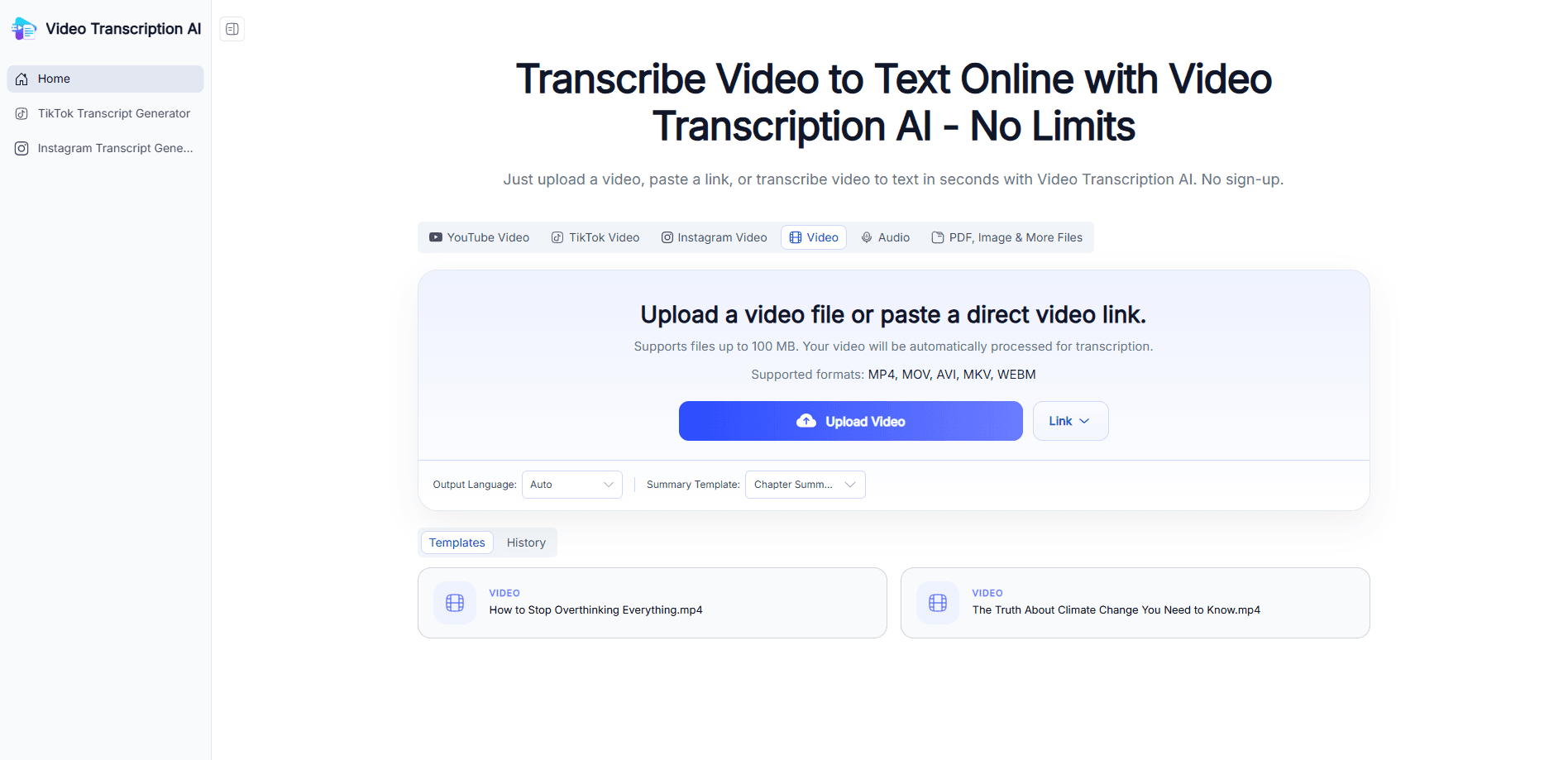
Video Transcription AI is a browser-based video to text converter that turns a video file or a pasted link into an editable transcript in seconds. You upload a clip or drop in a YouTube, TikTok or Instagram URL, and the tool returns speaker-labeled text with timestamps, a one-click summary, and export options that include TXT, DOCX, PDF, SRT, VTT and Markdown. It runs free in the browser, so there's no app to install and no account to create. It's also a YouTube transcript generator, a subtitle generator and an MP4 to text converter in one place.
About Video Transcription AI
What Is Video Transcription AI
Video Transcription AI is a free online service that converts spoken audio in videos into written text you can edit and reuse. Instead of typing out a lecture, interview or podcast by hand, you upload a file or paste a public link, and the tool handles the rest. It's built for people who work with video but don't want to pay for a heavyweight editing suite.
The main problem it solves is time. A 30-minute recording that would take an hour or more to transcribe manually comes back as structured text in seconds, and the transcript stays searchable, so you don't have to scrub through the whole video to find one quote. Speaker labels and clickable timestamps make long conversations easier to follow. No more replaying the same clip four times.
The limits are worth knowing up front. Accuracy sits around 97% on the company's own numbers. Noisy audio, heavy accents or several people talking at once drag it down. There's no public API and no stated developer, so teams that need to wire transcription into their own pipeline should look elsewhere. You're also trusting the service with your files. It says sensitive content is deleted after 24 hours.
Getting Started
- Open the site in your browser and choose the upload option or the link option. No sign-up is required.
- Upload a video or audio file, or paste a public YouTube, TikTok, Instagram or direct video URL.
- Pick the output language, and switch on speaker diarization if you need speaker labels in the transcript.
- Let the video transcript generator process the audio, then read the result and edit any lines that came out wrong.
- Copy the text, generate a summary, or export in your preferred format such as SRT, VTT, DOCX or Markdown.
Product Information
A quick look at Video Transcription AI's pricing, supported platforms, and performance.
Best for
The users, tasks, and scenarios where this tool fits best.
Users
- Content creators
- Students and educators
- Researchers
- Marketers
Tasks
- Turning a YouTube video into an editable transcript
- Generating subtitles
- Summarizing a long recording
- Translating a transcript
Scenarios
- You finished recording a podcast and need show notes plus a blog draft before the episode airs.
- You're reviewing a recorded meeting and want to search for what a specific person said.
- You're studying for an exam and would rather read a lecture than rewatch it.
Key features
Automatic Video to Text Conversion
The core job is simple: hand it a video and get words back. Upload a file or paste a link, and the converter turns speech into a structured, editable transcript. It handles common formats like MP4, MOV, AVI and WebM, plus audio files, so you're not stuck converting your source first. For anyone who regularly works with recorded content, this alone replaces a tedious manual step. That's the whole point.
Speaker Diarization and Timestamps
When more than one person is talking, the tool separates them into labeled speakers and stamps each block with a timecode. Even better, the timestamps are clickable, so clicking a line jumps the video to that exact moment. This is the feature that makes hour-long interviews usable, because you can scan the transcript and land on the right second instead of hunting through a timeline. Worth knowing before you start.
One-Click Summaries and Chapter Breakdowns
Long transcripts are hard to skim, so the tool can condense a video into a short summary, a set of key takeaways, an outline or chapter breakdowns in a single click. You get the gist of a recording without watching all of it. It's handy for deciding whether a webinar is worth your full attention, or for pulling the main points into meeting notes.
Translation into Other Languages
You can translate a finished transcript into a language you're more comfortable with, which opens up content that only exists in a foreign language. It cuts both ways too: localizing your own video into other languages lets you reach an international audience without a separate workflow. The translation rides on top of the transcript, so you keep the original text as well.
Multiple Export Formats
Transcripts export as TXT, DOCX, PDF, SRT, VTT or Markdown. That spread covers most downstream needs, from subtitle files for a video editor to a document for a client or a Markdown file for a blog. You're not locked into one output, which matters if you reuse the same recording across different tools. Pick the format that fits the job.
Mind Map Generation
One feature that stands out from typical transcriber tools is mind map generation. Click a button and the transcript is reorganized into a visual map of the topics and how they connect. It's a quick way to see the shape of a long conversation or lecture before you commit to reading it. We didn't expect to use it much. We did.
Pros and cons
Pros
- Runs entirely in the browser with no install, no sign-up and no account to manage.
- Free to use, with no pricing tiers or credit limits mentioned on the site.
- Speaker labels, clickable timestamps and one-click summaries cover the features people actually ask for.
- Broad export support, including SRT and VTT for subtitles alongside TXT, DOCX, PDF and Markdown.
- Handles files and links, so YouTube, TikTok and Instagram videos work without downloading first.
Cons
- No public API, which rules it out for teams that need transcription inside their own pipeline.
- No named developer or company on the site, so there's little transparency about who runs the service.
- Accuracy drops sharply on noisy audio, strong accents or overlapping speakers, and there's no manual correction workflow beyond editing the text yourself.
Frequently asked questions
Yes. The site states you can transcribe any video to text completely free, and there are no listed paid tiers. You don't need an account or a card to start.
Related content
Explore related tools, skills, and articles for Video Transcription AI.
Video Transcription AI Alternatives

Google EmbeddingGemma 2
Google DeepMind · Writing · Image · CodingGoogle EmbeddingGemma 2 is a 740M-parameter open model that turns text, code, images, audio, and video frames into vectors in one 768-dimension space, running on phones and laptops.

MePersona
MePersona, Inc. · Writing · Productivity · MarketingMePersona is an AI unified inbox for creators. It learns your voice, drafts replies to fan messages from 12 platforms, and sends only what you approve.

Fluence
Yay Software (Yannick Huchard) · Writing · Voice & Language · ProductivityFluence is an Android app that reads PDFs, EPUBs, Word files and web articles aloud, follows each sentence as it speaks, and answers questions about the text on the phone itself.