
Viral Reply
Viral Reply · Marketing
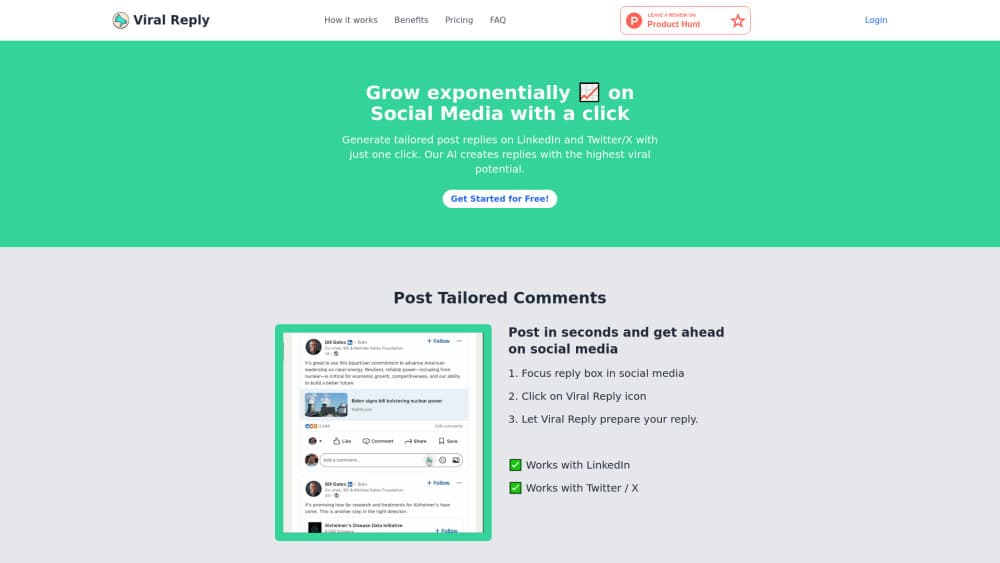
Viral Reply is a Chrome extension and browser workspace that drafts LinkedIn and X replies from a post plus optional talking points, with tone presets and a review step before anything gets posted.
About Viral Reply
What Is Viral Reply
Viral Reply is a social media reply tool that doubles as an AI LinkedIn reply generator and an X reply generator. The whole product is built around one job: writing comments that sound like a person rather than a bot. You give it a post from LinkedIn or X, pick a tone, and it returns several drafts you can edit before pasting them into the comment box yourself.
The product started as a solo side project in 2024. The original pitch was blunt: most people read far more posts than they comment on, and the replies they skip are the ones that would have put their name in front of a new audience. Viral Reply turns that skipped reply into a two click task, which is why it gets filed under growth tools as often as under writing assistants.
Two limits matter before you commit time to it. The tool only covers LinkedIn and X, and it only runs in Chrome, so anyone who works mainly from a phone or from Safari is out of luck. The other limit is bigger: as of October 2026 the official site at viralreply.com no longer resolves, and the domain is listed for sale. Treat what follows as a record of how the product worked at its last live version, not as a recommendation to install it today.
Getting Started
- Open the Chrome Web Store listing, or the web workspace if the site is reachable in your region, and install the extension.
- Open a post on LinkedIn or X and copy the text you want to answer.
- Paste it into Viral Reply, choose one of the preset tones, and add a few talking points if you want the draft to land on a specific idea.
- Generate the drafts, edit the one you like, then copy it into the comment box and post it under your own account.
Product Information
A quick look at Viral Reply's pricing, supported platforms, and performance.
Best for
The users, tasks, and scenarios where this tool fits best.
Users
- Founders and solo marketers
- Job seekers and freelancers
- Social media managers
Tasks
- Writing a reply to a long industry post
- Keeping a daily commenting habit
- Testing angles on the same post
- Drafting replies for a client account
Scenarios
- Morning routine on LinkedIn
- Launch week on X
- Personal brand building on a tight schedule
Key features
Post Aware Reply Drafting
Viral Reply takes the text of a post as its starting point, so the draft references the actual argument instead of recycling a generic compliment. Early versions worked by highlighting a post and clicking the extension icon. Later versions moved the same flow into a browser workspace where you paste the post text. Either way, the output is a comment written for that specific thread.
Eighteen Plus Professional Tone Styles
The tone picker is the part that separates this from a plain chatbot prompt. You choose from more than eighteen professional styles, from measured and analytical to warm and conversational, and the drafts shift register accordingly. For a LinkedIn comment that has to sit next to a prospect's post, that control is more useful than a blank prompt box.
Talking Points That Keep Drafts On Message
You can add optional talking points before generating. When you do, the drafts build around your idea rather than inventing one, which cuts the usual AI habit of writing something agreeable and empty. Skip the field and you get general responses. Fill it in and the reply carries a claim you actually want to make.
Batch Generation Up To Fifty Replies Per Request
The last live version generated as many as fifty replies in a single request. That number is less about volume and more about variety: you get several angles on the same post and pick the one that fits. For a LinkedIn comment generator used across a feed, having options in front of you beats regenerating one draft ten times.
Compliance Signals Before You Copy
Viral Reply checks drafts for signals that tend to trip platform spam filters and flags anything that looks risky. It also asks you to review every reply before posting, and the terms put ownership of the generated text on you. None of that makes automated commenting safe by default, but the guardrails at least push you toward slower, human paced use.
Chrome Extension With A Browser Workspace
The product ships as an AI reply Chrome extension plus a web workspace that runs in the same browser. There is no desktop app, no mobile app, and no Safari build. If your work machine locks down extensions, the workspace is the fallback, and if you live on a phone, neither option helps.
Pros and cons
Pros
- Turns a post into several usable comment drafts in one pass, which is the actual bottleneck for most people who want to comment more.
- Tone presets and talking points give more control than a raw chat prompt, so drafts need fewer rewrites before they sound like you.
- Generates multiple angles at once, which makes it easy to test a direct take against a question or a supportive note.
- Review step and compliance flagging encourage slower use instead of blind mass commenting.
- Output belongs to you under the terms, so client work does not raise an ownership question.
Cons
- As of October 2026 the official domain no longer resolves and is listed for sale, so there is no support channel and no guarantee the extension keeps working.
- Chrome only, with no mobile or Safari option, which rules out anyone who works from a phone.
- No public API and no team features, so agencies cannot wire it into an existing approval workflow.
- Drafts still read as AI when the post is thin or the talking points are vague, and posting those under your name can cost more than staying quiet.
Frequently asked questions
It writes comment drafts for LinkedIn and X posts. You supply the post text and an optional tone, then it returns replies you can edit and post yourself. It does not schedule posts, track analytics, or manage your accounts.
Related content
Explore related tools, skills, and articles for Viral Reply.
Viral Reply Alternatives

ngram 2.0
ngram · Video · Marketingngram 2.0 is an AI video generator for teams. It turns a prompt, a screen recording, or a product URL into a narrated explainer, product demo, or AI avatar video, and every scene stays editable.

shippedit.me
Krawlup · Marketing · Businessshippedit.me now redirects to Krawlup, a web platform that audits SEO, AEO and page speed every week, then hands the fixes to AI coding agents over MCP.

MePersona
MePersona, Inc. · Writing · Productivity · MarketingMePersona is an AI unified inbox for creators. It learns your voice, drafts replies to fan messages from 12 platforms, and sends only what you approve.