

Free Online Vocal Remover
VocalRemover · Voice & Language
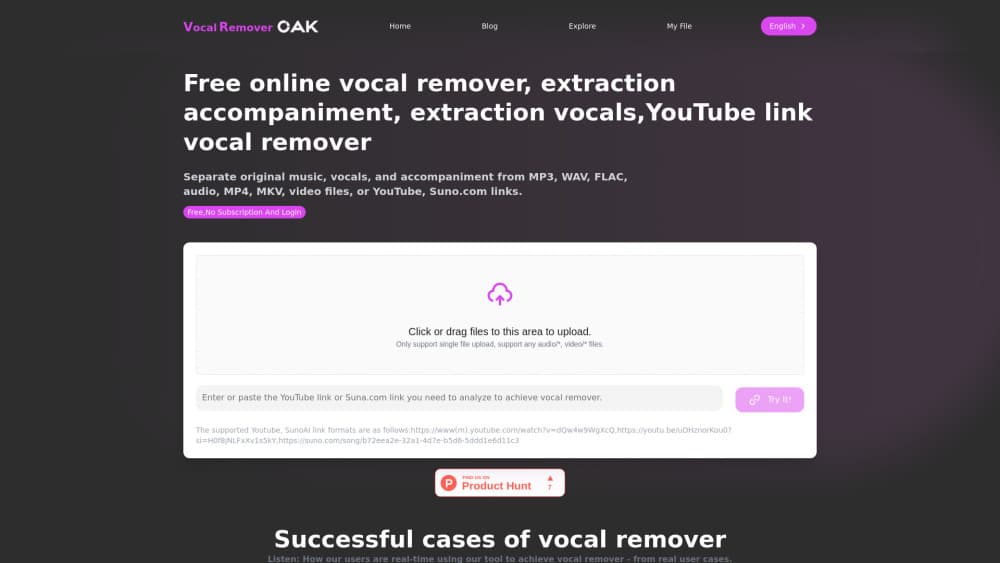
Free Online Vocal Remover is a browser based AI vocal remover that splits songs and videos into vocal and instrumental stems, with no install required and a free trial allowance for new accounts.
About Free Online Vocal Remover
What Is Free Online Vocal Remover
Free Online Vocal Remover is the web app behind vocalremoveroak.com. You drop in a song or a video file, or paste a YouTube or TikTok link, and the workbench hands back separate tracks: the singing on one file, the backing music on another. Nothing gets installed, and there's no timeline to learn.
It solves one narrow problem well. Cover singers need a backing track. Producers want a clean acapella to sample. Teachers want the vocal pulled off a rehearsal recording. Every one of those jobs starts with the same request: take this mix apart. The tool answers with two stems by default and up to four or six parts when you choose a multi-stem model, depending on how the mix was built.
The meter runs on minutes rather than uploads. A new account gets 15 free trial minutes once, on files no longer than 8 minutes and no heavier than 100MB. Paid packs cost $10 for 300 minutes, $20 for 700, and $40 for 1,500, and those minutes never expire. Each job bills the audio length multiplied by the number of models you run, so an ensemble pass that compares two models eats twice the credit.
Two limits matter before you pay. Download links stay live for 24 hours after a job finishes, so a track you forget to save means running the file again. The site also returns separated stems only, never the original mix, and its terms limit use to study and research unless you hold the rights to the recording.
Getting Started
- Open vocalremoveroak.com and create an account, which unlocks the one-time free trial minutes.
- Upload an audio or video file, or paste a public YouTube or TikTok link. Free accounts cap uploads at 100MB and 8 minutes per file.
- Pick an output mode: remove vocals, isolate vocals, extract accompaniment, or split audio into stems.
- Choose a model, or turn on ensemble mode to compare several and keep the cleanest result.
- Preview the stems, then download each file in WAV, MP3, or FLAC before the 24-hour link window closes.
Product Information
A quick look at Free Online Vocal Remover's pricing, supported platforms, and performance.
Best for
The users, tasks, and scenarios where this tool fits best.
Users
- Cover singers and karaoke regulars
- Remixers and sample based producers
- Music teachers and students
- Video editors and podcasters
Tasks
- Building a karaoke backing track
- Pulling an acapella for a remix
- Practicing a part against the original arrangement
- Testing how a mix survives separation
Scenarios
- A weekly cover upload schedule
- A rehearsal with no licensed backing tracks
- Pre-production before studio time
Key features
Vocal and instrumental separation in the browser
The core job takes one upload and returns two files: vocals and accompaniment. Processing happens on remote GPUs, so a laptop with no discrete graphics card finishes a three-minute song in about two to five minutes. Nothing is installed and no project file is created.
Four ways to split a track
Remove vocals, isolate vocals, extract accompaniment, and multi-stem splitting cover different ends of the same job. Karaoke singers pick the first to remove vocals from a song, the second turns the tool into an acapella extractor for remix work, and anyone rebuilding an arrangement picks the last. Choosing the right mode matters more than choosing the biggest model.
YouTube and TikTok link import
Paste a public link instead of downloading the audio first. The workbench pulls the track and starts processing without a local file. Private or region locked videos fail, and the copyright limits in the terms still apply to whatever comes out.
Model choice and ensemble comparison
Several separation models sit behind the same upload button, and they fail in different ways. One keeps cymbals intact but smears consonants, another cleans the vocal and dulls the low end. Ensemble mode runs more than one model and bills each one, which is why a comparison job costs two or three times a single pass.
Video files work without conversion
MP4, MOV, MKV, AVI, and WebM files go straight in, alongside MP3, WAV, FLAC, AAC, M4A, and OGG audio. The audio track gets extracted on upload. That saves a detour through a converter when the song you want lives inside a concert video or a phone recording.
Minute credits that carry over
Paid minutes don't reset monthly and don't disappear at the end of a billing cycle. A $40 Studio pack holds 1,500 minutes, enough for batch work, and the balance stays put until you spend it. Free minutes are used before paid ones.
Downloads in WAV, MP3, or FLAC
Each stem downloads on its own or all at once, in the format you pick. WAV suits further editing, MP3 keeps files small for sharing, and FLAC sits between the two. Preview clips run about 30 seconds and are compressed, so judge quality on the downloaded file.
Pros and cons
Pros
- Runs entirely in a browser, with no install, plugin, or GPU requirement on your machine.
- Handles audio and video files plus YouTube and TikTok links, which covers most ways people find a song.
- Paid minutes never expire, and a $10 pack is enough for dozens of songs.
- Ensemble mode lets you compare models on the same file instead of guessing which one suits a mix.
Cons
- Every model in a job costs full minutes, so ensemble runs can triple the credit for one song.
- Free accounts get 15 minutes once, with an 8-minute file cap and a 100MB upload limit, which won't carry a weekly channel.
- Download links expire after 24 hours, and re-running the file spends the minutes again.
- No public API and no batch upload, so automating a catalog means doing each file by hand.
Frequently asked questions
There's a free tier, but it's a trial rather than an ongoing free plan. A new account gets 15 minutes once, with files capped at 8 minutes and 100MB. After that, packs start at $10 for 300 minutes.
Related content
Explore related tools, skills, and articles for Free Online Vocal Remover.
Free Online Vocal Remover Alternatives

Foley
Hanamori Labs, LLC · Voice & Language · Productivity · AI AssistantFoley is a voice to-do list that turns a spoken sentence into a filed task, complete with project, date and time, then helps you plan the day around what is already there.

HireKey
HireKey · Voice & Language · Productivity · LeaningHireKey is an AI job search copilot built by a former tech recruiter. It checks role fit, tailors resumes, runs interview practice and tracks every application.

Fluence
Yay Software (Yannick Huchard) · Writing · Voice & Language · ProductivityFluence is an Android app that reads PDFs, EPUBs, Word files and web articles aloud, follows each sentence as it speaks, and answers questions about the text on the phone itself.