

vocalove
vocalove · Voice & Language
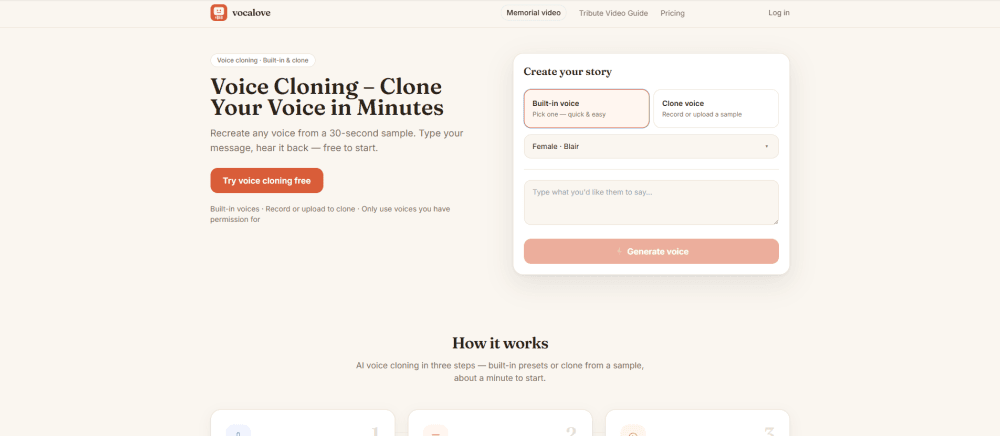
vocalove is a browser-based AI voice cloning tool that turns a short voice sample and typed script into natural-sounding speech, with an optional talking photo video step. It targets families making tribute or memorial clips, creators who need quick voice-over, and anyone who wants a familiar voice instead of a generic text to speech narrator. You get five welcome credits plus a free daily pool, and paid packs start at $1.90. If you want to clone your voice online without wrestling with a video editor, this covers the basics well.
About vocalove
What Is vocalove
vocalove is a voice cloning and talking photo service that runs entirely in your browser, and it works as lightweight voice cloning software rather than a heavy desktop suite. You record or upload a 3 to 30 second sample, type what you want said, and the model generates new audio in that voice instead of a stock AI text to speech reading. There's no app install and no local GPU, which matters if you're on a laptop at a funeral home or sitting at a kitchen table with a family photo.
The product leans hard into emotional use cases. The site frames itself around tributes, keepsakes and messages from a loved one, and pairs voice cloning with optional portrait animation so you don't have to sync audio to a face in a video editor yourself. That's the main reason people pick it over a plain speech generator.
The limits are worth knowing before you commit. vocalove isn't a general video studio, so titles, music beds and long slideshows stay in your own tools. Is that a dealbreaker? Not if voice is the part you care about. Clone mode can take one to three minutes per generation, and you confirm you have permission to use any voice before cloning runs. Uploads go to your output only.
Getting Started
- Open vocalove.io in your browser and create a free account, which comes with 5 welcome credits that never expire plus a daily free pool.
- Pick a voice: choose a built-in preset for a fast draft, or switch to Clone voice and record in the browser or upload an mp3, wav or m4a you have permission to use.
- Type your script into the text box (up to 1000 characters) and preview built-in voices for free before you spend anything.
- Generate the audio, then add a talking portrait if you want a video, and export watermark-free HD using your credits.
Product Information
A quick look at vocalove's pricing, supported platforms, and performance.
Best for
The users, tasks, and scenarios where this tool fits best.
Users
- Families preparing tribute or memorial content
- Content creators who need voice-over
- People who want a talking portrait without editing skills
Tasks
- Cloning a voice from a short clip
- Generating narration or voice-over audio
- Making a memorial or keepsake video
Scenarios
- Preparing a tribute that has to sound like someone specific
- Turning an old photo into a speaking message
- Drafting a script before you spend credits
Key features
Zero-shot voice cloning from a short sample
vocalove learns how someone sounds from a short clip, roughly 30 seconds at the top end, then lets you type new words in that voice. Record straight in the browser or upload an mp3, wav or m4a. A clean sample in a quiet room is the one thing that decides quality here, so it pays to record carefully rather than upload a noisy phone memo.
Built-in preset voices
If you don't have a sample or just need a fast draft, preset voices work as a plain voice-over generator for narration, tests and directions. You can audition them free before generating, which makes them useful for checking timing and length before you commit credits to a cloned take.
Talking photo videos
Upload a portrait, add built-in or cloned speech, and generate an MP4 where the face animates to the audio. This is the feature that separates vocalove from plain text to speech tools, since families don't have to line up audio and video by hand. Paid credits enable watermark-free HD exports.
Free preview with credits that never expire
New accounts start with 5 welcome credits plus a free daily pool that refills every day. Guests get one generation before signing in. Credits are one-time packs rather than a subscription, and unused credits stay in your account, so there's no monthly bill running in the background.
Pay-as-you-go credit packs
Four paid packs run from $1.90 to $69, each matching your payment in base credits plus a bonus that grows with the pack size (10% to 25%). The smallest pack covers roughly one export, the largest around 43, and cloning runs are included at the top tier. Nothing auto-renews.
Permission and data rules built in
You confirm you have the right to use a voice before clone mode runs, and the site states plainly that photos are never used to train AI models and uploads only produce the output you request. For anyone cloning a relative's voice, that clarity matters more than a feature list.
Pros and cons
Pros
- Runs in the browser with no install or local hardware, so you can start from almost any machine.
- Cloning and optional portrait animation sit in one flow, cutting out manual audio-to-video syncing.
- Free preview lets you hear a match before spending credits.
- Credits are one-time packs with no subscription, and unused credits don't expire.
- Clear permission and data policy, including a stated ban on using photos for model training.
Cons
- Clone mode takes one to three minutes per generation, so quick edits aren't instant.
- It's not a video studio. Titles, music beds and long slideshows need a separate editor, which means extra steps for anything beyond voice and talking-head output.
- No developer or company details are published on the site, which is a gap if you care about who runs the service.
- The Category field can't be filled from the library, since the product record has no category assigned.
Frequently asked questions
It clones a voice from a short sample and turns typed text into speech in that voice, with an optional talking photo video. Think narration, tribute messages and keepsakes rather than a full video editor.
Related content
Explore related tools, skills, and articles for vocalove.
vocalove Alternatives

Foley
Hanamori Labs, LLC · Voice & Language · Productivity · AI AssistantFoley is a voice to-do list that turns a spoken sentence into a filed task, complete with project, date and time, then helps you plan the day around what is already there.

HireKey
HireKey · Voice & Language · Productivity · LeaningHireKey is an AI job search copilot built by a former tech recruiter. It checks role fit, tailors resumes, runs interview practice and tracks every application.

Fluence
Yay Software (Yannick Huchard) · Writing · Voice & Language · ProductivityFluence is an Android app that reads PDFs, EPUBs, Word files and web articles aloud, follows each sentence as it speaks, and answers questions about the text on the phone itself.