

VocalVia
VocalVia · Writing · Voice & Language
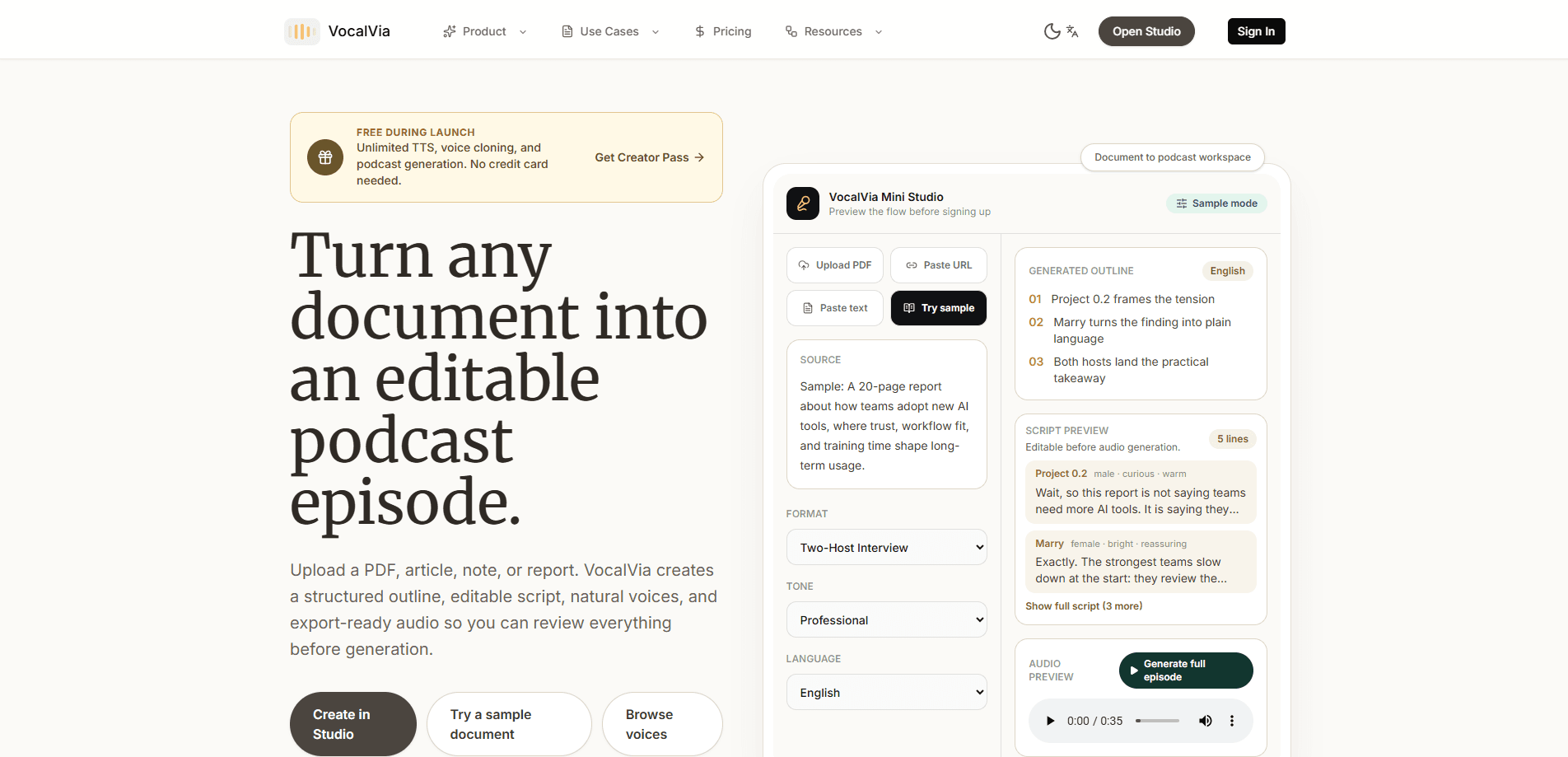
VocalVia is an AI podcast generator that turns PDFs, articles, notes, and reports into listenable episodes. Instead of reading your text aloud like a plain text to speech tool, it builds a structured outline first. Then it drafts an editable podcast script with host roles and tone tags. Then it produces natural audio through a previewable voice library. The pitch is editorial control. You review the script before you spend time or credits generating sound. Think of it less as an AI voice generator and more as a production assistant. The voice is the last step, not the first.
About VocalVia
What Is VocalVia
VocalVia is a web-based AI audio tool built for people who want a podcast episode out of source material they already have. You feed it a document, and it handles the transformation from dense text to spoken content.
Most text to speech tools stop at reading text back to you. VocalVia adds a planning layer on top. According to the company, the source becomes an episode plan with roles, pacing cues, and a script you can rewrite before any audio gets generated, which means you're not stuck re-recording because a line landed wrong or a section ran too long. That means less time re-recording and more control over what the final episode actually says.
The biggest limitation is scope. This is a document to podcast tool, not a full production suite. There's no video export in the free documentation, no live recording, and the free tier comes with fair-use limits. If you need multi-track editing or music beds, you'll still pull the MP3 into another editor. That extra step is easy to miss until you're mid-project.
Getting Started
- Sign up with an email address and verify your account before you can access the studio.
- Upload a PDF, Word document, plain text file, or Markdown file, or paste article text directly into the source queue.
- Review the generated outline and reorder sections, drop weak points, or mark what deserves more emphasis.
- Pick a voice, language, and pacing style from the voice library, then adjust tone tags in the script.
- Generate the audio, preview it, and download the finished MP3 while keeping the editable project and generation history.
Product Information
A quick look at VocalVia's pricing, supported platforms, and performance.
Best for
The users, tasks, and scenarios where this tool fits best.
Users
- Researchers and analysts who need to get through long PDFs and reports without reading every page
- Content marketers turning blog posts and editorial articles into audio
- Students working through dense study notes
- Educators and trainers who publish explainer audio
Tasks
- Turning a research paper into a 5-minute summary episode
- Converting team docs into a podcast update
- Repurposing articles into podcast content
- Producing multilingual narration
Scenarios
- Building a content pipeline from existing written assets rather than recording from scratch, which is useful when you already publish articles and want an audio version without hiring a voice actor or booking studio time.
- Preparing listenable versions of reports for colleagues who prefer audio over reading.
- Practising podcast production without a co-host, using AI host roles to cover both sides of a discussion.
Key features
Document-Aware Outline Generation
VocalVia reads your PDF, Word document, text file, or Markdown file and builds a structured episode plan before it writes a single line of dialogue. You can reorder sections, cut weaker points, and decide what the episode should stress. That's the step that sets it apart from a plain text to speech tool, which just voices whatever you paste in. VocalVia reasons about the document's structure, not just its words. Want to turn a PDF into a podcast without it sounding like a robot reading a memo? This is where that happens.
Editable Podcast Script With Roles and Tone Tags
The script generator writes an editable draft with host roles, section markers, and expression tags. You get lines like [Host A][curious] or [Expert][calm] that shape how each segment is delivered, and you can rewrite any of them by hand if the phrasing sounds off for your audience. The real payoff is structure. A document becomes an actual episode with a beginning, a discussion, and a takeaway. Not a wall of narration.
Previewable Voice Library
Browse realistic voices by language, gender, age, and speaking style before you commit to generating anything. You can preview the cast without signing in. Pick a voice only when you're ready to work in the studio. That preview step matters when you're choosing between a warm storyteller and a calm narrator for the same script. It's a small thing, but it saves a lot of rework. Previews are free.
Multi-Language Voice Support
The voice setup covers several languages, including English, Mandarin, and Spanish voices in the library. You can set the narration language for the same source material, which helps creators reach audiences outside their first language without re-recording sessions or hiring a second narrator. That's a real opening if your audience is split across markets. Language and pacing controls sit next to the voice picker, so one setup pass covers the whole episode.
Download-Ready MP3 and Saved Projects
Finished episodes export as MP3 audio you can drop into any podcast host or share directly. VocalVia keeps the editable script and the generation history with your project, so you can revisit an old episode, swap the voice, change the pacing, and regenerate the audio without ever touching the original source file again. No rebuilding the source workflow from scratch.
Generation History and Reusable Drafts
Every draft and audio file is saved and browsable. You can replay past generations, download files, or jump back into a document to try another angle. For anyone producing episodic content week after week, this turns a one-off conversion into a repeatable production record instead of a throwaway export.
Pros and cons
Pros
- The outline-and-script step gives you editorial control before any audio gets generated, which saves credits and rework.
- The editable script with host roles and tone tags produces actual conversation structure, not a flat read-aloud.
- Voice preview is open before signup, so you can judge the cast before committing to the tool.
- Source-aware intake handles PDFs, DOCX, TXT, and Markdown, plus pasted text, covering most real documents.
- Generation history keeps drafts and audio reusable, which suits ongoing episode production.
Cons
- There's no public pricing page beyond the free tier, so it's hard to know what paid plans cost before signing up.
- The free plan runs on fair-use limits, so heavy users will hit a ceiling quickly.
- It's a web-only tool with no mobile app, which means no offline work and no on-the-go recording.
- No API is documented, so developers can't wire VocalVia into an automated publishing pipeline.
Frequently asked questions
VocalVia turns written documents into podcast-style audio. You upload a PDF, article, or set of notes, and it generates a structured episode with a script and narration you can edit before producing the final MP3.
Related content
Explore related tools, skills, and articles for VocalVia.
VocalVia Alternatives

Google EmbeddingGemma 2
Google DeepMind · Writing · Image · CodingGoogle EmbeddingGemma 2 is a 740M-parameter open model that turns text, code, images, audio, and video frames into vectors in one 768-dimension space, running on phones and laptops.

MePersona
MePersona, Inc. · Writing · Productivity · MarketingMePersona is an AI unified inbox for creators. It learns your voice, drafts replies to fan messages from 12 platforms, and sends only what you approve.

Fluence
Yay Software (Yannick Huchard) · Writing · Voice & Language · ProductivityFluence is an Android app that reads PDFs, EPUBs, Word files and web articles aloud, follows each sentence as it speaks, and answers questions about the text on the phone itself.