

Voice Vault
Voice Vault · Writing · Voice & Language
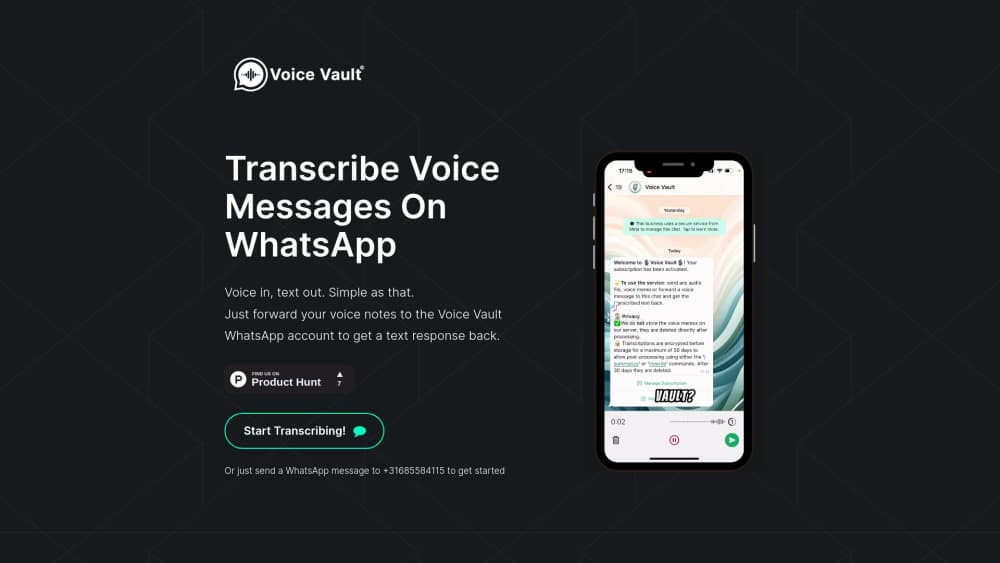
Voice Vault turns WhatsApp voice notes into text. Forward a voice message to its WhatsApp contact and the transcript comes back in the same chat, with no extra app to install.
About Voice Vault
What Is Voice Vault
Voice Vault is a WhatsApp transcription bot built around one job: voice message transcription without leaving the chat app. You forward a voice note to its WhatsApp contact, and a written copy comes back as a reply. Voice in, text out.
The need is easy to picture. A voice message arrives while you're in a meeting, on a train, or in a room where playing audio is rude. Forwarding takes two taps, and the reply is text you can read, quote, or paste into a note. Forwarding is also faster than opening a separate transcription app, which is why people transcribe voice messages this way at all. Because the transcript lands in a thread, WhatsApp search finds it later.
The limits are just as concrete. There's no web dashboard, no bulk import, and no documented API, so turning a year of archived voice notes into a searchable file isn't a job for this tool. Audio still leaves your phone and reaches a third-party server, which matters if the message is sensitive. Pricing and availability are also fuzzy. The launch in December 2022 was free, no plan has been published since, and the voice-vault.com homepage now promotes a different product from the same founder, so confirm that the bot still answers before you build a habit around it.
Getting Started
- Save the Voice Vault WhatsApp number as a contact on the phone where you run WhatsApp.
- Find the voice message in any chat, long press it, and choose Forward.
- Send it to the Voice Vault contact. The reply with the transcript appears in that thread.
- Reply with a short command if a name, an acronym, or a product term came out wrong, and ask for a corrected pass.
- Copy the text into your notes app, an email, or a task manager while the thread is still open.
Product Information
A quick look at Voice Vault's pricing, supported platforms, and performance.
Best for
The users, tasks, and scenarios where this tool fits best.
Users
- Office workers who get voice notes mid meeting
- Journalists and researchers who collect spoken quotes
- Anyone who would rather read than listen
Tasks
- Turning a forwarded voice message into text
- Searching an old conversation
- Fixing names and jargon
- Passing on what someone said
Scenarios
- Listening is impossible
- WhatsApp on a laptop
- Quick capture on the move
Key features
Transcription inside WhatsApp
The service runs as a WhatsApp contact, not a website and not an app. You forward a voice message the way you forward anything else, and the transcript comes back as a reply in that thread. Voice note to text in two taps, with nothing to log into.
Forward and forget
There's no upload screen, no file picker, and no drag and drop. A forwarded note is the input. That shortcut matters on a phone, where trimming and exporting audio takes more steps than the transcription itself.
Text commands for corrections
The bot takes written commands, so you can ask for a cleaner version when the first transcript gets a name, an acronym, or a technical term wrong. It turns a one shot tool into something closer to a conversation.
Transcripts that stay searchable
Replies live in the chat history. WhatsApp search then works on words that were spoken, not only on messages someone typed, which helps months later when you half remember a detail.
No account, no dashboard
You don't create a Voice Vault login. Your WhatsApp account is the access key, and the interface is the chat you already know. Setup takes under a minute, and there's no password to reset.
Same behavior on phone and desktop
Because the whole product is a WhatsApp conversation, it follows you to WhatsApp Web and the desktop app. Forward from a laptop when you're at your desk, from a phone when you aren't.
Pros and cons
Pros
- Setup is a saved contact. No sign up form, no password, no app to update.
- The workflow matches how people already share voice notes, so there's nothing new to learn.
- Transcripts stay in the chat, which makes them searchable and easy to copy.
- Text commands give you a second pass when the first transcription is close but not right.
- It works from WhatsApp Web and the desktop app too, so it isn't tied to one device.
Cons
- WhatsApp is the only way in. No email, no web upload, no integrations, so a team on Slack or Telegram can't use it.
- There's no documented API or bulk mode, which rules out automated archiving of a long voice note history.
- Pricing and current availability are unclear. The 2022 launch was free, and the official site now promotes a different product.
- Audio leaves your device to be processed by a third party, so confidential messages carry a privacy cost.
Frequently asked questions
Voice Vault is a WhatsApp bot that turns voice messages into text. You forward a voice note to its WhatsApp contact and get a written transcript back as a reply.
Related content
Explore related tools, skills, and articles for Voice Vault.
Voice Vault Alternatives

Claude for Google Workspace
Anthropic · Writing · Productivity · BusinessClaude for Google Workspace puts Claude in a sidebar inside Google Docs, Sheets, and Slides, where it reads the file you have open and edits it in place.

Claude Haiku 5.5
Anthropic · Writing · Coding · ChatbotClaude Haiku 5.5 is Anthropic's fastest and cheapest small model, built for high volume tasks at $0.10 per million input tokens with a 1M token context window.

NoteWorthy
Suman Hansada · Writing · Productivity · AI AssistantNoteWorthy is a notes app for iPhone, iPad and Mac that writes titles, tidies formatting, summarizes long notes and files each one with on-device AI. No account, no upload, no network requests.