

Voicebox
Jamie Pine · Voice & Language
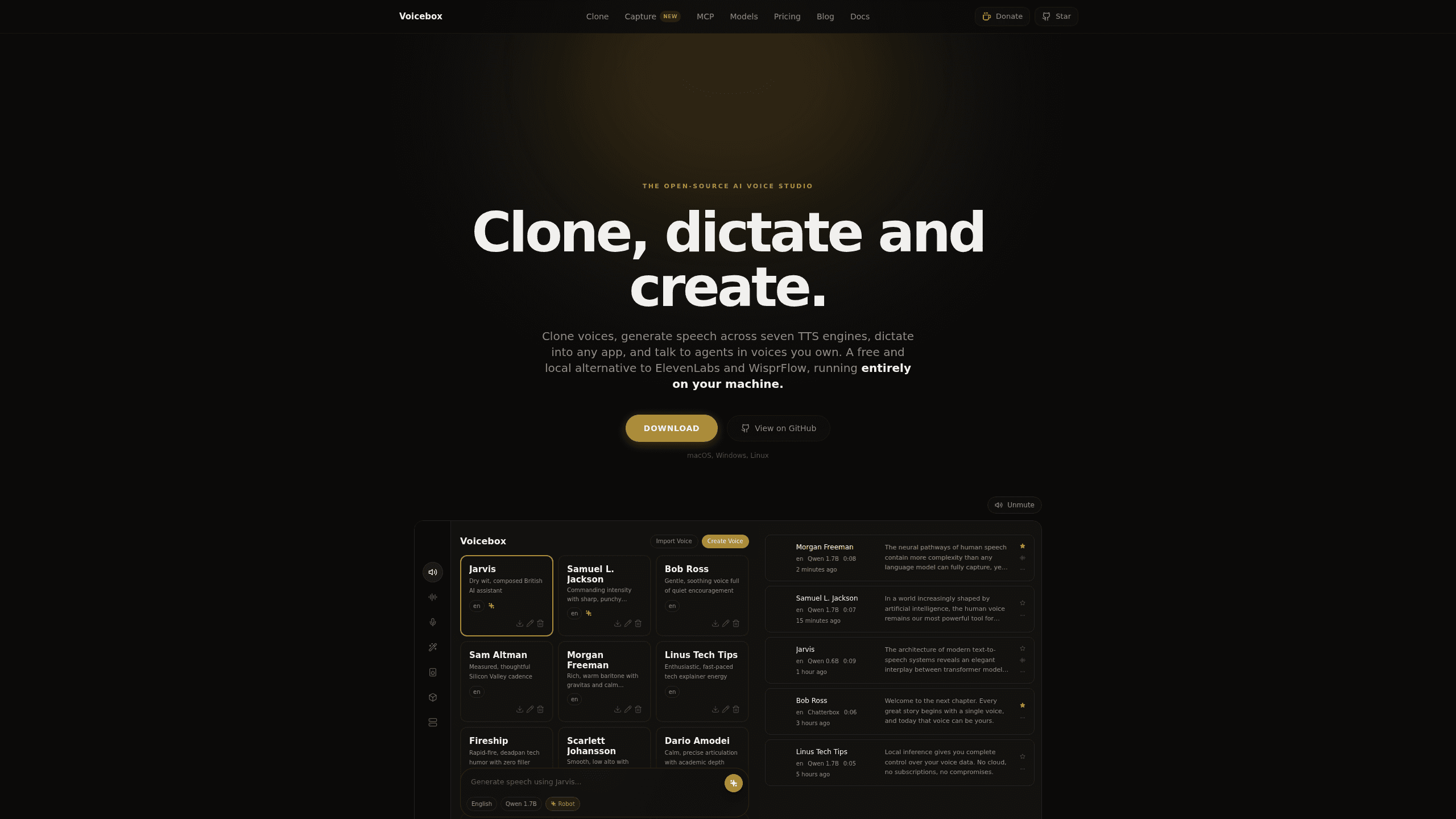
Voicebox is a free, open-source voice cloning studio for macOS and Windows that clones a voice in seconds, generates speech across seven TTS engines, and keeps data local.
About Voicebox
What Is Voicebox
Voicebox is a local AI voice studio that closes the whole voice loop on one computer. Most tools pick a side: a cloud service handles text-to-speech, another handles dictation, and your samples sit on someone else's server. Voicebox does both ends locally. You create a voice profile from a short sample, use it to speak and to listen, and every model and recording stays on disk.
The appeal is control. Voice data is sensitive. Cloud voice cloning means uploading your voice and your scripts to a company that meters every character. Voicebox flips that: no account, no per-character fees, and no rate limits, because the models run on your hardware. The cost is setup. You download multi-gigabyte models, the first run is slower than a web tool, and results lean on how much GPU or unified memory your machine has.
It also works as a straightforward AI voice generator once a profile exists. Even so, it's an open project under the MIT license, not a finished consumer product. Some pieces, like cloud sync, are still marked coming soon, and Linux users have to build from source for now. If you want one-click convenience, this isn't it. But as voice cloning software you actually own, it's one of the few serious options.
Getting Started
- Download the app for macOS or Windows from the official site, or run it with Docker or from source on Linux.
- Open the Profiles tab and click New Profile, then add a sample by uploading a clip, recording from your mic, or capturing system audio.
- Download a TTS engine you want to use. Each one turns into a local voice model on your machine.
- Type your text, pick the profile and engine, then generate. For dictation, hold the global shortcut and speak into any text field.
- Optional: bind a voice to an MCP client like Claude Code or Cursor so the agent speaks through your cloned voice.
Product Information
A quick look at Voicebox's pricing, supported platforms, and performance.
Best for
The users, tasks, and scenarios where this tool fits best.
Users
- Privacy-conscious creators
- Podcasters and video editors
- Developers and AI agent users
Tasks
- Voice cloning from a short sample
- Batch text-to-speech
- Dictation into any app
Scenarios
- Turning a script into multi-character dialogue
- Giving AI agents a voice
- Working offline or on a plane
Key features
Voice Cloning From a Few Seconds
Voicebox builds a voice profile from a short sample instead of a long training session. You can drop in an audio file, record up to 30 seconds from your microphone, or capture audio playing on your system, which means you can clone a voice straight from a video or podcast. Profiles are reusable. You can combine several samples to sharpen the result. For anyone who wants open source voice cloning without renting cloud minutes, this is the core of the tool.
Seven TTS Engines in One App
Rather than betting on one model, Voicebox bundles seven text-to-speech engines and lets you switch between them. Qwen3-TTS handles multilingual cloning, Chatterbox Multilingual covers the widest language range, Chatterbox Turbo adds paralinguistic tags like laughs and sighs, and Kokoro stays tiny and fast on CPU. There isn't a single best engine, just the right one for a task. Picking per job beats being locked to whatever a single vendor ships.
Dictation That Pastes Anywhere
A global shortcut turns your speech into text in any app. Hold the keys, talk, and release; the transcript drops into the focused field or your clipboard. It's the part that lets you dictate into any app on macOS and Windows, and every text box gets an in-app microphone button. The transcript and the original audio are kept together in Captures, so you can revisit what you said later. It's a practical answer to typing long messages by hand.
Agent Voice Over MCP
One tool call, voicebox.speak, lets any MCP-aware agent talk in a voice you've cloned. Claude Code, Cursor, Cline, and anything else that speaks MCP can bind to a voice profile, so you hear which agent is responding without looking. Every agent-initiated clip surfaces the same on-screen pill, so nothing plays silently in the background. The endpoint also fits other tool-call protocols, like ACP and A2A, on the same local server.
Local REST API
Every engine you download becomes a REST endpoint on your own machine at port 17493. There are no API keys, no rate limits, and no per-character fees, because the requests never leave your computer. Developers use it to generate NPC dialogue, localize characters, or add voice replies to an app, all against a localhost address. For anyone building voice features, it removes the usual pricing and privacy trade-off.
Personalities and the Stories Editor
A voice profile can carry a free-form personality, and the app's local model will rewrite your text in that voice or improvise a fresh line on demand. That's handy for game dialogue, narration cues, or keeping a character consistent across a long project. The Stories editor then lays multiple voices on a multi-track timeline, so you can cut a scene or a podcast segment with several speakers. It turns scattered clips into a finished piece. No studio required.
Pros and cons
Pros
- Fully local by default, so voice samples and generated audio stay on your machine.
- Free and open source under the MIT license, with no account and no per-character billing.
- Seven TTS engines and dozens of preset voices give you room to match the model to the task.
- Built-in REST API and MCP server make it easy to wire voice into apps and AI agents.
- Cross-platform support covers macOS, Windows, Linux, and Docker.
Cons
- You download multi-gigabyte models yourself, which takes time and disk space before the first result.
- Linux users can't grab a prebuilt binary yet and have to build from source.
- Quality depends on your hardware, so older machines without a decent GPU or Apple Silicon will feel slow.
- Cloud backup and sync are still listed as coming soon, so multi-device use isn't ready.
Frequently asked questions
Yes. The full app is free and open source forever, including cloning, dictation, every TTS engine, and MCP support. There's no account and no usage cap, because everything runs locally. The only paid tiers are optional cloud backup and sync, which haven't launched yet.
Related content
Explore related tools, skills, and articles for Voicebox.
Voicebox Alternatives

Prosp
Prosp · Writing · Voice & Language · MarketingProsp is an AI LinkedIn outreach tool built for agencies and sales teams, and it writes the message and the voice note in your own voice for each prospect so they actually reply. You connect your accounts, find leads, and let the AI draft and send personalized messages at scale, all from one inbox. It's built for people running outbound at volume. That's the whole pitch. Every touchpoint still has to feel human.

Wordly AI Translation
Wordly · Voice & Language · ProductivityWordly AI Translation is a real-time AI translation and captioning platform built for meetings, conferences, and events. It delivers live translation, captions, transcripts, and summaries in more than 60 languages, and attendees join by scanning a QR code or opening a link instead of using dedicated headsets. The platform works with Zoom, Microsoft Teams, Google Meet, and Webex, and it's designed for organizations that want multilingual access without hiring human interpreters for every session. Simple as that.
Musicful
Musicful AI · Voice & Language · VideoMusicful is an AI music generator and AI music video maker that turns text to music in minutes. Give it a text prompt, a set of lyrics, or a hummed melody and it returns a finished track with vocals and instruments. It also doubles as an AI song generator, produces music videos from the songs you create, and offers an AI cover tool plus a developer API. The platform runs in a web browser and through an Android app, so you can start a song on desktop and pick it up on your phone.