

Voice Changer
Independent developer (hobby project) · Voice & Language · AI Assistant
Voice Changer.io is a free browser voice changer that transforms recordings into robot, monster, alien, and deep tones. No install or account needed, and clips are free to download.
About Voice Changer
What Is Voice Changer.io
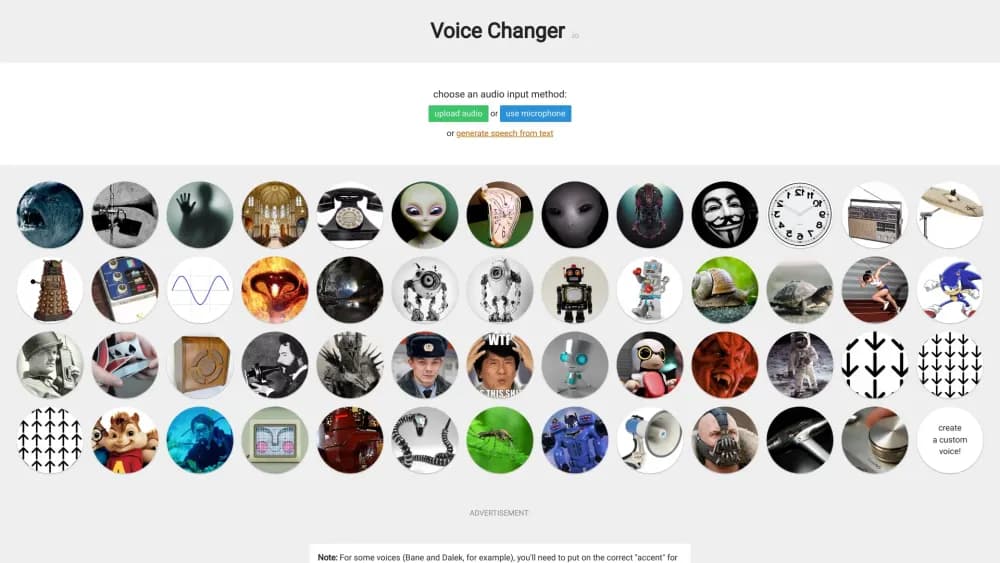
Voice Changer.io is a web app that alters how a voice sounds. You pick an audio source, choose one of the many built-in effects, and the site processes the clip in your browser. The tone ranges from playful, like chipmunk and robot voices, to dark, like demon and Sauron effects. It runs on a hobby project by an independent developer, so the whole thing stays free and ad-supported.
The tool solves a simple problem: wanting a different voice without buying software or learning an audio editor. You record straight into the page or upload a file, then preview and download the result. Everything happens in the browser, so there's nothing to install and no signup screen to pass.
The main limit is realism. These are classic audio effects, not AI voice cloning, so a robot sounds like a robot and won't pass as a real person. Some effects also need context to work: for Bane and Dalek, you have to mimic the target accent yourself, and echo-heavy voices get muddy if you talk fast.
Getting Started
- Open voicechanger.io in your browser and choose an audio input method, either the microphone or a file upload.
- Pick an effect from the list, such as Monster, Robot, or Anonymous Voice.
- Record a clip or load your audio, then let the page apply the effect.
- Preview the processed audio and download the clip to your device.
Product Information
A quick look at Voice Changer's pricing, supported platforms, and performance.
Best for
The users, tasks, and scenarios where this tool fits best.
Users
- Casual creators making funny clips
- Students and hobbyists
- Privacy-minded casual users
Tasks
- Adding a robot or monster voice to a short video
- Making anonymous audio for a joke or skit
- Producing weird sound designs
Scenarios
- Recording a voice message to surprise a friend
- Building audio for a game or school play
- Playing with audio on a rainy afternoon
Key features
Wide Effect Library
The site ships dozens of effects, from deep voice and high pitch to alien, vibrato, and demon. Each one targets a distinct sound, so you can match the mood of a clip fast. The catalog covers robots, radio broadcasts, ghosts, and cave echoes, and the voice modulator options keep growing as the developer adds more.
Instant Recording and Upload
This online voice changer takes your audio in one of two ways: record through the microphone or upload a file. There's no account, no plugin, and no download step for the editor itself. That keeps the barrier low for a quick idea.
Browser-Based Processing
Every effect runs in the page, so you don't install software or hand over personal details. Open the site, process a clip, and close the tab. It works the same on a laptop and a phone browser.
Free Downloads With Commercial Use
You can save any generated clip and use it however you like, including in commercial projects. There's no requirement to credit voicechanger.io, and the site states this openly. That makes it unusually permissive for a free tool.
Anonymous and Distortion Effects
Effects like Anonymous Voice and the hacker-style distorter shift your tone enough to mask a voice in casual settings. The site is clear that this is for fun and shouldn't be trusted for real anonymization. Pair it with the robot voices for a stranger result.
Speed and Pitch Adjustment
The library includes slow, half-speed, double-speed, and very fast options, plus reversed and jumbled audio. You can stretch a single clip into several variants. This suits sound design and comedy editing where timing matters.
Pros and cons
Pros
- Fully free with no signup, which keeps friction near zero for a quick clip
- Runs in the browser, so nothing to install and no account data to share
- Large effect list covers robots, monsters, radio, echo, and pitch changes
- Downloaded audio is cleared for commercial use with no credit needed
- Works on both desktop and mobile browsers
Cons
- Effects are classic audio tricks, not AI voice cloning, so results don't sound like a real person
- Several voices, like Bane and Dalek, need you to mimic the accent for a convincing match
- Echo-heavy effects become hard to understand if you speak quickly
- The project updates rarely, so new effects arrive slowly
Frequently asked questions
Yes. Every effect and download is free, and the site runs on ads. There's no paid tier, no signup, and no hidden limit on how many clips you make.
Related content
Explore related tools, skills, and articles for Voice Changer.
Voice Changer Alternatives

Foley
Hanamori Labs, LLC · Voice & Language · Productivity · AI AssistantFoley is a voice to-do list that turns a spoken sentence into a filed task, complete with project, date and time, then helps you plan the day around what is already there.

HireKey
HireKey · Voice & Language · Productivity · LeaningHireKey is an AI job search copilot built by a former tech recruiter. It checks role fit, tailors resumes, runs interview practice and tracks every application.

Fluence
Yay Software (Yannick Huchard) · Writing · Voice & Language · ProductivityFluence is an Android app that reads PDFs, EPUBs, Word files and web articles aloud, follows each sentence as it speaks, and answers questions about the text on the phone itself.