

Voicemaker®
Voicemaker · Voice & Language
Voicemaker is an AI text to speech converter that turns written text into downloadable voiceovers with 2,000+ voices across 130+ languages.
About Voicemaker®
What Is Voicemaker
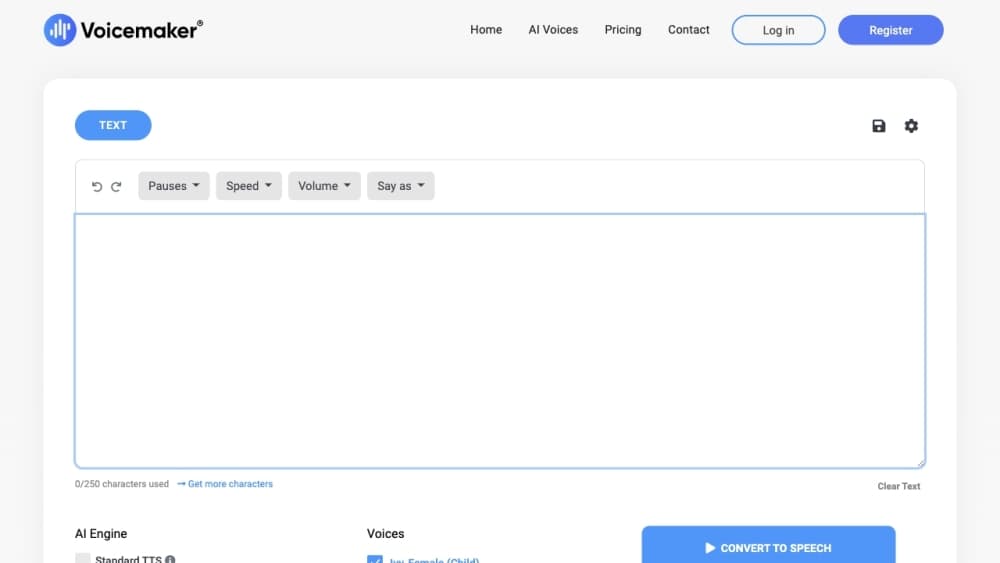
Voicemaker is an online AI text to speech converter, also called a text to speech tool or AI voice generator. You paste a script into the editor, pick a voice and language, tweak speed, pitch and pauses, then convert the text into speech you can play or download. It ships more than 2,000 AI voices spread across 130+ languages, and the company says the site has served over a million users in roughly 120 countries.
The service targets everyday voice work: a YouTube narration, a podcast intro, an audiobook chapter, or a training module. Beyond plain text to speech, Voicemaker bundles speech-to-speech conversion for redubbing, speech-to-text transcription in 90+ languages, and a voice cloning option on higher plans. That range puts it in the same bracket as tools like ElevenLabs or Murf. Voicemaker leans on volume and price rather than on one flagship model.
The main constraint is the credit system. Free accounts get only limited generations with a 250 character cap per conversion, and heavy or long-form work pushes you into the paid Starter, Creator or Pro plans. Pro voices also cost more credits per character, so a project that sounds cheap on paper can drain a monthly allowance faster than expected.
Getting Started
- Open voicemaker.in in a browser. You can preview voices before creating an account.
- Register with an email and verify it to unlock the free tier, which offers limited generations at up to 250 characters each.
- Paste your text into the box, then choose a language and a voice from the AI voice library.
- Adjust speed, volume, pitch and pauses, or add effects and pronunciation overrides for tricky words.
- Click Convert to Speech, then download the result as MP3, WAV, OGG or another format, or export an SRT subtitle file.
Product Information
A quick look at Voicemaker®'s pricing, supported platforms, and performance.
Best for
The users, tasks, and scenarios where this tool fits best.
Users
- Content creators
- Podcasters and audiobook producers
- Developers and product teams
Tasks
- Dubbing a video
- Generating an AI voiceover
- Transcribing audio
- Learning pronunciation
Scenarios
- Publishing daily social clips
- Building an audio course
- Prototyping a voice feature
Key features
Large Voice and Language Library
Voicemaker lists over 2,000 AI voices across 130+ languages, from widely spoken ones like English, Spanish and Mandarin to smaller ones like Welsh, Icelandic and Malayalam. Each language carries several regional accents, and voices come grouped into default and Pro tiers. Voice models span Default AI1 through AI6, ProV1, ProV2, ProPlus and the experimental FlashX line. That spread helps when you need a specific accent most tools skip.
Voice Cloning
On eligible paid plans, you can create a custom voice clone from a short recording and reuse it across projects. A clone slot costs $2 per year as an add-on, and the feature sits behind the higher tiers rather than the free plan. It suits creators who want a consistent personal voice without re-recording every script.
VoxStudio and VoxFX Effects
VoxStudio is the all-in-one workspace for professional audio tools, while VoxFX packages over 100 creative voice effects. You can reshape a narration, add texture, or transform a voice for a character read. VoxFX runs free for unlimited conversions, which makes it an easy extra rather than a paid gate.
Projects Mixing
The Projects tool lets you combine several voices, background music and audio files into one mix. You can build a multi-speaker conversation or a scene with a soundtrack, then export it as a single track. This is aimed at podcasts and storytelling rather than one-line conversions.
Speech to Speech and Speech to Text
Beyond text to speech, Voicemaker converts existing audio into a new voice and transcribes speech in 90+ languages with SRT export. Speech-to-text billing runs at 10 credits per second of audio and speech-to-speech at 100 credits per second, so both are heavier on credits than plain TTS. Together they cover dubbing and captioning jobs in one tool.
Pronunciation Editor and SSML Support
A pronunciation editor lets you fix how the engine reads names, acronyms and unusual words. SSML support adds finer control over emphasis, pauses and delivery for technical or brand-heavy scripts. These matter when a flat or mispronounced read would undercut the message.
Developer API
A full REST API covers text to speech, speech to speech and speech to text for apps and pipelines. It runs through a standalone developer platform at developer.voicemaker.in with pay-as-you-go pricing, separate from the web plans. This makes Voicemaker viable for teams that need to embed voice output in their own software.
Pros and cons
Pros
- 2,000+ voices across 130+ languages cover most accents and less common languages.
- A free tier with up to 250 characters per conversion lets you test voices before paying.
- Paid plans grant personal and commercial rights to the audio, so voiceovers are cleared for use.
- Outputs MP3, WAV, OGG, OPUS, AAC and Telephony, plus SRT subtitles from the same conversion.
- A full REST API covers TTS, speech-to-speech and speech-to-text on pay-as-you-go pricing.
Cons
- The free plan allows only limited generations at 250 characters each, so real projects need a paid tier.
- Pro voices cost 2x or 4x credits per character, which drains a monthly allowance quickly.
- Voice cloning, Projects and cloud storage sit behind higher paid plans, not the entry tiers.
- Chinese, Japanese and Korean characters each cost 2 credits, raising the cost of CJK narration.
Frequently asked questions
Voicemaker is an online AI text to speech converter, also called a text to speech tool or AI voice generator. It turns written text into voiceovers you can play in the browser or download as an audio file.
Related content
Explore related tools, skills, and articles for Voicemaker®.
Voicemaker® Alternatives

Foley
Hanamori Labs, LLC · Voice & Language · Productivity · AI AssistantFoley is a voice to-do list that turns a spoken sentence into a filed task, complete with project, date and time, then helps you plan the day around what is already there.

HireKey
HireKey · Voice & Language · Productivity · LeaningHireKey is an AI job search copilot built by a former tech recruiter. It checks role fit, tailors resumes, runs interview practice and tracks every application.

Fluence
Yay Software (Yannick Huchard) · Writing · Voice & Language · ProductivityFluence is an Android app that reads PDFs, EPUBs, Word files and web articles aloud, follows each sentence as it speaks, and answers questions about the text on the phone itself.