

Voicenotes
Coping Hard Inc. · Voice & Language · Productivity
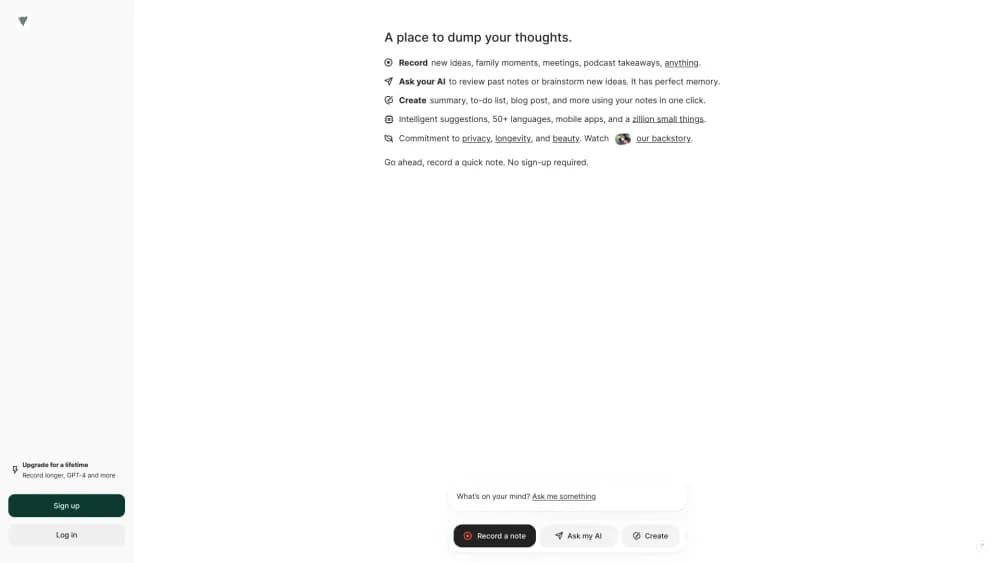
Voicenotes is an AI voice notetaker that records memos and meetings, transcribes speech in 100+ languages, and turns every conversation into searchable notes.
About Voicenotes
What Is Voicenotes
Voicenotes is a voice notes app that records what you say, transcribes it, and summarizes the result into notes you can actually revisit. It handles two everyday jobs: quick voice memos where you talk through an idea, and meetings where you capture the whole conversation and walk away with AI meeting notes, a summary, and action items.
What separates it from plain voice recorders is that the audio becomes working text. This voice to text app lets you ask the AI questions about anything you've recorded, and it answers from your own history rather than a generic model. The team behind it, Coping Hard Inc., also built it to run without a meeting bot, so nothing joins your call and your recordings aren't used to train AI models.
Two things shape whether it fits. The free plan caps transcription at 100 minutes a week, which is plenty for occasional memos but tight for daily meeting users. And the AI answering and unlimited history features sit behind the Pro plan, so the free tier is really for trying it out rather than living on.
Getting Started
- Sign up at voicenotes.com, or download the app for iOS, Android, macOS, Windows, or the web. An Apple Watch and Wear OS tile handles quick capture on the go.
- Hit record. Start a memo for a passing thought, or switch to meeting mode to capture a full conversation. You can type notes alongside the recording to add context.
- Let it transcribe. Voicenotes turns the audio into text in real time, and you can speak in any of 100+ supported languages.
- Ask the AI. Query your notes in plain language to pull out decisions, dates, and details from any recording you've made.
- Share or export. Send notes to Notion, WhatsApp, or other connected tools, or download the transcript and output.
Product Information
A quick look at Voicenotes's pricing, supported platforms, and performance.
Best for
The users, tasks, and scenarios where this tool fits best.
Users
- Meeting-heavy professionals
- Students and note-takers
- Journalers and thinkers
- Small teams
Tasks
- Recording and summarizing meetings
- Turning spoken ideas into written notes
- Searching past conversations
- Importing existing audio
Scenarios
- Capturing an in-person meeting
- Getting notes from a class or talk
- Keeping a running voice journal
Key features
Real-Time Transcription in 100+ Languages
Voicenotes converts speech to text as you talk and supports more than 100 languages, so multilingual meetings stay usable. You can switch languages mid-conversation and still keep the original audio alongside the transcript.
Meeting Mode Without a Bot
Unlike tools that send a bot to join your call, Voicenotes records locally and works for online and in-person meetings alike. That removes the awkward "who invited the recorder" moment and keeps confidential meetings private by design.
Ask AI About Your Notes
You can query everything you've recorded in plain language. The AI answers from your own notes, so questions about decisions, dates, or details pull from your history rather than a generic model.
Summaries and Action Items
Recordings turn into a clear summary with action items and next steps, ready the moment a meeting ends. For long recordings, the summary is what you'll actually read back.
Integrations and MCP
Voicenotes connects to Notion, Todoist, Readwise, WhatsApp, Zapier, and, on Pro, an MCP server that links your notes to Claude, ChatGPT, and other AI tools.
Cross-Device Access
The same library is available on iOS, Android, macOS, Windows, the web, and a Chrome extension. An Apple Watch and Wear OS tile let you start recording without pulling out your phone.
Security and Privacy Controls
Voicenotes says it is SOC 2 Type II and GDPR compliant, encrypts data at rest, and states that it does not train AI models on your recordings. Enterprise plans add SSO, admin sharing controls, and consent management.
Pros and cons
Pros
- No meeting bot joins your call, so confidential conversations stay private and in-person meetings work the same as online ones.
- Transcription covers 100+ languages, which keeps multilingual meetings usable instead of forcing everyone into English.
- The AI answers from your own recordings, so past decisions and details stay retrievable long after the meeting.
- The app runs across phones, desktops, the web, and a watch tile, so capture is never more than a tap away.
- Pro adds an MCP server, which connects your notes to Claude and ChatGPT for teams already working in those tools.
Cons
- The free plan caps transcription at 100 minutes a week, so anyone recording meetings daily will hit the limit and need Pro.
- Unlimited history and AI answering sit behind Pro, which means the free tier is best treated as a trial rather than a long-term home.
- There is no documented public API, so teams that want to build on Voicenotes programmatically will find MCP the main route.
- Meeting summaries are the AI's reading of the conversation, so a garbled recording can still produce a summary you'll want to check.
Frequently asked questions
Voicenotes records voice memos and meetings, transcribes them, and turns them into searchable notes with summaries and action items. It covers both quick ideas and full conversations.
Related content
Explore related tools, skills, and articles for Voicenotes.
Voicenotes Alternatives

Foley
Hanamori Labs, LLC · Voice & Language · Productivity · AI AssistantFoley is a voice to-do list that turns a spoken sentence into a filed task, complete with project, date and time, then helps you plan the day around what is already there.

HireKey
HireKey · Voice & Language · Productivity · LeaningHireKey is an AI job search copilot built by a former tech recruiter. It checks role fit, tailors resumes, runs interview practice and tracks every application.

Fluence
Yay Software (Yannick Huchard) · Writing · Voice & Language · ProductivityFluence is an Android app that reads PDFs, EPUBs, Word files and web articles aloud, follows each sentence as it speaks, and answers questions about the text on the phone itself.