

VoicePad AI
Hoermal · Voice & Language
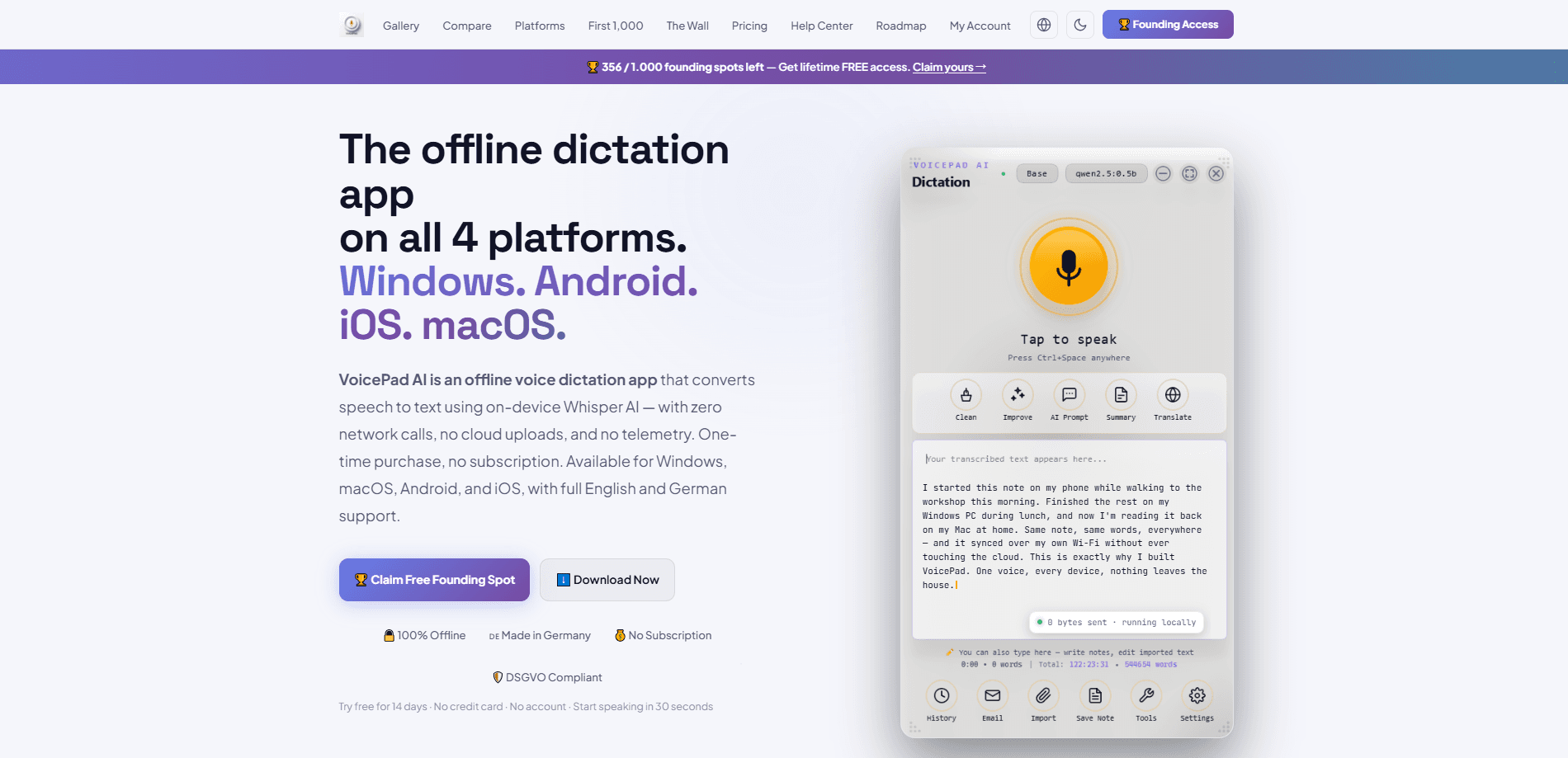
VoicePad AI is an offline voice dictation app that turns speech into clean text using on-device Whisper AI. It runs on Windows, macOS, Android, and iOS, writes into just about any app through a floating Orb or a real system keyboard, and never sends your voice to a server. If you want a fast speech to text app without a cloud account or a monthly subscription, this is the pitch.
About VoicePad AI
What Is VoicePad AI
VoicePad AI is a dictation software built around one idea: your voice should stay on your device. Instead of streaming audio to a cloud server and waiting for a transcript to come back, it runs a Whisper model locally and types the result where your cursor sits. That design choice matters for anyone handling client notes, medical details, or anything you'd rather not upload.
The app targets people who type a lot and find the keyboard the bottleneck. Writers, developers, and students get the most out of it, since the Orb floats over every window and drops text into Gmail, Word, VS Code, or an AI chat without a plugin. The base model is tiny. We're talking around 142 MB here, so the whole thing stays light on RAM.
The main catch is language support. Full English and German are here, but other languages are still marked as coming. If you dictate in Spanish or Japanese daily, this isn't your tool yet. The AI cleanup tools also need Ollama installed separately. Plain dictation works fine without it, but the cleanup, summary, and translation features all depend on that separate local engine being up and running.
Getting Started
- Download VoicePad AI for your platform from the official site and install it. Each platform is sold separately, but one license covers up to 4 devices with WiFi sync.
- Launch the app and let it load the on-device Whisper model. The base model is small, so setup takes a minute at most.
- Start the 14-day free trial. No credit card and no account are needed to begin.
- Tap the floating Orb and speak. Your text lands on the clipboard, or if you enable VoicePad Direct, it flows straight into the field where your cursor sits.
- Optional: install Ollama if you want the local AI tools for cleaning up, summarizing, or translating what you dictated.
Product Information
A quick look at VoicePad AI's pricing, supported platforms, and performance.
Best for
The users, tasks, and scenarios where this tool fits best.
Users
- Writers and journalists
- Developers
- Privacy-conscious professionals
Tasks
- First drafts
- Long-form chat and email
- Technical writing
Scenarios
- Working on a plane or in a spotty-signal café
- Handling confidential client work at a desk
- Multitasking away from the keyboard
Key features
100% On-Device Dictation
VoicePad AI runs Whisper locally, so speech never leaves your computer or phone. There are no network calls during dictation, no cloud uploads, and no telemetry. Why does that matter? For anyone who's uncomfortable piping voice into a US-based server, that's the whole point.
The Floating Orb and VoicePad Direct
The Orb sits on top of every window. Tap it, speak, and your words drop onto the clipboard. VoicePad Direct goes further: click into a text field, speak, and text streams in character by character until you end the session. It's the difference between copy-paste dictation and true voice typing, and the Direct mode is what makes long dictation sessions into an AI chat or a document feel natural instead of choppy.
One License, Four Platforms
Buy once and cover up to four devices across Windows, macOS, Android, and iOS. WiFi sync keeps your settings and dictionary aligned. Each platform is sold separately, so you only pay for the ones you actually use, and the shared sync means your custom vocabulary follows you from the desktop to the phone without any manual export or import step.
Local AI Tools with Ollama
Clean up, improve, summarize, or translate your dictated text using a free local AI engine. No API key, no account, no internet. The catch is that the AI tools need Ollama installed; dictation itself works without it. If you want the extra polish and don't mind a one-time setup, this turns raw speech into something closer to publishable text without ever touching the cloud.
English and German, Fully Supported
Voice commands, formatting, and the interface all work in English and German. The developers say more languages are coming. Today, that's it. If you need Spanish, French, or Japanese, you'll have to wait or look elsewhere.
Works Inside Your IDE
Dictate code comments, commit messages, and documentation directly into VS Code, Cursor, or Claude Code. No plugin and no cloud service in the loop. For developers who think faster than they type, it removes a real friction point.
Pros and cons
Pros
- Dictation stays fully offline, so private and regulated content never leaves the device, which matters more than ever for anyone handling client notes under rules like DSGVO.
- One-time purchase instead of a subscription, which sets it apart from most cloud dictation tools.
- The Orb and Direct modes cover both quick clip-and-paste use and long continuous sessions.
- Runs across all four major platforms with WiFi sync between them.
- Light on memory, with the Whisper base model around 142 MB.
Cons
- Full support only covers English and German right now, which rules it out for many multilingual users.
- The AI cleanup tools require a separate Ollama install, so it's not a pure one-click setup.
- Each platform is a separate purchase, so covering desktop and phone costs more than a single license suggests.
- There's no public API, so you can't wire it into your own tools or automation.
Frequently asked questions
Windows, macOS, Android, and iOS. All four get the same offline Whisper engine, and one license covers up to four devices with WiFi sync. Each platform is bought separately, so a phone plus a laptop means two purchases. Mac dictation and Android voice typing use the same base model as the desktop builds.
Related content
Explore related tools, skills, and articles for VoicePad AI.
VoicePad AI Alternatives

Foley
Hanamori Labs, LLC · Voice & Language · Productivity · AI AssistantFoley is a voice to-do list that turns a spoken sentence into a filed task, complete with project, date and time, then helps you plan the day around what is already there.

HireKey
HireKey · Voice & Language · Productivity · LeaningHireKey is an AI job search copilot built by a former tech recruiter. It checks role fit, tailors resumes, runs interview practice and tracks every application.

Fluence
Yay Software (Yannick Huchard) · Writing · Voice & Language · ProductivityFluence is an Android app that reads PDFs, EPUBs, Word files and web articles aloud, follows each sentence as it speaks, and answers questions about the text on the phone itself.