

Voiser
Voiser Teknoloji Limited Sirketi · Voice & Language
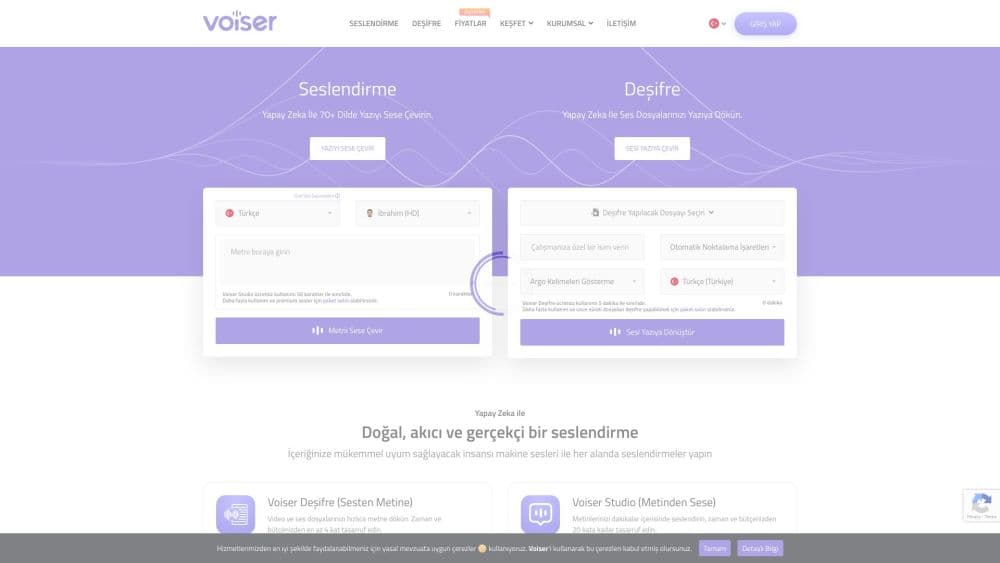
Voiser is an AI voice generator and transcription platform that turns text into voiceovers in 75+ languages and converts audio or video into text, with a REST API for developers.
About Voiser
What Is Voiser
Voiser is an AI voice and transcription platform from Turkey that does two jobs in one account. The voiceover side turns written text into spoken audio across 75+ languages and more than 550 voices, and the transcription side turns audio and video files into text with timestamps. It runs in the browser plus apps for iOS and Android.
The draw is the range and the price. You get hundreds of voices, dozens of emotional styles, and 140 dialects on the text-to-speech side, while the transcription tool handles YouTube links, speaker detection, and subtitle files. Both are aimed at creators, teachers, and small teams who need a voice track or a transcript without booking a studio or a freelancer.
Two things decide whether it fits. Voiser counts characters, not minutes, so a long script burns your allowance fast, and the character limit is what most plans are really selling. The voice cloning and higher-quality audio sit on the paid tiers, which means the free credits are a test drive, not a working setup. Businesses that ship a lot of audio will find the ceiling quick; someone voicing a few videos a month gets plenty.
Getting Started
- Sign up at voiser.net, which comes with 5,000 free characters to try the voiceover tool on the first login.
- Paste your text into the studio, or upload a DOC or TXT file so you don't have to copy long scripts by hand.
- Pick a voice and a language. Adjust speed, pitch, and emotion, or add a pronunciation rule for a name the voice keeps getting wrong.
- Generate the audio and download it as an MP3. Credits come off the moment the text is converted, whether or not you download the file.
- Switch to the transcription side when you need it. Upload an audio or video file, or paste a YouTube link, then export the result as SRT, TXT, DOCX, or an Excel file.
Product Information
A quick look at Voiser's pricing, supported platforms, and performance.
Best for
The users, tasks, and scenarios where this tool fits best.
Users
- Content creators
- Teachers and course builders
- Podcasters and video editors
Tasks
- Turning scripts into voiceovers
- Transcribing interviews and meetings
- Making subtitles
- Cloning a voice
Scenarios
- Voicing videos for a global channel
- Handling a long interview or webinar
- Producing a quick ad read or announcement
Key features
Text to Speech in 75+ Languages
This is the core of the product. You type or upload text and Voiser reads it aloud in over 75 languages and more than 550 voices, with 140 dialects and accents on the menu. The appeal is breadth: a creator working in several markets can voice the same script in each one without switching tools. Multilingual voices can even change language mid-text and keep the same tone.
Emotional and Expressive Voices
Voiser groups voices by the delivery they suit, from chat and customer service to newscast, narrative, and whispering. You pick a style that matches the content, then fine-tune speed, pitch, and tone. The emotional presets are what make a voiceover sound like a read rather than a machine reciting words, which matters most for ads and storytelling.
Voice Cloning
On the paid tiers, Voiser can build a reusable copy of a voice from a short sample, so you don't have to record the same person twice. The Pro tier opens custom voice cloning, and the top tier adds professional cloning. It is handy for consistent branding, and it also raises the questions any voice cloning tool does about consent and use.
Speech to Text and Transcription
The transcription side takes audio and video in most common formats, or a YouTube link, and returns text with timestamps. It covers 75+ languages, detects speakers so you can tell who spoke, flags keywords, and lets you edit the result in a built-in editor. Files stay hosted for six months, and you can export as SRT, TXT, DOCX, XLS, or MP3.
Subtitle Translation and Dubbing
Beyond a plain transcript, Voiser translates subtitles into 129 languages and supports AI dubbing, so one video can be re-voiced for other markets. That package turns a transcript into something publishable abroad, which is the part small teams usually outsource.
Developer API
Voiser runs a REST API for both text-to-speech and speech-to-text, with SDKs and documentation. The same voices and transcription engine that power the web studio are available inside your own app, which is how developers wire voice into a product, an IVR system, or a news reader.
Pros and cons
Pros
- The voice library is wide: 75+ languages, 550+ voices, and 140 dialects cover most markets and accents in one place.
- Voiceover and transcription live in one account, and both tie into the same API, so you aren't paying for two subscriptions.
- The $5 monthly plan is cheap to start, and the free 5,000 characters let you test real output before paying.
- Transcription extras like speaker detection, timestamped output, and SRT export save editing time after the file comes back.
Cons
- Voiser counts characters, not minutes, and credits come off the moment text is converted, so a long audiobook or course burns the allowance even if you never download it. Voiser pricing is built around that character count rather than hours of audio.
- Free users get 5,000 characters once, which is a trial and not enough for ongoing work. Anything regular needs a paid plan.
- Voice cloning and the higher audio quality sit on the Pro tiers, so the entry price understates what a full setup costs.
- Accuracy claims are the vendor's own. The 99% figure is a marketing number, and how well it holds for your own recordings and accents still needs testing.
Frequently asked questions
Voiser is used to turn text into spoken audio and to turn audio or video into written text. Creators use it for voiceovers, subtitles, and dubbing, while teams use it to transcribe meetings, interviews, and lectures. It runs in the browser and as apps for iOS and Android, and both sides connect to the same REST API.
Related content
Explore related tools, skills, and articles for Voiser.
Voiser Alternatives

Foley
Hanamori Labs, LLC · Voice & Language · Productivity · AI AssistantFoley is a voice to-do list that turns a spoken sentence into a filed task, complete with project, date and time, then helps you plan the day around what is already there.

HireKey
HireKey · Voice & Language · Productivity · LeaningHireKey is an AI job search copilot built by a former tech recruiter. It checks role fit, tailors resumes, runs interview practice and tracks every application.

Fluence
Yay Software (Yannick Huchard) · Writing · Voice & Language · ProductivityFluence is an Android app that reads PDFs, EPUBs, Word files and web articles aloud, follows each sentence as it speaks, and answers questions about the text on the phone itself.