

Volamail
Volamail · Writing · Productivity
Volamail is an open source email platform that pairs an AI template editor with a single HTTP call for sending. Hosted tiers run from free to $19/mo, and self-hosting costs nothing.
About Volamail
What Is Volamail
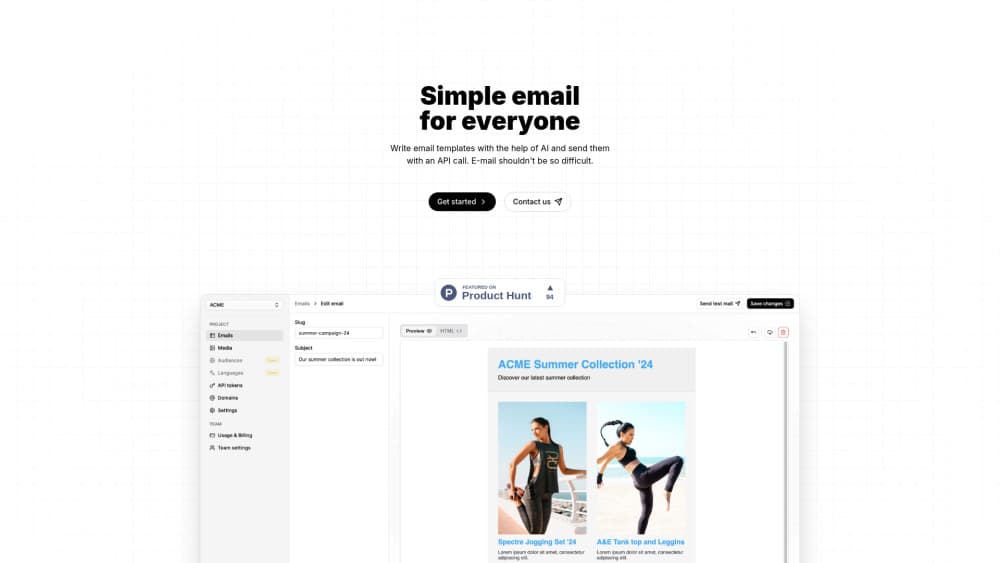
Volamail is an open source email provider that does two jobs usually split across different tools. One is building HTML email templates, the other is delivering them. Its editor takes AI prompts, its sending layer takes one HTTP request, and the code behind both is public.
The pitch lands with developers on small teams. Those are the people hand-coding table layouts for a password reset, or paying a marketing suite a monthly fee to send a receipt. Volamail gives the designer an editor they can open themselves and gives the backend one endpoint to call.
The limitation to know before you sign up is project state. The GitHub README says Volamail is "undergoing a heavy migration," with dashboard access temporarily disabled in production and documentation treated as out of date. The docs subdomain did not resolve when we checked. Pricing and login on the main site still respond, so treat the roadmap and the docs as provisional until the migration wraps.
Getting Started
- Create an account at app.volamail.com, or clone the repository and deploy it to your own AWS account.
- Start a project. Each one holds its own templates and image storage.
- Build a template, either by describing the email to the AI editor or by importing HTML you already send.
- Grab the send example from the dashboard, add your API key, and fire a test message to yourself.
- Read the delivered mail in your inbox, then swap the test call for the real one in your app.
Product Information
A quick look at Volamail's pricing, supported platforms, and performance.
Best for
The users, tasks, and scenarios where this tool fits best.
Users
- Developers on small teams
- Designers who own the templates
- Teams with data rules
Tasks
- Password resets and receipts
- Restyling an HTML email you already use
- Drafting a template from scratch
Scenarios
- A side project sending a few hundred messages a month
- A startup outgrowing a shared SMTP relay
- A company that cannot ship customer data to a third party
Key features
AI Template Writing
Describe the email you want and the editor drafts it. Prompts work at the template level, so a single sentence can produce a full layout with header, body and footer. The output is plain HTML underneath, so nothing is locked to a proprietary block format.
Edits Aimed at One Element
Select a single element and prompt only that change. The rest of the layout stays where it was, which matters when a heading is fine and only the button copy is wrong. It's the difference between a copy tweak and rebuilding a section.
HTML Import, HTML Export on the Way
The editor reads and writes plain HTML email templates, so you can bring in mail you already send and test the platform gradually. Export sits on the published roadmap rather than in the feature list today. Until then, keep your source files close.
Sending With a Plain HTTP Call
Transactional email goes out through one request, no dependency or bulky SDK. You paste your key into the call, point it at a template and a recipient, and the server handles delivery. For a backend team, that's one less package in the lockfile.
Self-Hosting the Whole Stack
Volamail is 100% open source per the site, and the repo ships a docker-compose file plus an SST config for AWS. Deploy it yourself and you skip per-email billing entirely. GitHub doesn't detect a license file on the repository, so read the terms before you ship it in a commercial product.
Quotas, Projects and Image Storage
Free covers 500 emails a month, two projects and 20MB of image storage per project. Pro at $19 a month raises that to 10,000 emails, five projects and 50MB per project. Custom plans exist for larger volumes, and both tiers include unlimited AI generations and edits.
Pros and cons
Pros
- The core is open source, so cost stops scaling with subscriber count.
- AI editing works on plain HTML, which means imported templates keep rendering the way they did.
- Sending takes one HTTP call, with no SDK to install or keep current.
- The free hosted tier includes unlimited AI edits, so you can test the editor before paying.
- Element-level prompts leave the rest of a template untouched, which saves rebuild time.
Cons
- The repo announces a heavy migration in progress, and the docs site was unreachable when we checked, so parts of the documented workflow may not work today.
- It sends transactional mail only. Marketing campaigns, scheduled sending and localization are still roadmap items, so you'll need another tool for those.
- Custom domains and dedicated IPs aren't available yet, which means hosted sending goes out on a shared domain and can land in spam more often.
- The AI email editor assumes you're comfortable with HTML. Without that, small layout fixes turn into a slow back and forth.
Frequently asked questions
It builds HTML email templates and sends them. You design a template in the AI email editor, then trigger it from your code with one HTTP call. Common uses are password resets, receipts, onboarding mail and any other message a product sends on its own.
Related content
Explore related tools, skills, and articles for Volamail.
Volamail Alternatives

Fluence
Yay Software (Yannick Huchard) · Writing · Voice & Language · ProductivityFluence is an Android app that reads PDFs, EPUBs, Word files and web articles aloud, follows each sentence as it speaks, and answers questions about the text on the phone itself.

Claude for Google Workspace
Anthropic · Writing · Productivity · BusinessClaude for Google Workspace puts Claude in a sidebar inside Google Docs, Sheets, and Slides, where it reads the file you have open and edits it in place.

Claude Haiku 5.5
Anthropic · Writing · Coding · ChatbotClaude Haiku 5.5 is Anthropic's fastest and cheapest small model, built for high volume tasks at $0.10 per million input tokens with a 1M token context window.