

WindChat
Windseed · Coding
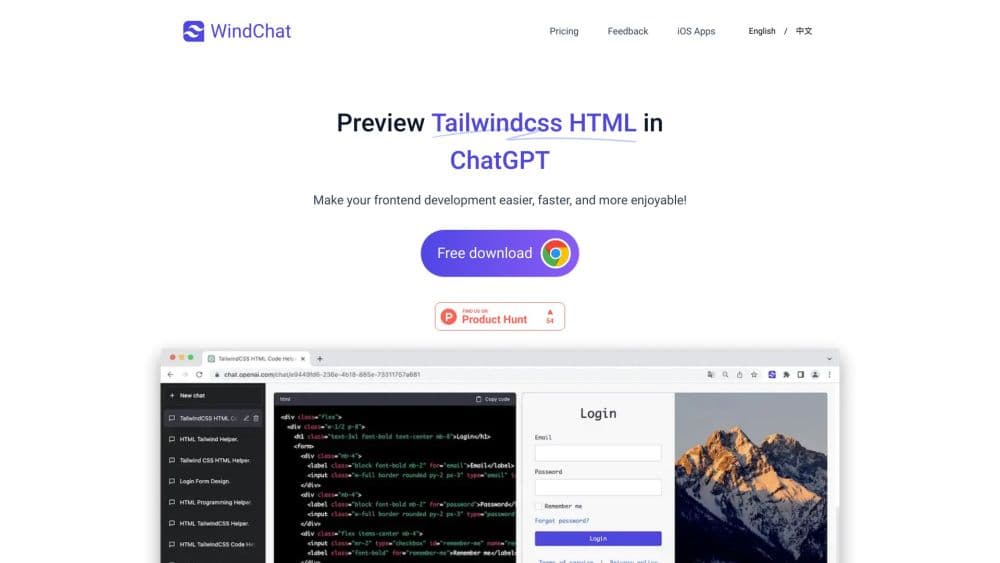
WindChat is a browser extension for front-end prototyping that renders Tailwind CSS HTML and React code right inside ChatGPT, so prototypes appear as finished pages while the model types.
About WindChat
What Is WindChat
WindChat adds a Tailwind CSS preview pane to ChatGPT. You ask the model for a page or a component, it answers with a code block, and WindChat draws that code as a live page beside the chat. Before this, the usual routine was copy the code, open a new file, paste, save, refresh the browser. WindChat removes the middle steps.
The extension is built for people who use ChatGPT as a front-end assistant rather than as a general chatbot. Designers sketch layouts, developers test component ideas, and students watch what a class name actually does to a heading. Tailwind CSS support is the core of it, and React code has been previewable since January 2024.
Support has limits. WindChat lives inside the ChatGPT interface, so it breaks whenever OpenAI ships a visual change, and the developer has patched the extension each time with a dated release. It also depends on the free plan being enough: accounts without a license can preview only the five most recent messages in a chat. Anything beyond that needs a paid key.
Getting Started
- Install WindChat from the Chrome Web Store and open ChatGPT in the same browser.
- Start a new chat and paste a prompt that asks for a single HTML or React code block using Tailwind CSS classes.
- Wait for the answer. WindChat renders the code block as a page next to the conversation.
- Adjust the prompt, send it again, and compare the new render with the old one.
- Buy a license key for unlimited previews, then activate it in the extension settings.
Product Information
A quick look at WindChat's pricing, supported platforms, and performance.
Best for
The users, tasks, and scenarios where this tool fits best.
Users
- Front-end developers
- UI designers
- Beginners learning HTML and React
- Indie makers and side project builders
Tasks
- Landing page prototyping
- Component iteration
- Prompt debugging
- Teaching and demos
Scenarios
- A quick Friday afternoon mockup
- Comparing two design directions
- Explaining a bug to a teammate
- Checking a React snippet from a tutorial
Key features
Live Preview of Generated Code
WindChat reads the code block in a ChatGPT answer and renders it as a page. The render updates as new answers arrive, so a sequence of refinements becomes a sequence of visible versions. You can keep working in the chat while the preview stays in view, which is the difference between describing a layout and looking at one.
Tailwind CSS Rendering
Tailwind support is the reason the extension exists. Utility classes such as flex, gap, rounded, and bg-slate-900 are applied as written, so what you see matches the markup the model produced. Pages that lean on custom CSS or component libraries from a project will look different here, because the preview has no access to your build pipeline.
React Code Preview
React answers can be previewed since the January 2024 release. The extension handles the common case of a single component written with Tailwind classes and demo data, which is how most React prompts from ChatGPT come out. Multi-file projects with imports and bundler configuration are outside what a chat preview can run.
Instant Iteration Loop
The useful part is speed. You change one line in the prompt, resend, and the new render replaces the old one. Judging spacing and hierarchy becomes a glance instead of a deploy. That loop is what turns ChatGPT from a code generator into something closer to a UI scratchpad.
Prompt Presets for Consistent Output
The official site publishes starter prompts for Tailwind CSS and React that fix the output format: one code block, no comments, placeholder images from picsum.photos, icons from Bootstrap Icons. Pasting these first saves you from re-explaining the rules every session, and the render stays clean because the model stops adding prose inside the code.
Multi-Device License and Lifetime Option
One license activates on up to five devices, which covers a laptop, a desktop, and a spare browser profile. Beyond the $1.99 monthly plan, there is a $9.99 yearly plan and a $19.99 one-time lifetime purchase. For a tool this narrow, the lifetime option is the sensible one if you expect to keep using ChatGPT for front-end work.
Pros and cons
Pros
- Removes the copy, save, refresh cycle that makes ChatGPT slow for front-end work.
- Tailwind CSS output renders accurately, which is the part that matters most for prototypes.
- Free tier previews the last five messages, enough to test whether the workflow suits you.
- Pricing is low and the lifetime license costs less than a year of most developer subscriptions.
- Prompt presets on the official site produce cleaner code blocks with less back and forth.
Cons
- Only works inside ChatGPT. Users of Claude, Gemini, or local editors get nothing from it.
- No build pipeline, so imports, npm packages, and multi-file React projects will not run in the preview.
- ChatGPT interface updates have broken the extension before, and each fix waits on a new release.
- The whole product depends on OpenAI keeping the code block format stable, which is a risk you cannot control.
Frequently asked questions
It renders the code ChatGPT writes. Ask for a Tailwind CSS page, and the extension shows that page as it would look in a browser, inside the chat window, without any copy and paste.
Related content
Explore related tools, skills, and articles for WindChat.
WindChat Alternatives

Base Code
Base44 (Wix) · Coding · ProductivityBase Code is a shared cloud development environment from Base44. Teammates describe changes to an existing GitHub codebase in chat, preview them live and send them back as pull requests.

Google EmbeddingGemma 2
Google DeepMind · Writing · Image · CodingGoogle EmbeddingGemma 2 is a 740M-parameter open model that turns text, code, images, audio, and video frames into vectors in one 768-dimension space, running on phones and laptops.

GitGlow
GitGlow · Coding · ProductivityGitGlow is a local-first desktop Git client that lets independent developers review their own code and their AI agents' changes in one place before shipping.