

Wispr Flow
Wispr · Voice & Language · Productivity
Wispr Flow is a voice dictation app that turns speech into clean, formatted writing in any app. It runs on Mac, Windows, iPhone, and Android, supports 100+ languages, and ships with an AI notetaker for meetings.
About Wispr Flow
What Is Wispr Flow
Wispr Flow is an AI dictation tool from the company Wispr. You hold a shortcut, talk the way you normally would, and the text shows up where your cursor is. The pitch is simple: speech to text should read like writing, while built-in voice typing transcribes every "um" and false start. Flow cleans the mess up before you ever see it. It removes filler words, adds punctuation, and formats lists or paragraphs on the fly.
The app sits on top of every program you already use. Gmail, Slack, iMessage, Notion, a code editor, a terminal, ChatGPT. If you can type there, you can dictate there, and no plugin or integration is needed. A personal dictionary learns your client names and company jargon, and snippets expand short phrases into full addresses or bios.
The main limit is that processing happens in the cloud. There's no offline mode, so dictation needs a network connection, and people with strict privacy requirements may want to weigh that against the team and enterprise options. Free accounts also carry a weekly word cap.
Getting Started
- Download the Flow app for Mac, Windows, iPhone, or Android and create an account.
- Grant microphone and accessibility permissions so Flow can type into other apps.
- Open any text field, hold the dictation shortcut, and speak naturally.
- Release the key, review the cleaned text, and add unusual names to your dictionary.
- Set a style per app, or create snippets for text you repeat often.
Product Information
A quick look at Wispr Flow's pricing, supported platforms, and performance.
Best for
The users, tasks, and scenarios where this tool fits best.
Users
- Writers and knowledge workers
- Developers
- People with repetitive strain or mobility needs
- Multilingual teams
Tasks
- Drafting long emails and messages
- Writing meeting notes and summaries
- Capturing ideas on the move
- Filling in forms and templates
Scenarios
- Back-to-back meetings on Mac or Windows
- Coding sessions
- Fast customer replies
- Writing in a second language
Key features
AI cleanup as you speak
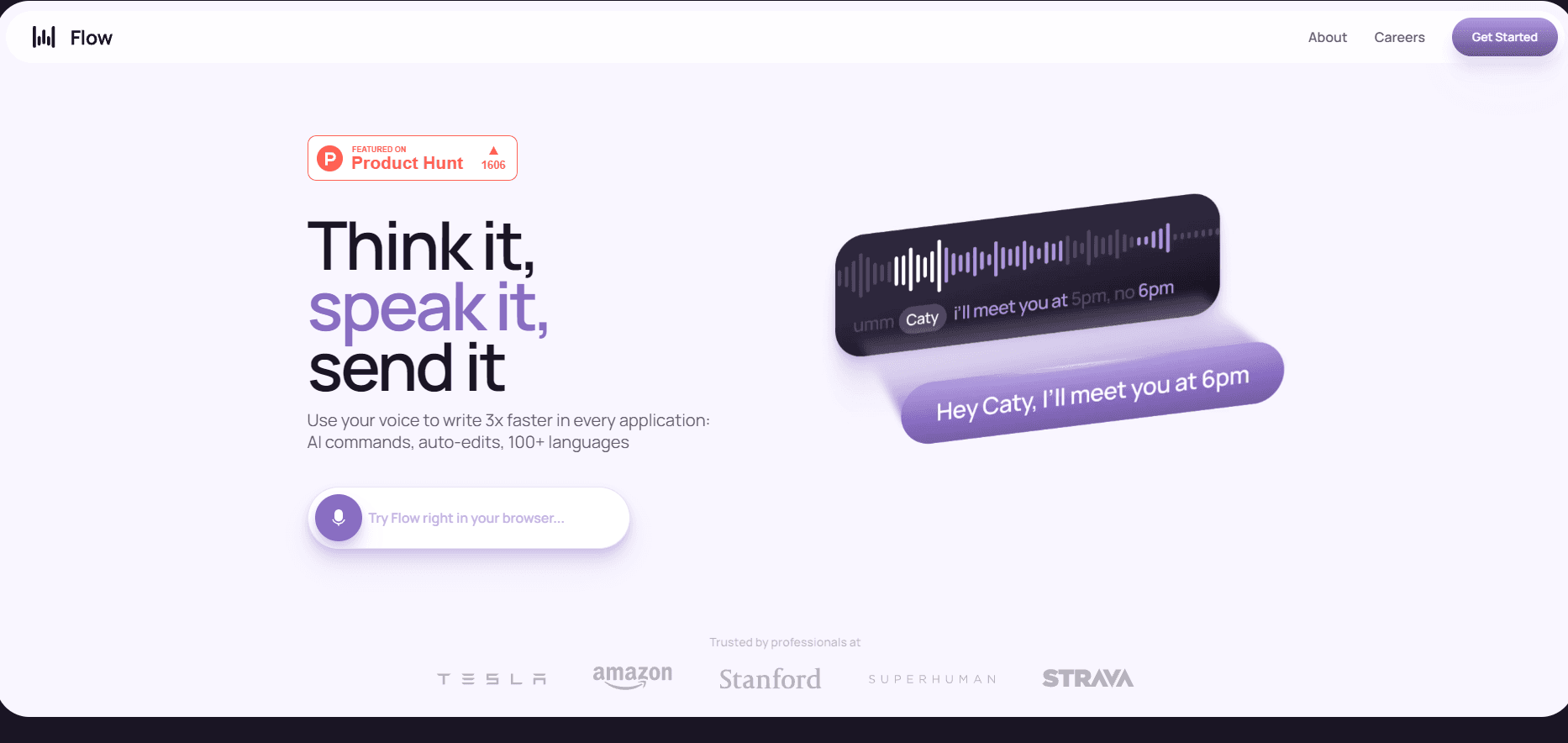
Flow doesn't just transcribe. It edits while you talk. Filler words like "um" and "you know" get removed, punctuation is added, and self-corrections are resolved. Say "let's meet at 5, actually 6" and you get "Let's meet at 6." The result reads like something you wrote, not a transcript.
Works in every app
The tool types wherever your cursor is, so it fits Gmail, Slack, Notion, iMessage, terminals, code editors, and AI chat tools with no plugins. That consistency across the desktop is the part most dictation tools miss. Built-in voice typing, by contrast, is often tied to one operating system or device.
Personal dictionary and snippets
Flow learns the names and jargon you use most, and you can add words manually. Snippets turn a spoken shortcut into a full address, link, or bio. Over time the accuracy on client names and acronyms improves, which matters if you dictate work that mixes proper nouns with everyday language.
100+ language support
Flow detects the language you're speaking and switches as you go. For the best results, you select the specific language in the Flow bar rather than relying on auto-detect. That matters for bilingual users and anyone with a strong accent, since narrowing the language set sharpens accuracy.
Wispr Notetaker for meetings
Notetaker is the meeting half of the product, included on every plan. It records on Mac and Windows, names the speakers, and turns a call into a topic-organized summary with next steps. It works on Zoom, Google Meet, Microsoft Teams, Slack huddles, and in-person conversations, and no bot joins the call.
Per-app writing styles
Flow adjusts how it formats your text depending on where you're writing. You set a style for messages, work chats, and emails, so a quick Slack line doesn't come out sounding like a formal email. The app keeps your voice without forcing one tone everywhere.
MCP access to meeting notes
Through an MCP connection, your meeting notes work inside Claude, ChatGPT, Gemini, Cursor, and other compatible AI tools. The connection covers meeting transcripts, not your dictations, and it needs Notetaker plus private cloud sync enabled on your account.
Pros and cons
Pros
- Cross-platform support on Mac, Windows, iPhone, and Android gives you the same tool on every device, so dictation software for Mac and voice typing for Windows feel identical.
- AI cleanup removes fillers and adds punctuation, so the output usually needs little editing.
- The free plan is real: 2,000 words a week on desktop and no credit card required.
- Notetaker is bundled with dictation, so one subscription covers typing and meeting notes.
- Personal dictionary and snippets make it better at your specific names and terms over time.
Cons
- Dictation runs in the cloud, so there's no offline mode and a connection is required.
- The free plan's weekly word limit is tight for heavy users, who will hit Pro quickly.
- Notetaker is Mac and Windows only for now, so mobile meeting capture isn't available.
- Bluetooth earbuds and AirPods tend to lower accuracy, which limits some microphone setups.
Frequently asked questions
Wispr Flow turns speech into written text across your apps. You hold a shortcut, talk, and polished text appears where your cursor is, with fillers removed and punctuation added. It also includes Notetaker for meeting transcripts and summaries.
Related content
Explore related tools, skills, and articles for Wispr Flow.
Wispr Flow Alternatives

Foley
Hanamori Labs, LLC · Voice & Language · Productivity · AI AssistantFoley is a voice to-do list that turns a spoken sentence into a filed task, complete with project, date and time, then helps you plan the day around what is already there.

HireKey
HireKey · Voice & Language · Productivity · LeaningHireKey is an AI job search copilot built by a former tech recruiter. It checks role fit, tailors resumes, runs interview practice and tracks every application.

Fluence
Yay Software (Yannick Huchard) · Writing · Voice & Language · ProductivityFluence is an Android app that reads PDFs, EPUBs, Word files and web articles aloud, follows each sentence as it speaks, and answers questions about the text on the phone itself.