

WizGenerator
WizGenerator · AI Detection · Other
WizGenerator is a free library of 105+ AI generators that turn a few short answers into names, copy, study guides, and images without any prompt writing.
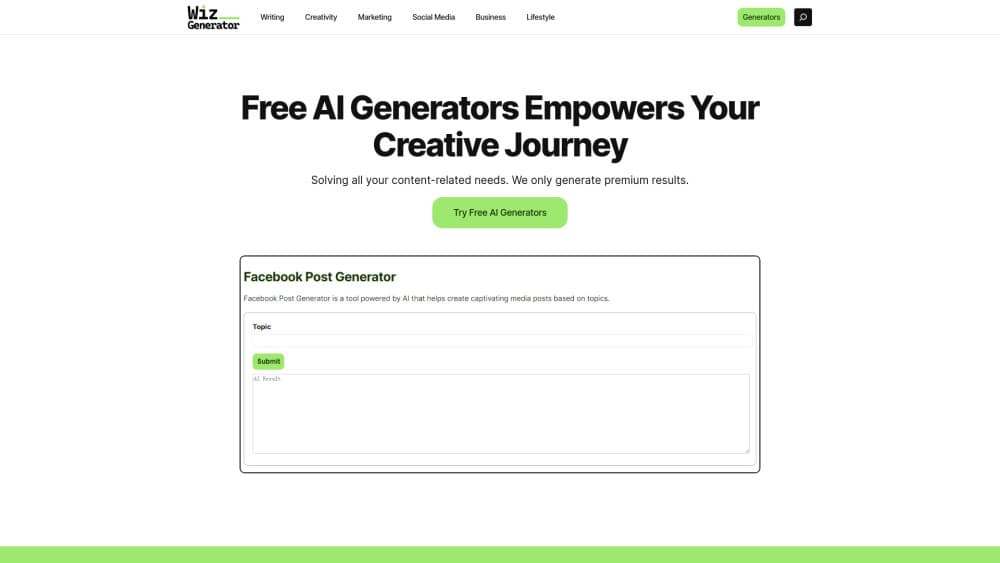
About WizGenerator
What Is WizGenerator
WizGenerator is a web library of small, single-purpose AI generators. You pick a task, fill in a short form, and get a finished result. There's no blank chat box to stare at and no prompt to craft.
The library covers AI writing tools for names, cover letters, product descriptions, thesis statements, and study guides. It also has image tools for simple visuals such as stream emotes. WizGenerator says its tools have produced more than 5 million outputs for over 50,000 users, and that every generator stays free.
The main limit is depth. Each tool handles one narrow job well, but none of them manage a long project. There's no saved history inside an account, no file upload, and no editor for a document you plan to revise over weeks. Treat it as a fast first draft, not a workspace.
Getting Started
- Open wizgenerator.com in any browser. No account or download is needed.
- Choose Text or Image on the homepage, then narrow down by topic until you reach the exact task.
- Fill in the form fields the generator asks for, such as tone, audience, length, or a short description.
- Generate the result, copy it, and edit anything that needs your own facts or voice.
Product Information
A quick look at WizGenerator's pricing, supported platforms, and performance.
Best for
The users, tasks, and scenarios where this tool fits best.
Users
- Students
- Small business owners
- Streamers and content creators
- Non-native English writers
Tasks
- Naming a product, brand, or online handle
- Writing short copy
- Classroom and research prep
- Testing an image idea
Scenarios
- You have ten minutes before a meeting and need three tagline options. A form gets you a shortlist faster than a general chatbot.
- A blank page has stalled a side project for a week. Picking a specific generator removes the "where do I start" step.
- You need twenty variants of the same short text for ad testing. Regenerating with different form inputs is quicker than rewriting by hand.
Key features
One Form per Job, No Prompt Writing
Each generator asks for the details that matter to that task, such as audience, tone, length, or a short brief. The tool builds the underlying instruction for you. That's the core promise of this prompt-free AI tool: you answer questions instead of guessing at wording.
A Library Split by Text and Image
The homepage separates text and image work, then breaks each side into topics like writing, business, education, travel, and creative. Each AI text generator and AI image generator sits on its own page, so you land on a specific tool rather than scrolling a flat list of 105+ options. It's a small design choice that saves real time when you don't know the exact tool name.
Results Built for Copy and Paste
Output arrives as structured text or a finished image, ready to use in a doc, email, or post. There's no export step and no proprietary file format. Most text results include headings or bullets, so you can drop them into your own template with light editing.
Free Access Without an Account
Every generator runs without signup, a credit card, or a usage counter. WizGenerator says premium features may arrive later, but the core generators will stay free. For occasional users, that removes the usual trial-then-paywall sequence.
Instant Generation in the Browser
Results come back in seconds on the same page. Nothing installs, and there's no queue or render wait for text tools. Image jobs take a little longer. Most finish in under a minute.
Generators for Narrow Everyday Tasks
The catalog goes beyond marketing copy. You'll find a random number generator for classroom draws, a password phrase builder, a travel itinerary planner, and an anagram helper. These are the kinds of small jobs where a general assistant usually gives an inconsistent answer.
Pros and cons
Pros
- Every tool is free, with no signup and no credit limit.
- Structured forms remove the prompt guessing that trips up new users.
- The topic-based layout helps you find the right AI generator without knowing its name.
- Text and image jobs sit in one place, so you don't juggle tabs.
- Output is plain text or a standard image file, easy to reuse anywhere.
Cons
- No account dashboard or saved history, so closing the tab loses the result unless you copy it first.
- No file upload or long-document editing, which rules out rewriting a PDF or managing a manuscript.
- No public API, so teams can't wire these free AI tools into their own workflow.
- Image resolution is modest, and brand or legal claims in text output need manual checking.
Frequently asked questions
Yes. Every generator on the site runs without payment, and the company says the core tools will stay free even if premium features are added later. There's no credit system to track.
Related content
Explore related tools, skills, and articles for WizGenerator.
WizGenerator Alternatives
Isgen AI
Isgen · AI DetectionIsgen AI is a web-based AI detector that scores text for machine authorship and shows you which sentences and phrases push the number up. It's built for teachers, editors, students, and writers. Their question is simple: did this draft come from ChatGPT, GPT-5, Claude, Gemini, DeepSeek, or another model? You paste or upload content, run a scan, and get a Human, AI, and Mixed breakdown in seconds. There's also a companion editor that scores text while you write it.
Humanizeai Tools
Humanizeai Tools · Writing · AI DetectionHumanizeai Tools is a web-based AI humanizer that rewrites machine-generated text so it sounds like a person wrote it, which is the whole point of the category it belongs to. Paste a draft from ChatGPT, Claude, or Gemini, run it through the tool, and it swaps out the phrases and sentence patterns that AI detectors flag. If your goal is to make AI text sound human before you publish it, this is the kind of tool built for exactly that. It suits students, bloggers, and marketers who need copy that reads naturally and clears tools like GPTZero, Copyleaks, and Winston AI after a single pass.

Hidemyai
Hidemyai · Writing · AI DetectionHidemyai is an AI content humanizer. It rewrites text from ChatGPT, Jasper, and similar tools so the result reads like a person wrote it. You paste your draft, pick a document type and tone, and the service returns a version meant to bypass AI detectors such as Originality.ai, Turnitin, and ZeroGPT. It targets writers, marketers, and students who lean on AI drafts but can't ship copy that sounds robotic. The promise is simple: make AI content undetectable.