

WOPA
WOPA · Business
WOPA is a WhatsApp invoicing assistant built for UK tradespeople. You message it a job, a customer, and an amount in plain English. It drafts a PDF invoice, emails it to your client, then chases late payments with polite reminders. There's no invoice app for tradespeople to download and no spreadsheet to keep tidy. The whole workflow runs inside the chat app you already have open all day. No setup. No new logins.
About WOPA
What Is WOPA
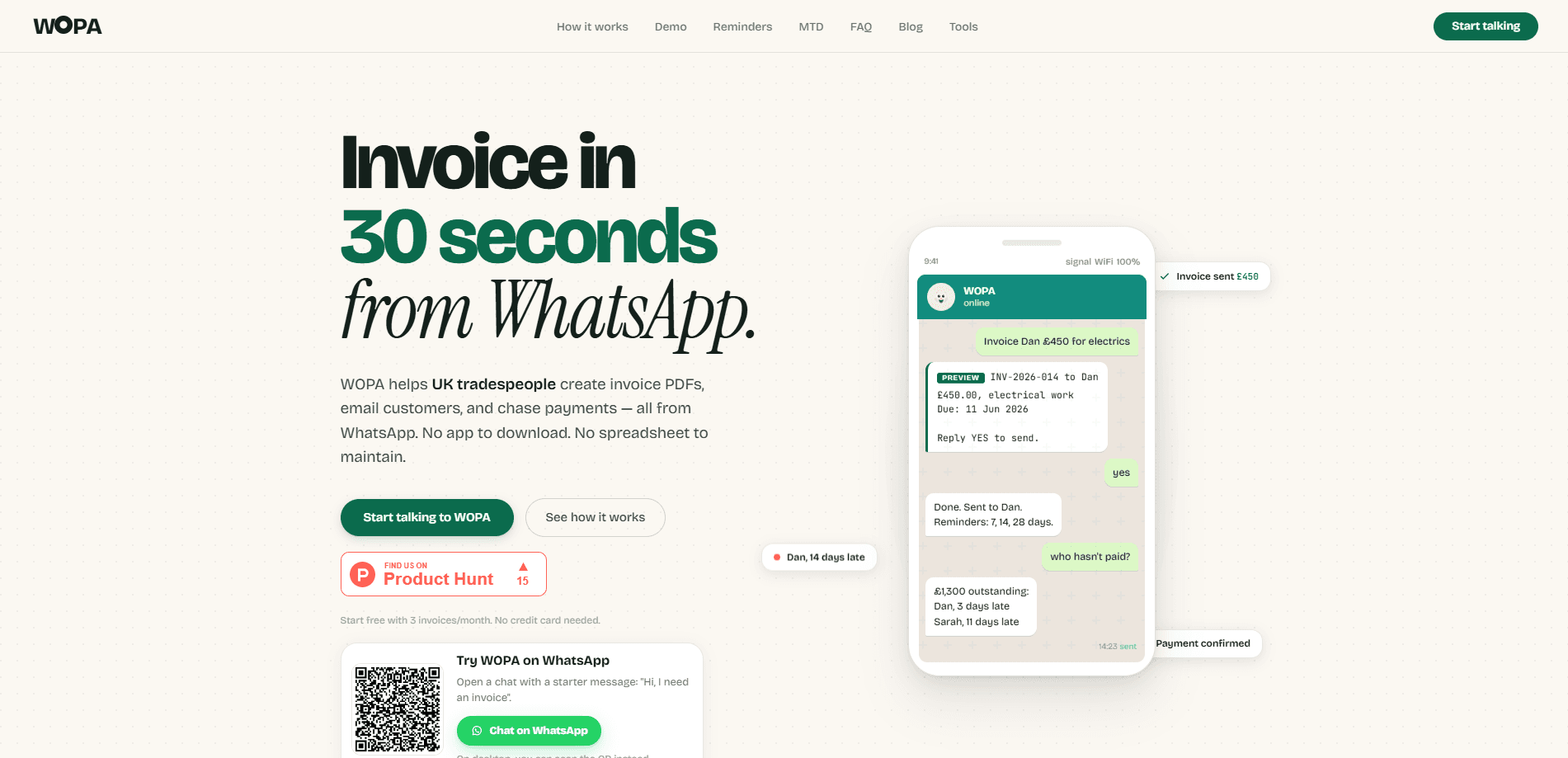
WOPA turns WhatsApp into an invoicing tool. Instead of opening accounting software on a laptop, you type something like "invoice Dan £450 for electrics" into a chat, and WOPA builds a draft invoice from that sentence. It fills in the customer, amount, due date, and your bank details, then waits for your approval before anything goes out.
The product targets a specific group: UK sole traders and tradespeople who bill clients by the job. Plumbers, electricians, builders, and similar workers often lose evenings to paperwork. WOPA's pitch is simple. Send a professional invoice from the van within seconds of finishing a job. Get paid sooner. Stop juggling paper receipts.
The catch is scope. WOPA is a live beta and only handles invoicing, not full bookkeeping. Its chat interface is convenient, but if you want ledgers, expenses, or payroll, you'll still need proper software. It's also not HMRC-recognised or Making Tax Digital compatible yet, so it can't be your only tool if you need digital tax records.
Getting Started
- Message the WOPA WhatsApp number to start a chat, no card required for the free tier.
- Tell it a job, a customer, and an amount in a normal sentence, such as "invoice Sarah £850 for a rewire".
- Check the draft it sends back. The customer email, due date, and bank details all appear there. Reply "YES" to send.
- Let WOPA email the PDF invoice to your client and track the payment status from the same chat.
- Ask "who hasn't paid?" whenever you want a list of outstanding invoices, and mark a job paid once the money lands.
Product Information
A quick look at WOPA's pricing, supported platforms, and performance.
Best for
The users, tasks, and scenarios where this tool fits best.
Users
- UK sole traders and tradespeople
- Electricians and plumbers handling VAT and CIS jobs
- Small contractors chasing slow payers
Tasks
- Turning a finished job into a sent invoice
- Chasing overdue payments
- Checking what you're owed
Scenarios
- Wrapping up on site before you drive off
- End-of-week admin catch-up
- Late-night worry about unpaid work
Key features
Plain-Language Invoicing
You describe the job the way you'd tell a mate, and WOPA handles the formatting. Type "invoice Chris £850 rewire" and it turns that into a PDF invoice generator output: a numbered document with an amount, a description, and a due date. If something's missing, it asks a follow-up question instead of guessing. That way the draft is right before it leaves your phone.
Approval Before Sending
Nothing goes to a client until you say so. WOPA shows you the customer, the amount, the due date, and your bank details, then waits for a "YES". You can edit the amount or other fields before sending. That pause matters, because once an invoice is emailed, correcting it means chasing the client again.
Automatic Payment Reminders
Once an invoice is out, WOPA tracks it and sends polite follow-ups at 7, 14, and 28 days. You don't schedule anything. You don't remember to nudge anyone. For tradespeople who hate the "just checking in" message, this removes the most awkward part of getting paid.
Outstanding Balance Checks
Ask "who hasn't paid?" and WOPA replies with a list of unpaid invoices, the amounts, and how many days late each one is. You can then tell it to chase everyone at once. So what does that look like in practice? One message returns the total you're owed, with each late client named and dated, which means you get a clear cash position without exporting a single file or opening a dashboard.
VAT and CIS Support
WOPA supports VAT and CIS invoice fields, plus the construction industry reverse charge, straight from chat. That covers a common headache for UK trades. You enter the details as you normally would, and the invoice reflects the right tax treatment for the job.
No App to Install
WOPA runs inside WhatsApp, so there's nothing new to download or learn. If you can send a text, you can send an invoice. That low barrier is the main reason it appeals to people who've tried accounting apps and given up on them.
Pros and cons
Pros
- Works inside WhatsApp, so there's no new app to install or master.
- The 3 free invoices a month and no-card signup keep the entry cost at zero.
- Automatic reminders at 7, 14, and 28 days take the awkwardness out of chasing payments.
- VAT, CIS, and reverse charge support covers the tax fields UK trades actually need.
- Asking about outstanding invoices gives an instant, chat-based view of who owes you.
Cons
- It's a live beta, so features and reliability may shift, and you should expect rough edges.
- Not HMRC-recognised or Making Tax Digital compatible, so it can't be your only UK invoicing software if MTD applies to you.
- The free tier caps you at 3 invoices a month, which runs out fast for anyone billing regularly.
- No public API, so you can't wire WOPA into other software or automate it beyond the chat.
Frequently asked questions
WOPA is a WhatsApp invoicing assistant for UK tradespeople. You message it the job details, approve a draft, and it emails a PDF invoice to your client and follows up on late payments. It's built around the chat app rather than a separate dashboard.
Related content
Explore related tools, skills, and articles for WOPA.
WOPA Alternatives

Knocket
Knocket (Tencent RTC team) · Productivity · Business · ChatbotKnocket is a free live chat and contact page tool that lets visitors message you from your website, app, or a shareable link, with every reply handled from Telegram or one inbox.

shippedit.me
Krawlup · Marketing · Businessshippedit.me now redirects to Krawlup, a web platform that audits SEO, AEO and page speed every week, then hands the fixes to AI coding agents over MCP.

Ayven
Alknoma · Productivity · BusinessAyven is an AI control centre by Alknoma that turns a plain-language goal into a dated plan, hands the work to your people and AI agents, and asks for your approval only when the call is yours.