

Wordware
Wordware · Coding
Wordware is an AI agent builder where teams write, test, and deploy agents in plain English, adding logic nodes, versioned flows, and API endpoints.
About Wordware
What Is Wordware
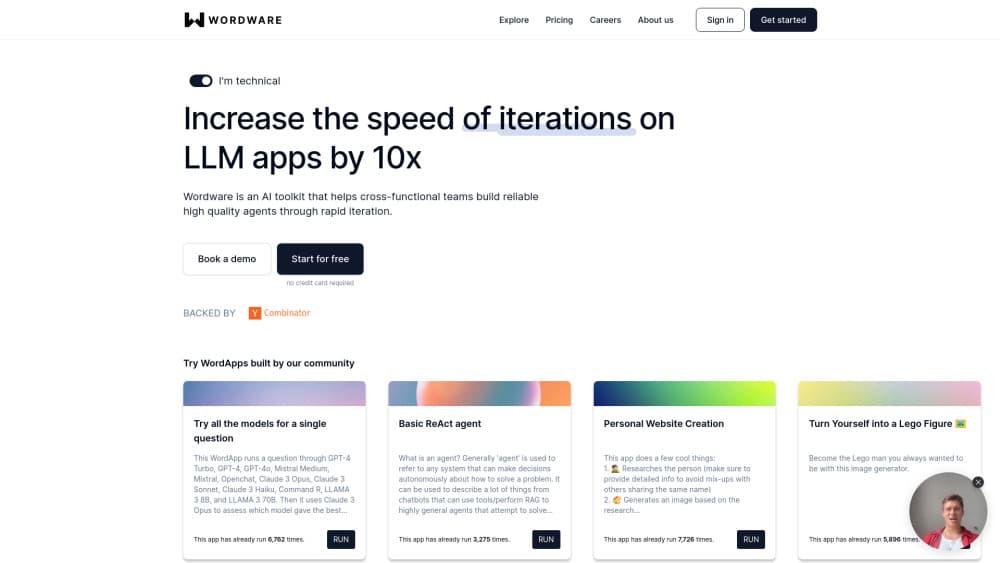
Wordware is a browser-based AI agent IDE from a San Francisco company that started in 2023. The working idea is simple: natural language prompts are the program. You type instructions in the editor, press run, and the flow executes step by step. Branching, loops, and model calls sit in the same document as the instructions themselves, so the file you read is the file that runs.
The product targets people who have a clear task but not a clear codebase. A support triage agent, a research summarizer, a lead qualifier: each is a flow of prompts and conditions you can build in an afternoon, then share with a teammate or expose as an endpoint. Wordware reports that it went through Y Combinator, raised a $30M seed round, and had the top Product Hunt launch of all time, which explains why so many templates and tutorials exist for it.
Two things set the limits. The platform is prompt-first, so heavy custom code and fine-grained infrastructure control aren't the point. And the company's public site now leads with a different product, Sauna, an AI assistant built around what Wordware calls compounding context. The agent builder and its documentation remain online, but the company's center of gravity has shifted, which matters if you're evaluating it for a long production commitment.
Getting Started
- Create an account at wordware.ai and open a new project from the dashboard, or start from one of the published templates.
- Write your first flow. Type text directly into the editor, and type
/to insert a node such as a generation, an if-else branch, or a loop. - Define inputs. Name the values the flow needs at run time, like a customer message or a document, then reference them in your prompts and conditions.
- Run the flow with
Ctrl+Ror the Run button, watch each step produce output, and edit the prompt where the result drifts. - Deploy. Publish the flow as a WordApp with a shareable interface, or call it through an API endpoint from your own app.
Product Information
A quick look at Wordware's pricing, supported platforms, and performance.
Best for
The users, tasks, and scenarios where this tool fits best.
Users
- Product teams without a dedicated ML engineer
- Prompt specialists and AI operations staff
- Consultants and small agencies
Tasks
- Turning a prompt you already trust into a repeatable workflow
- Prototyping an agent with real branching
- Shipping an agent behind an API
- Comparing models on the same task
Scenarios
- A support team needs a triage assistant this week and has no engineering capacity
- A sales team wants consistent research briefs before calls
- An agency is scoping an AI feature for a client
Key features
Prompt-First Editor
The editor is the product. Anything you type is a prompt, and the AI on any generation node can see everything above it in the flow. That "what you see is what you get" design removes the usual split between the instructions in a doc and the code that runs them. You edit the text, press run, and the change takes effect immediately.
Flows as Documentation and Program
A flow holds the whole project: prompts, inputs, logic, and notes in one scrollable document. Small projects fit in a single flow, and larger ones split into several that can call each other. Because the flow is readable top to bottom, a new teammate can follow the reasoning without a separate spec. That is the part most AI workflow builder tools miss.
Logic Nodes for Branching and Loops
Generations are only one node type. If-else nodes route work down different paths, loop nodes repeat a branch over a list, and comment nodes stay hidden from the model and from the deployed app. You add them by typing / and the node name, which keeps the writing flow intact. For anyone doing serious prompt engineering, this is where the control lives.
Deployment as WordApp or API
A finished flow can be published as a WordApp, a hosted interface where someone fills in inputs and reads the result without seeing the editor. It can also be exposed as an API endpoint, so your own application can deploy AI agents into a product without rebuilding the logic. Both routes keep a single source of truth for the prompt.
Model Choice and Side-by-Side Iteration
Generation nodes let you pick from several hosted models instead of locking you to one vendor. You can run the same flow twice with different models and compare the outputs on real inputs, which is more useful than a leaderboard when your task is narrow. Cost per run also becomes visible, so model choice turns into a budget decision rather than a guess.
Templates, Recipes, and Collaboration
The documentation ships a library of recipes for common jobs, and the team publishes templates you can open and adapt. Flows can be shared with collaborators, so a prompt change gets reviewed like any other edit instead of living in someone's notes. If you're weighing Wordware pricing against a stack of separate tools, that shared workspace is a large part of what you're paying for.
Pros and cons
Pros
- The editor reads like a document, so non-engineers can follow and change an agent without learning a framework.
- Logic nodes cover branching and repetition, which puts it well past a single-prompt playground.
- Deploying to a WordApp or an API endpoint takes minutes, and the deployed version stays tied to the flow you edited.
- Model swapping on a generation node makes quality comparisons cheap and concrete.
- The free tier includes monthly credits, so a small team can validate one real use case before paying.
Cons
- Pricing jumps sharply after the free tier. The Builder plan at $199/mo is a real commitment for an individual, and the $899/mo Company tier puts team features out of reach for small shops.
- Prompt-first also means prompt-bound. Complex state handling or custom integrations run into the ceiling quickly, and you'll need code outside the platform.
- The company's public focus has moved to Sauna, so anyone planning a multi-year dependency should ask about the roadmap for the builder before committing.
- Node-based debugging gets awkward on large flows. Tracing which branch produced a bad output takes patience once a flow passes a few dozen steps.
Frequently asked questions
Wordware builds AI agents and workflows from written prompts. You describe the steps, add inputs and logic nodes, run the flow to test it, then publish it as a shareable app or an API endpoint. It suits tasks that need a repeatable process rather than a one-off chat.
Related content
Explore related tools, skills, and articles for Wordware.
Wordware Alternatives

Base Code
Base44 (Wix) · Coding · ProductivityBase Code is a shared cloud development environment from Base44. Teammates describe changes to an existing GitHub codebase in chat, preview them live and send them back as pull requests.

Google EmbeddingGemma 2
Google DeepMind · Writing · Image · CodingGoogle EmbeddingGemma 2 is a 740M-parameter open model that turns text, code, images, audio, and video frames into vectors in one 768-dimension space, running on phones and laptops.

GitGlow
GitGlow · Coding · ProductivityGitGlow is a local-first desktop Git client that lets independent developers review their own code and their AI agents' changes in one place before shipping.