

WP.Chat
Potent Pages · Coding · Leaning · Chatbot
WP.Chat is a free WordPress chatbot plugin that turns your existing site content into an AI assistant answering visitor questions.
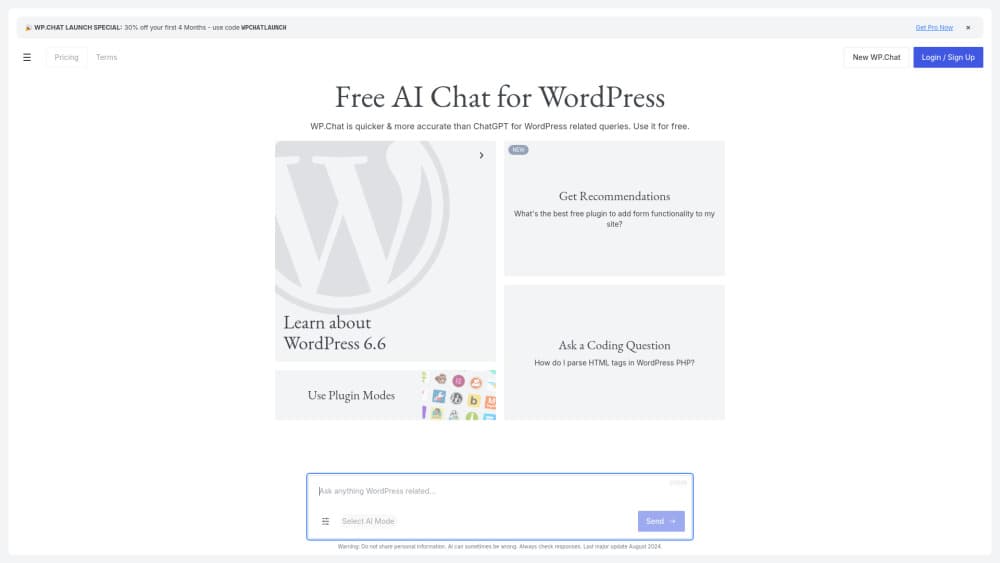
About WP.Chat
What Is WP.Chat
WP.Chat is a WordPress plugin that adds an AI chatbot to your site. Instead of relying on a generic model trained on the open web, it searches your own posts, pages, and configured context, then hands the most relevant excerpts to OpenAI to build an answer. The pitch is simple. Your visitors get replies grounded in what's actually on your site.
The plugin is built by Potent Pages, a software and data systems company that has made web applications, crawlers, and automation tools since 2014. WP.Chat runs on GPT-4o-mini, which keeps API costs low, and you supply your own OpenAI API key so billing goes straight to your OpenAI account. There's no monthly subscription for the plugin itself.
The catch is that setup isn't fully plug-and-play. You need a WordPress site, an OpenAI account with an API key, and the willingness to fund your own API usage. If you're not comfortable managing an API key or watching token costs, this one takes some hands-on work. Conversations and usage data stay stored locally in your WordPress database, which is a real plus for privacy-minded site owners who'd rather keep a third party away from their visitor chats.
Getting Started
- Download the WP.Chat plugin ZIP file from the official site.
- In your WordPress dashboard, go to Plugins, choose Add New, and upload the ZIP to install it.
- Activate the plugin, then open its settings page.
- Paste in your OpenAI API key and pick the model options you want.
- Set the welcome message, colors, and rate limits, then save and test the chat widget on your site.
Product Information
A quick look at WP.Chat's pricing, supported platforms, and performance.
Best for
The users, tasks, and scenarios where this tool fits best.
Users
- WordPress site owners
- Small business owners
- Bloggers and content publishers
Tasks
- Answering FAQs as a customer support chatbot
- Helping visitors navigate a large content library
- Reducing repetitive support emails
Scenarios
- A documentation site where readers struggle to find the right page
- A WooCommerce store fielding the same shipping and return questions daily
- A small agency site that wants to look responsive without staffing a chat desk around the clock.
Key features
Content-Grounded Answers
The core idea behind WP.Chat is that replies come from your site, not the open internet. The plugin indexes your WordPress posts, pages, and any extra business context you add, then sends the most relevant excerpts to OpenAI as prompt context. Think of it as semantic search for WordPress wired straight into a chat box. That means a visitor asking about your return policy gets your return policy, not a guess. No guesswork. It's the difference between a generic chatbot and one that actually knows your business.
Bring Your Own OpenAI Key
You connect the plugin to OpenAI with your own API key, and OpenAI bills you directly. One bill. No markup. WP.Chat doesn't resell usage or bolt on a second subscription. For site owners already paying for OpenAI, this keeps things clean: no reseller in the middle, full visibility into what each request costs, and a single bill you can reconcile against your own usage dashboard at any time. Just keep an eye on consumption, since GPT-4o-mini is cheap but not free.
Cost-Effective GPT-4o-mini Responses
The plugin uses OpenAI's GPT-4o-mini, a smaller model built for fast, low-cost responses. That's the GPT-4o-mini chatbot most site owners run here. For FAQ-style questions and content lookup, it does the job without the price tag of a flagship model. If you're running a high-traffic site, that cost gap matters a lot over a month. The trade-off is that mini models can stumble on complex, multi-step reasoning, so keep expectations realistic.
Built-In Rate Limiting
You can set per-IP request limits by minute and by hour. That discourages abuse, keeps access fair when traffic spikes, and stops one bad actor from draining your OpenAI balance. Rate-limit identifiers stay local to your site. Simple stuff. But it's an effective guardrail for anyone worried about runaway API costs.
Customizable Presentation
You control the welcome message, title, color scheme, transition timing, and whether the chat opens automatically. You can also add extra business context so the bot understands things your pages don't spell out. Small touches. But they're what make the widget feel like part of your site instead of a bolted-on third-party box.
Local Data Storage
Conversations and usage data are stored in your own WordPress database, not on Potent Pages servers. The plugin ships no third-party analytics, telemetry, or advertising pixels. So who holds your visitor conversations? You do. If data residency matters, or you just don't want another vendor sitting on that data, this design is worth noting.
Pros and cons
Pros
- Free plugin with no monthly subscription, so the only cost is your own OpenAI usage.
- Answers are grounded in your actual site content, which cuts down on made-up responses.
- Conversations and usage data stay local in your WordPress database.
- Configurable rate limits help keep API costs predictable.
- Presentation controls let the widget match your branding.
Cons
- Requires an OpenAI API key and an account, so it's not a true zero-setup install.
- You pay OpenAI directly for usage, which means bills can climb on high-traffic sites.
- GPT-4o-mini handles simple Q&A well but can struggle with complex, multi-step questions.
- No public API for developers who want to build on top of the plugin.
Frequently asked questions
The plugin itself is free to download, install, and run. There's no monthly WP.Chat subscription. You do pay OpenAI separately for API usage through your own account, and that cost scales with how much traffic your chatbot handles across a busy month.
Related content
Explore related tools, skills, and articles for WP.Chat.
WP.Chat Alternatives

Base Code
Base44 (Wix) · Coding · ProductivityBase Code is a shared cloud development environment from Base44. Teammates describe changes to an existing GitHub codebase in chat, preview them live and send them back as pull requests.

Google EmbeddingGemma 2
Google DeepMind · Writing · Image · CodingGoogle EmbeddingGemma 2 is a 740M-parameter open model that turns text, code, images, audio, and video frames into vectors in one 768-dimension space, running on phones and laptops.

GitGlow
GitGlow · Coding · ProductivityGitGlow is a local-first desktop Git client that lets independent developers review their own code and their AI agents' changes in one place before shipping.