

WrapFast
Juanjo Valiño · Coding
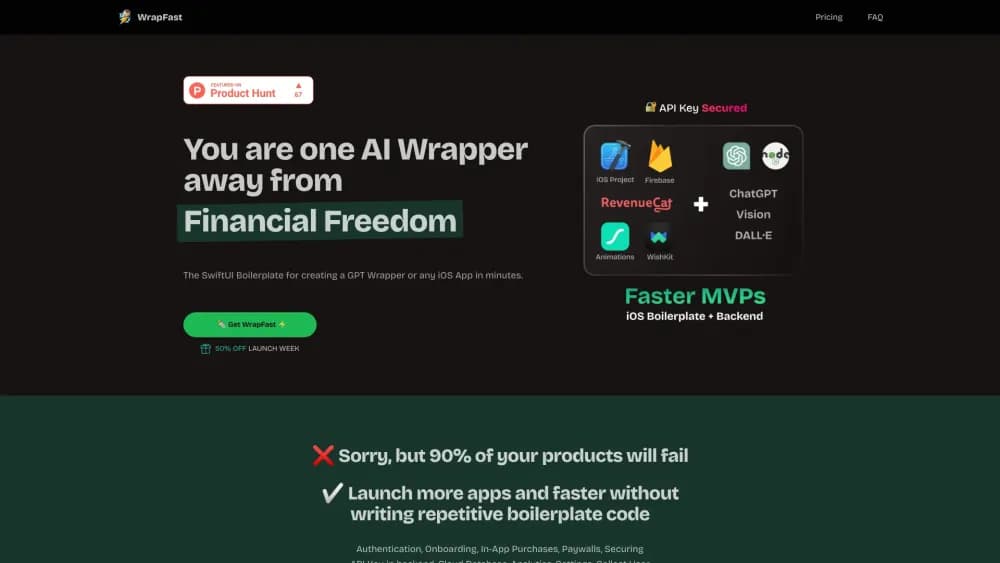
WrapFast is a SwiftUI boilerplate for AI wrapper apps and other iOS products. It bundles auth, paywalls, in-app purchases and a Node.js AI backend, so small teams ship in days.
About WrapFast
What Is WrapFast
WrapFast is a paid starter kit for iOS developers who want to ship an app without rebuilding the same scaffolding every time. You get an Xcode project written in SwiftUI, a backend that hides your AI provider keys, and the screens every subscription app needs: onboarding, login, paywall, settings, feedback.
The product was built by Juanjo Valiño and launched in 2024. Its pitch is narrow and useful: the slow part of an AI wrapper is rarely the AI call itself. It's the account system, the paywall, the receipt handling, the privacy policy screens, and the server that keeps your OpenAI key out of the app binary. WrapFast packages that work once, and you reskin it for each app.
The tradeoff is that you're buying code, not a service. There's no hosted dashboard that keeps your app updated, no Android build, and no refund once the repositories are handed over. If you plan to write everything in UIKit or you need cross-platform, this isn't the shortcut you're looking for.
Getting Started
- Buy a license on the official site and accept the GitHub invitation to the iOS and backend repositories.
- Open the Xcode project, set your bundle identifier, app name, colors and fonts.
- Deploy the Node.js backend to your own host, then add your OpenAI or Anthropic key as an environment variable.
- Point the app at your backend URL and test the chat, image and vision flows on a device.
- Replace the sample screens with your own product idea, connect your App Store products, and submit.
Product Information
A quick look at WrapFast's pricing, supported platforms, and performance.
Best for
The users, tasks, and scenarios where this tool fits best.
Users
- Indie iOS developers
- Founders without an engineering team
- Designers who code a little
Tasks
- Shipping an AI chat or image app
- Adding subscriptions to an existing idea
- Prototyping for a client
Scenarios
- A weekend MVP you want in front of real users
- A first App Store launch
- Rebuilding the same app for a second niche
Key features
AI Wrapper Setup in Minutes
The kit connects a SwiftUI client to a backend that calls OpenAI models for chat, image generation and image understanding, plus Anthropic's Claude. Because the requests pass through your server, the API key never ships inside the app. You can swap providers by editing one file on the backend.
Authentication and Onboarding
Sign in with Apple, Google and email are wired, along with the onboarding carousel most subscription apps use to explain value before the paywall. Account state persists across launches, so testers don't get logged out between builds. Adding a new onboarding page means dropping in a view, not rebuilding the flow.
Paywalls and In-App Purchases
Subscription and one-time purchase screens are included, with restore purchases, loading states and error handling already written. That matters because a missing restore button is a common App Store rejection. You connect your own product identifiers, set prices in App Store Connect, and the screens pick them up.
Secure Node.js Backend
The backend is Express on Node.js and deploys to any host that runs Node, including Firebase and a small VPS. It exposes endpoints for chat, image generation, vision and Claude, and handles rate limiting so one user can't burn through your credit. For an AI wrapper, this is the piece that saves the most debugging time.
Firebase Database and User Records
User profiles, subscription status and app settings live in Firebase, so you don't design a schema on day one. The template reads and writes the records the app already needs, which means analytics on sign-ups and retention work without extra setup.
Rebrandable Design System
Colors, fonts and spacing sit in one place, so a full visual change is a morning of work rather than a rewrite. Dark mode is handled. The catch is that the default look is generic by design, and reviewers can tell a reskinned template from a designed app, so budget time for a distinct icon and a few custom screens.
Documentation and Lifetime Updates
Buyers get written docs, step-by-step tutorials and access to a Discord community, plus updates to the repositories for as long as the project is maintained. The code is also friendly to AI coding assistants, and the vendor notes that Cursor works well with it, which shortens the learning curve for developers new to the codebase.
Pros and cons
Pros
- Native SwiftUI with an MVVM structure, so the code reads like an iOS project rather than a web wrapper.
- The AI backend is included, which solves key security and rate limiting in one step.
- Onboarding, auth, paywall and restore flows are already done, and those are the tasks that usually delay a launch.
- One-time payment with lifetime repository access, docs and community support instead of another subscription.
- A meaningful track record: the vendor cites more than 30 apps published with the kit.
Cons
- It costs $199 or more up front and there are no refunds once repository access is granted, so a wrong fit is an expensive mistake.
- iOS only. If Android is on your roadmap, you'll maintain a second codebase.
- You still need working knowledge of SwiftUI and Xcode 15 to change anything beyond colors and copy.
- The official site returned a not found error when we checked in October 2026, so confirm the product is still on sale before paying.
Frequently asked questions
It's a one-time purchase, listed at $199 for the iOS project and around $249 for the full package with the AI backend. There's no subscription and no free tier, and refunds stop once you get repository access.
Related content
Explore related tools, skills, and articles for WrapFast.
WrapFast Alternatives

Base Code
Base44 (Wix) · Coding · ProductivityBase Code is a shared cloud development environment from Base44. Teammates describe changes to an existing GitHub codebase in chat, preview them live and send them back as pull requests.

Google EmbeddingGemma 2
Google DeepMind · Writing · Image · CodingGoogle EmbeddingGemma 2 is a 740M-parameter open model that turns text, code, images, audio, and video frames into vectors in one 768-dimension space, running on phones and laptops.

GitGlow
GitGlow · Coding · ProductivityGitGlow is a local-first desktop Git client that lets independent developers review their own code and their AI agents' changes in one place before shipping.