

WriCo
Otourou Da Costa · Writing
WriCo, also called Writer Copilot, is a story planner and optional AI writing assistant for iPhone, iPad and Mac that keeps characters, plots and scenes connected in one workspace.
About WriCo
What Is WriCo
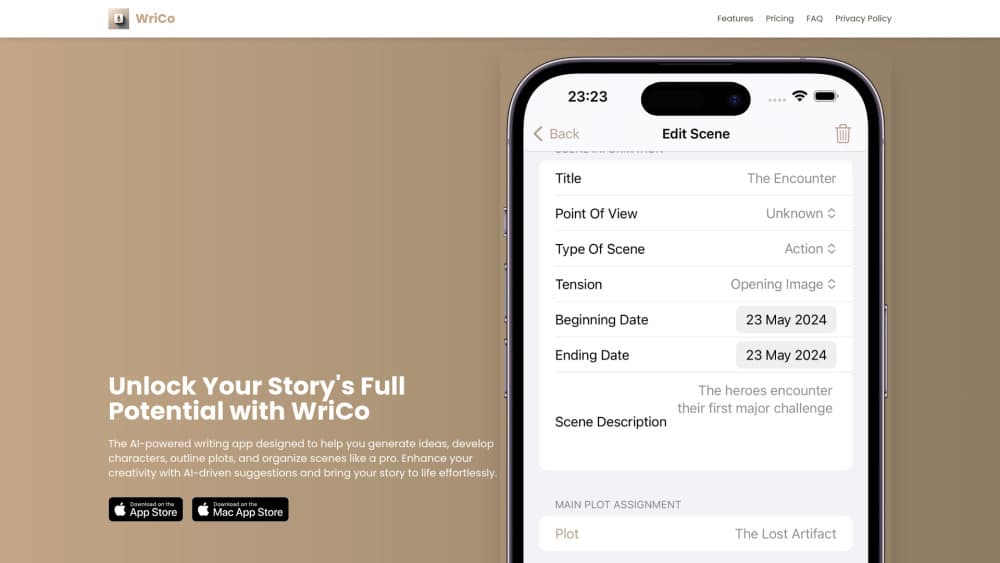
WriCo is a native story planner and novel planning app for iPhone, iPad and Mac, built for novelists, screenwriters and narrative designers. It puts characters, locations, story objects, plots, episodes, scenes, notes and timelines in one workspace, so a long project stops living in a dozen scattered files.
The draw is a screenplay outline or manuscript plan that bends to your method. You can outline everything up front or discover the story as you draft, and WriCo doesn't force either one. Want a full outline before you write page one? Fine. Prefer to chase the plot and let the structure catch up later? That works too.
A few limits are worth knowing before you install. WriCo runs on iPhone, iPad and Mac only, so Windows and Android users are left out for now. The core workspace is free, but advanced AI writing, coherence analysis and image generation sit behind subscriptions and credit packs. It also won't write the story for you, which is the point.
Getting Started
- Download WriCo free from the App Store and open a new project.
- Add the people, places, objects, notes and rules that give your narrative its shape.
- Link plots to acts, episodes and scenes, then drag them into whatever order the story needs.
- Invite AI help when you want it: generate imagery, summarize an episode or run a coherence check.
- Review relationships, timeline and pacing, then export a shareable PDF project bible.
Product Information
A quick look at WriCo's pricing, supported platforms, and performance.
Best for
The users, tasks, and scenarios where this tool fits best.
Users
- Novelists
- Screenwriters
- Narrative designers
- Writing groups
Tasks
- Planning a novel outline
- Mapping character relationships
- Running a coherence check
- Tracking continuity across a series
- Exporting a project bible
Scenarios
- A messy first draft
- A revision pass at the midpoint
- A pitch meeting
Key features
Story Workspace
WriCo keeps projects, plots, episodes, scenes, characters, locations, story objects and notes connected in one native workspace. You build the system your story needs rather than filling in someone else's template. Private projects stay local and can sync across your Apple devices through iCloud.
Character Relationship Mapping
WriCo shows character relationships as a visual network, not another flat list. You see who connects to whom and how, which helps when a large cast starts to blur together. Grouping characters, places and objects keeps a busy project organized as it grows.
AI-Assisted Coherence Analysis
Run a check and WriCo surfaces observations about narrative promises, missing payoffs, character-arc issues, timeline anomalies, world-state inconsistencies, knowledge gaps and unresolved threads. You review them in a dedicated inbox and get a notification when a new report is ready. The suggestions stay suggestions, so the editorial call remains yours.
Character and Location Imagery
Optional AI image tools generate character and location visuals, with credits sold in packs. The feature is meant to give you a concrete face for a place or a person while you plan, not to replace the image in your own head. Image credits are a separate purchase from the text subscriptions.
Ask Your Story
Ask Your Story answers questions using your project's scenes, characters, timeline and narrative state, and it backs each answer with passages from your story. Instead of scrolling through notes to check a detail, you ask and get a grounded reply. It's the AI feature that stays closest to your own material.
Import and Structure
WriCo imports existing projects and screenplays from PDF, DOCX, TXT, Markdown, RTF, Fountain and Final Draft, then shows you the extracted scenes, characters, locations, plots, relationships and timeline data before you apply anything. That review step matters because an import you can't edit is worse than no import.
Timelines, Stakes and Storyboards
Timelines, scene statistics, stakes analysis and story-object tracking help you spot gaps, pacing shifts and unresolved setup. Storyboards let you plan visual beats, shots, composition and timing for novels, scripts and game narratives that benefit from a visual pass. A branching feature lets you draft an alternate outline without touching the main one.
Pros and cons
Pros
- The core workspace is free to download, so you can test whether the structure fits before paying for anything.
- Relationship mapping, timelines and coherence analysis give you several ways to catch continuity problems early.
- Import supports PDF, DOCX, Fountain, Final Draft and more, with a review step before extracted data is applied.
- Private projects sync across iPhone, iPad and Mac through iCloud, so a project follows you between devices.
Cons
- It's Apple-only. There's no Windows, Android or web app yet, so the Android version is still in early access.
- Advanced AI writing, coherence analysis and image generation need subscriptions and credit packs, and the core free tier is limited.
- The AI assists rather than writes, so anyone hoping for a draft generator will need a different tool.
- Some in-app purchases have drawn refund complaints in App Store reviews, which is worth checking before you buy credits.
Frequently asked questions
WriCo is used for planning long-form stories. It keeps characters, plots, scenes, locations, notes and timelines in one workspace so novelists, screenwriters and narrative designers can organize a project and check its continuity.
Related content
Explore related tools, skills, and articles for WriCo.
WriCo Alternatives

Google EmbeddingGemma 2
Google DeepMind · Writing · Image · CodingGoogle EmbeddingGemma 2 is a 740M-parameter open model that turns text, code, images, audio, and video frames into vectors in one 768-dimension space, running on phones and laptops.

MePersona
MePersona, Inc. · Writing · Productivity · MarketingMePersona is an AI unified inbox for creators. It learns your voice, drafts replies to fan messages from 12 platforms, and sends only what you approve.

Fluence
Yay Software (Yannick Huchard) · Writing · Voice & Language · ProductivityFluence is an Android app that reads PDFs, EPUBs, Word files and web articles aloud, follows each sentence as it speaks, and answers questions about the text on the phone itself.