

WriteHuman AI Humanizer
WriteHuman · Writing · AI Detection
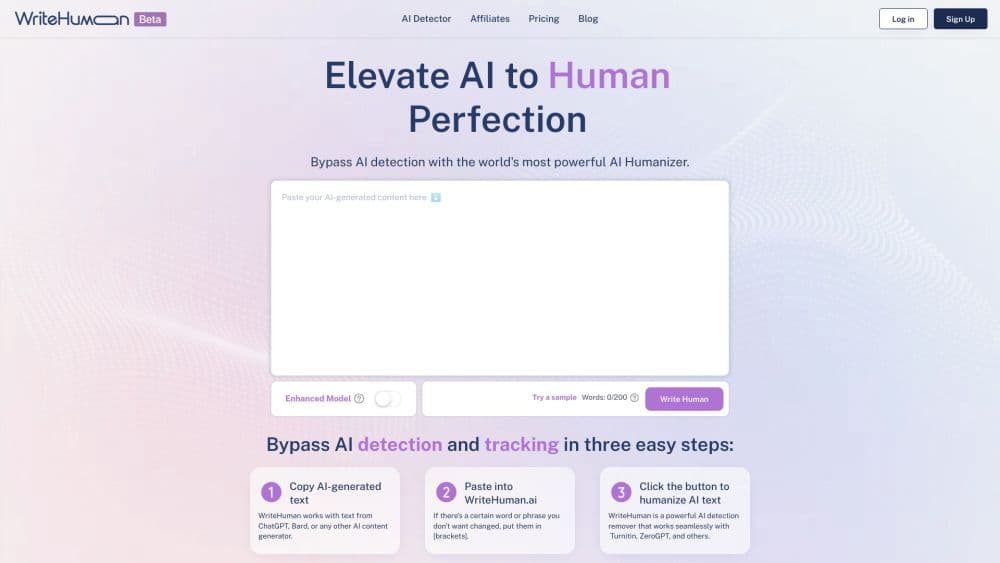
WriteHuman is an AI humanizer that rewrites text from ChatGPT, Claude, and other models into natural sounding prose, with a built in AI detector to check the result.
About WriteHuman AI Humanizer
What Is WriteHuman
WriteHuman is a web based AI humanizer that takes machine drafted text and rewrites it so it reads like a person wrote it. You paste AI output from ChatGPT, Claude, Gemini, or any other large language model, and the tool restructures the prose, varies sentence length, and swaps out predictable phrasing while keeping your original meaning. It sits alongside a built in AI detector, so you can check a draft against the same tools your readers use before you publish.
The problem it targets is a familiar one. Language models tend to pick the safest next word at every step, which leaves a fingerprint: predictable phrasing, sentences clustered around the same length, and transitions that always land in the same place. WriteHuman reshapes those patterns specifically. Rather than swapping a handful of synonyms, it rebuilds how sentences flow, mixing short declarative lines with longer ones to break the flat rhythm most machine drafts share.
The limits are worth knowing up front. WriteHuman is a rewriter, not a content generator, so it can't invent ideas, sources, or arguments that were not in your input. It doesn't remove plagiarism, and it can't promise that every AI detector will pass a given draft. The free plan is capped at a few requests each month and a low word ceiling per run, so anyone who writes at volume will need a paid plan.
Getting Started
- Open writehuman.ai in a browser, or install the Chrome extension or mobile app if you want to work outside the tab.
- Create an account, since the humanizer and detector both run against a logged in session and a monthly request balance.
- Paste your AI generated text into the input box and pick an output variation if your plan allows more than one.
- Run the humanizer, then send the result through the built in AI detector to see how it scores before you share it.
- Copy the humanized text into your editor, or call the same engine through the developer API if you are building a product.
Product Information
A quick look at WriteHuman AI Humanizer's pricing, supported platforms, and performance.
Best for
The users, tasks, and scenarios where this tool fits best.
Users
- Marketers and SEO writers
- Founders and product teams
- Bloggers and creators
- Students and job seekers
Tasks
- Humanizing AI drafts
- Pre publish detection checks
- Rewriting marketing and web copy
- Translation aware rewriting
- Batch workflows through the API
Scenarios
- A content team publishing a daily blog
- A solo founder launching a product page
- A writer working across devices
Key features
AI Humanizer Engine
The core of WriteHuman is its rewriter, which takes machine drafted text and rebuilds it so the cadence, word choice, and structure read like a human draft. It targets the patterns every major model leaves behind, from template phrases to uniform sentence length, and adjusts them together. The point is not to swap a few words but to change how the prose moves.
Built In AI Detector
Every plan includes an AI detector that scores your text the way your audience's tools would. You run a draft through it and see whether it reads as AI, then revise before you publish or submit. Pairing the checker with the rewriter means you can catch a weak result before someone else does, instead of finding out after a rejection.
Multiple Output Variations
Depending on your plan, the tool returns two, three, or five different versions of the same rewrite. You pick the one that reads best rather than accepting a single result. That matters when a turn of phrase lands awkwardly and you want a natural alternative without running the whole thing again.
Word Limits That Scale With Plan
Each run has a word ceiling: 250 words on the free plan, up to 600 on Basic, 1,200 on Pro, and 3,000 on Ultra. The limits map to how much you write, so a short email fits the free tier while a full article needs Pro or above. Hitting the ceiling means splitting a long document into parts.
Chrome Extension and Mobile Apps
The humanizer runs in the browser, but WriteHuman also ships a Chrome extension and iOS and Android apps. One account covers all of them, so you can humanize text inside a doc, on a phone, or in the web tab without switching tools. For writers who move between devices, that removes the copy and paste shuffle.
Developer API
WriteHuman exposes the same engine behind its product as a single REST endpoint, with word based pricing, support for 40+ languages, and code samples in JavaScript, Python, and cURL. A support team can wire humanization into a publishing pipeline, and the average response lands in about 20 seconds per request. This is what makes the tool usable beyond a single writer at a keyboard.
Pros and cons
Pros
- The rewriter restructures prose instead of swapping synonyms, so the output keeps your meaning while fixing the flat rhythm of machine drafts.
- A built in AI detector lets you check a draft before publishing, on the same plans you already pay for.
- Chrome extension plus iOS and Android apps mean the same account works wherever you write, not just in a browser tab.
- A REST API with word based pricing lets teams humanize content at scale instead of one document at a time.
- The free plan and low entry price make it easy to test the humanizer before committing to a subscription.
Cons
- The free plan is tight, at three requests and 250 words per run each month, so heavy writers outgrow it fast.
- Word ceilings per request mean long documents have to be split into chunks, which adds manual steps.
- No humanizer can guarantee a pass on every detector, so you still need to review and edit the output yourself.
- The tool rewrites what you give it, so it can't fix weak arguments or missing facts in the original draft.
Frequently asked questions
WriteHuman is an AI humanizer that rewrites machine generated text into prose that reads like a person wrote it. It restructures sentences, varies their length, and replaces template phrasing while keeping your original meaning, and it adds a built in AI detector so you can check the result.
Related content
Explore related tools, skills, and articles for WriteHuman AI Humanizer.
WriteHuman AI Humanizer Alternatives

Google EmbeddingGemma 2
Google DeepMind · Writing · Image · CodingGoogle EmbeddingGemma 2 is a 740M-parameter open model that turns text, code, images, audio, and video frames into vectors in one 768-dimension space, running on phones and laptops.

MePersona
MePersona, Inc. · Writing · Productivity · MarketingMePersona is an AI unified inbox for creators. It learns your voice, drafts replies to fan messages from 12 platforms, and sends only what you approve.

Fluence
Yay Software (Yannick Huchard) · Writing · Voice & Language · ProductivityFluence is an Android app that reads PDFs, EPUBs, Word files and web articles aloud, follows each sentence as it speaks, and answers questions about the text on the phone itself.