

WriteMail.ai
WriteMail.ai (Futuristica) · Writing · Productivity
WriteMail.ai is an AI email writer that turns a few key points into a complete message, with controls for tone, length and language, plus a Chrome extension for Gmail.
About WriteMail.ai
What Is WriteMail.ai
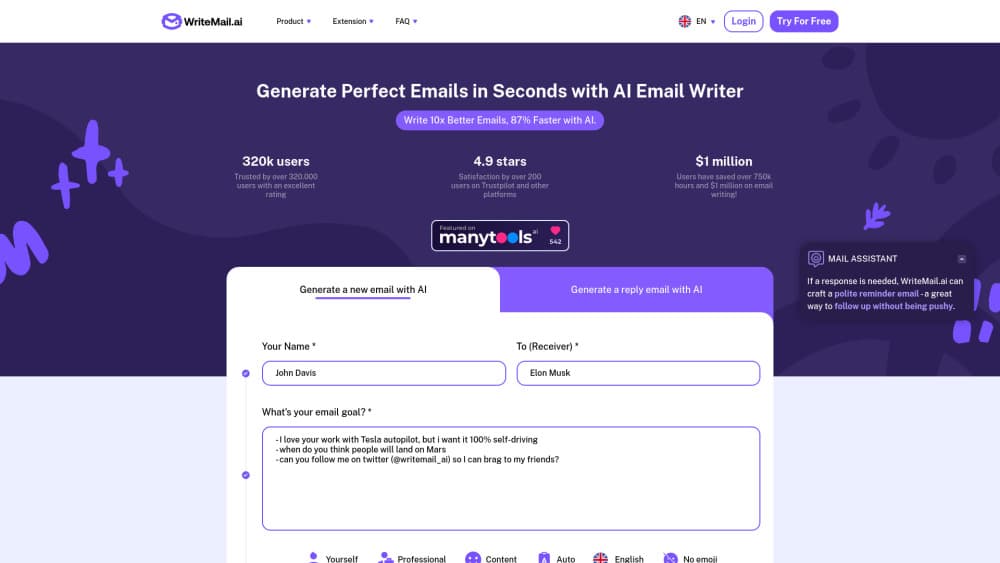
WriteMail.ai is a browser based email writing tool from Futuristica, the studio founded by Uros Gazvoda. You type the recipient, the reason for writing and a handful of bullet points. The AI email generator returns a finished draft with a greeting, a body and a sign off you can edit before sending.
The product exists for one narrow problem. Most people know what they want to say in an email, and still lose twenty minutes to phrasing it. WriteMail.ai takes the blank page out of that loop. It's aimed at sales reps, recruiters, freelancers and managers who write similar messages all day and want a head start rather than a lecture on grammar.
The limits are worth knowing up front. Output quality tracks the quality of your input, so a vague prompt gives a vague email. The tool doesn't read your inbox and doesn't send anything on its own. It hands the draft to your default mail client. The free plan also caps you at 5 AI emails a month, which runs out fast if you write for a living.
Getting Started
- Create an account at app.writemail.ai with an email address or a Google login. No card is required for the free plan.
- Choose Compose or Reply, then fill in the sender name, the recipient and a short purpose line.
- Paste your key points in any language and set tone, mood, length and output language. The emoji switch is on the same panel.
- Generate the draft, edit it in the built in editor, then copy it or press Send Email to open it in your default client. Install the Chrome extension if you want the same panel inside Gmail.
Where the Drafts Come From
WriteMail.ai runs on large language models tuned for email. The site credits a set of underlying models and lets paid users switch between them, which is why two people can get noticeably different drafts from the same prompt. The AI email assistant panel offers suggestions on a draft you already wrote, so the tool works as an editor as well as a first draft machine.
Privacy gets a plain treatment here. The company says generated messages never touch its servers, and that your saved preferences sit in a browser cookie rather than a database. Account history for reuse is a paid feature, and it stays tied to your login.
Product Information
A quick look at WriteMail.ai's pricing, supported platforms, and performance.
Best for
The users, tasks, and scenarios where this tool fits best.
Users
- Sales and business development reps
- Recruiters and hiring managers
- Freelancers and small agency owners
- Non native English speakers
Tasks
- Writing a cold email from scratch
- Replying to a long thread
- Rewriting an email that reads too blunt
Scenarios
- Clearing a backlog after a week off
- Writing to someone in another market
- Sending the same update to twenty people
Key features
Key Points to Full Email
The core flow is short. You give WriteMail.ai a purpose line and a few bullet points, and it builds the greeting, the paragraphs and the closing. Points can be messy notes in any language, which suits people who draft on a phone between meetings. The draft is a starting point, not a locked document, so edits happen in the same window.
Tone, Mood and Length Controls
Three dials do most of the work. Tone covers professional, casual and humorous registers. Mood pushes the same content toward confident, apologetic or friendly. Length runs from very short to long. A Write As option adds famous styles for brainstorming, useful when you want a different angle and not a permanent voice.
Reply with AI
Paste a message you received and WriteMail.ai writes the answer. It reads the ask, keeps the thread's subject matter and returns a response you can trim. This is the feature that saves the most time on support queues, because the incoming text already carries the context an AI email writer needs.
30+ Languages, One Click
The multilingual email writer covers more than 30 languages, with automatic detection of your input and a manual override for the output. That combination matters for cross border teams. You can write notes in Spanish, set the output to English, and skip the separate translation tool that usually sits between the two steps.
Gmail Extension and One-Click Send
The Chrome extension puts the same generator inside Gmail, so replies get drafted without a tab switch. Outside Gmail, the Send Email button opens your default client with the content pre filled. WriteMail.ai never sends on your behalf, which keeps your credentials and your sent folder in the app you already trust.
Templates, History and Signatures
The email writing tool ships with quick response templates and a library of common formats, from follow ups to apology notes. Paid accounts keep a history you can search and reuse, plus a signature creator. That turns the product from a one off generator into something closer to a personal library of messages.
Pros and cons
Pros
- Fast first drafts: most messages come back in a few seconds, and the structure is usable without heavy editing.
- Language range: more than 30 output languages with a manual override beats most email tools that assume English.
- Privacy stance: the company states messages aren't stored on its servers, which is a real concern for people emailing client details.
- Gmail extension: drafting inside the inbox removes the copy and paste step that kills most AI writing workflows.
- Clear pricing: four tiers from free to Pro, with annual billing at roughly 20 percent less.
Cons
- The free plan allows only 5 AI emails a month, so it works as a trial rather than a working tool.
- Long or highly technical threads come back generic, and you'll rewrite the middle paragraphs yourself.
- There's no inbox reading, no scheduling and no CRM connection, so it stays a writing layer rather than an email manager.
- No public API, so teams that want to build email generation into their own product can't.
Frequently asked questions
Yes, there's a free plan with 5 AI emails a month. Paid plans start at $6.95 a month, or $5 a month on annual billing, and the Pro plan at $19.95 a month allows 500 emails.
Related content
Explore related tools, skills, and articles for WriteMail.ai.
WriteMail.ai Alternatives

Google EmbeddingGemma 2
Google DeepMind · Writing · Image · CodingGoogle EmbeddingGemma 2 is a 740M-parameter open model that turns text, code, images, audio, and video frames into vectors in one 768-dimension space, running on phones and laptops.

MePersona
MePersona, Inc. · Writing · Productivity · MarketingMePersona is an AI unified inbox for creators. It learns your voice, drafts replies to fan messages from 12 platforms, and sends only what you approve.

Fluence
Yay Software (Yannick Huchard) · Writing · Voice & Language · ProductivityFluence is an Android app that reads PDFs, EPUBs, Word files and web articles aloud, follows each sentence as it speaks, and answers questions about the text on the phone itself.