

Writers-Copilot
Sage Wang · Writing
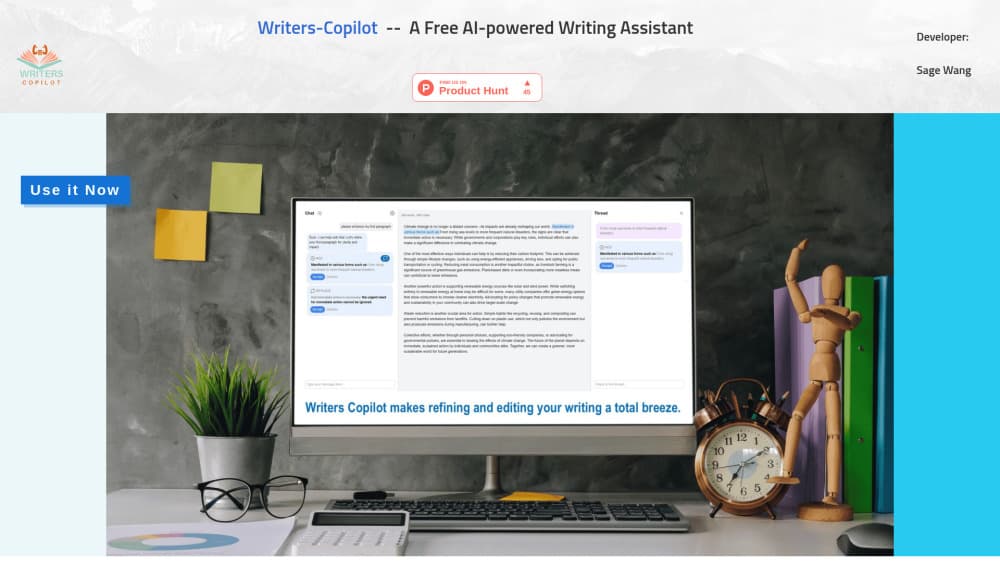
Writers-Copilot is a free AI writing assistant by Sage Wang that runs in your browser, pastes your draft into a chat workspace, and suggests edits you can preview, accept or reject one by one.
About Writers-Copilot
What Is Writers-Copilot
Writers-Copilot is a browser-based AI writing tool built by Sage Wang. It looks at your draft, points out what could read better, and offers line-level changes you review before anything touches your text. There's no software to install and no account to create. You open the page, paste your writing, and start asking for feedback.
The core idea is control. Most AI writers hand you a rewritten paragraph and leave you to sort out what changed. Writers-Copilot takes the opposite route. Every suggestion sits in a light blue highlight, so you hover to preview it, then keep it or bin it. You stay the editor.
It won't suit everyone. It's a focused tool to edit and revise text rather than a full drafting engine, so if you want a free AI writing tool that writes the piece from scratch, this isn't it. Everything happens in the browser, which means an internet connection and no offline mode. And it leans on you to judge each suggestion, so the more you know about your own writing, the more you get out of it.
Getting Started
- Open writers-copilot.com and click the blue Use it now button. No registration is needed.
- Paste your draft into the middle content window.
- Ask the AI to improve or edit your text in the chat box at the bottom left.
- Hover each light blue section to preview a suggested change, then accept or reject it.
- Click the gear icon to set custom instructions such as a word limit or a writing style, then work through the remaining suggestions.
Product Information
A quick look at Writers-Copilot's pricing, supported platforms, and performance.
Best for
The users, tasks, and scenarios where this tool fits best.
Users
- Students
- Content creators
- Non-native English writers
- Editors and reviewers
Tasks
- Tightening a rough draft
- Checking grammar and phrasing
- Rewriting a stubborn paragraph
- Enforcing a style or word limit
- Getting focused feedback on one section
Scenarios
- A late-night email you want to sound professional
- A first draft that reads flat
- A school assignment under a word limit
Key features
Chat-Based Editing Workspace
Writers-Copilot puts your draft in the middle of the screen and a chat window at the bottom left. You ask for improvements in plain language, and the AI replies with concrete edits rather than a wall of rewritten text. It keeps the loop conversational, so you can push back, ask why, or request a different direction.
Hover-to-Preview Suggestions
Each proposed change shows up as a light blue section in your text. Hover it to see exactly what the AI wants to swap in, then accept or reject it. Nothing gets applied behind your back, which is the difference between this and a tool that rewrites first and explains later.
Per-Suggestion Chat Threads
Click the Open icon on any suggestion and a separate thread starts on the right pane. That thread deals only with that one change, so you can dig into a single edit without losing your place in the bigger conversation. It's a small thing that keeps long review sessions manageable.
Highlight and Ask
Select any part of your draft and start a new thread to ask a question, seek feedback, or request a re-write of just that passage. This is how you get a second opinion on one paragraph without dragging the whole document into the discussion.
Custom Instructions
The gear icon opens a settings panel where you add rules for the AI to keep in mind, like a word limit or a target writing style. Once set, the assistant factors those instructions into its suggestions, which saves you from re-explaining your requirements every time.
Free and No Registration
You reach the editor straight from the site with no account, email or payment step. That low barrier is the main reason to try it: a few seconds from landing on the page to getting your first round of feedback.
Pros and cons
Pros
- Free to use with no registration, so there's nothing to sign up for just to test it.
- Every suggestion is optional, and you preview, accept or reject each one rather than accepting a full rewrite.
- The per-suggestion chat threads let you question a specific edit instead of a vague overall pass.
- Custom instructions cover word limits and writing style, which keeps suggestions aligned with your goals.
Cons
- It reviews and edits your writing rather than drafting from scratch, so it won't generate a piece for you.
- It runs in the browser with no offline mode, so you need a steady connection to use it.
- There's little public detail about which AI model sits behind it, so you can't judge its reasoning or limits up front.
- Every change needs your manual review, which is slower than letting a tool apply edits automatically.
Frequently asked questions
Writers-Copilot is used to edit and improve writing. You paste a draft, ask the AI for feedback or changes, and review suggestions to fix grammar, phrasing and clarity while keeping your own voice.
Related content
Explore related tools, skills, and articles for Writers-Copilot.
Writers-Copilot Alternatives

Google EmbeddingGemma 2
Google DeepMind · Writing · Image · CodingGoogle EmbeddingGemma 2 is a 740M-parameter open model that turns text, code, images, audio, and video frames into vectors in one 768-dimension space, running on phones and laptops.

MePersona
MePersona, Inc. · Writing · Productivity · MarketingMePersona is an AI unified inbox for creators. It learns your voice, drafts replies to fan messages from 12 platforms, and sends only what you approve.

Fluence
Yay Software (Yannick Huchard) · Writing · Voice & Language · ProductivityFluence is an Android app that reads PDFs, EPUBs, Word files and web articles aloud, follows each sentence as it speaks, and answers questions about the text on the phone itself.