

WritingMate.ai
Writingmate · Writing · Other
WritingMate.ai (Writingmate) is an all-in-one AI app that runs GPT, Claude, Gemini, Grok, and 350+ models in one chat, with files, web search, and image or video generation on a shared credit pool.
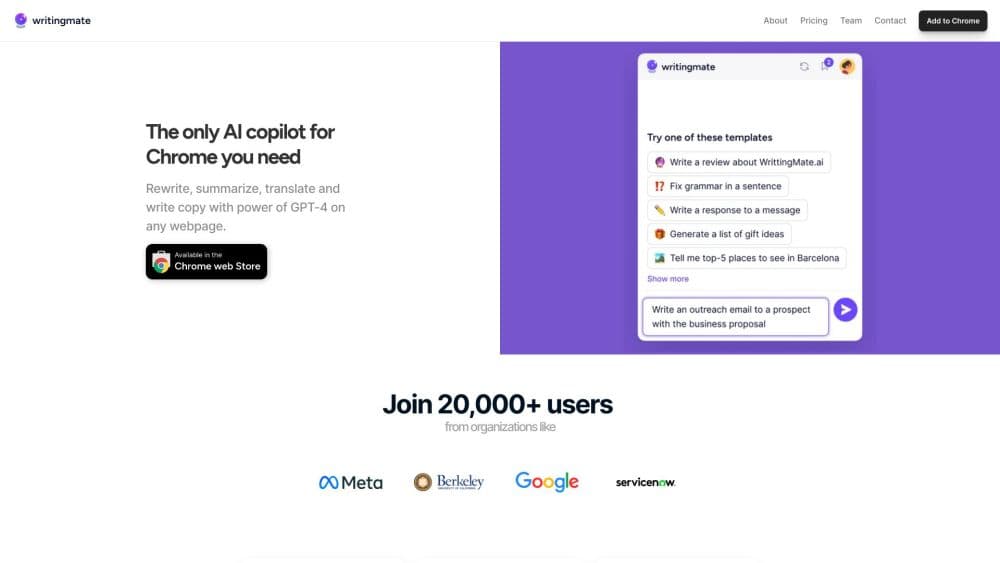
About WritingMate.ai
What Is WritingMate.ai
WritingMate.ai is a web app from the team behind the Writingmate browser extension, built for people who already use three or four AI assistants and are tired of paying for each one. You sign in once, pick a model for the job, and get chat, search, document analysis, images, and short video from the same window.
The problem it solves is subscription sprawl and tab hopping. If your work alternates between drafting in Claude, fact-checking in Gemini, and quick answers in GPT, three bills and three chat histories add up fast. Writingmate routes every request through the providers' official APIs under one account, and switches models inside a conversation instead of starting a new one.
The tradeoff is that you're renting access, not owning it. Every model costs credits out of one pool, newer models may arrive a day or two after their public launch, and the catalog shifts as providers retire endpoints. Heavy users can burn through a mid-size plan in a week of image work.
Getting Started
- Create an account at writingmate.ai with an email address. No separate ChatGPT or Claude login is needed.
- Pick Pro, Ultimate, or Ultra, or start the 3-day trial and explore the app before committing.
- Open a chat, tap the model selector, and choose a text model from the list. Compare Mode runs the same prompt across two to four models at once.
- Add a file, switch on web search, or jump to the Images or Video tab when the task calls for it.
- Save recurring work as a prompt or an agent so the next email or report starts from the same instructions.
Product Information
A quick look at WritingMate.ai's pricing, supported platforms, and performance.
Best for
The users, tasks, and scenarios where this tool fits best.
Users
- Freelance writers and marketers
- Small teams without per-seat budgets
- Developers testing models
- Students and researchers
Tasks
- Drafting an email in three tones
- Summarizing a long contract
- Building a post and its image
- Running a repeatable research workflow
Scenarios
- A provider outage hits mid-deadline
- A new model ships and you want a quick read
- A solo consultant runs content for four clients
Key features
350+ Models in One Account
The model selector covers text, image, and video models from OpenAI, Anthropic, Google, xAI, Meta, DeepSeek, Perplexity, and Black Forest Labs. You can filter by category, hide the models you never use, and newly released flagships usually land within a day of launch. This is the core of the AI model aggregator pitch: one login instead of four.
Compare Mode for Side-by-Side Answers
Compare Mode sends a single prompt to two to four text models and returns each answer in its own column. Reasoning style, tone, and completeness differ enough between labs that benchmarks rarely settle the question for your specific task. Running your own prompt is the faster check.
Mid-Chat Model Switching
When one provider slows down or gives a weak answer, you can hand the conversation to another model without losing the thread. Writingmate keeps the messages in place, so the chatbot that answers is a different one and the draft continues from where it stopped. This is where a multi-model AI chat app beats juggling tabs.
Files, Web Search, and MCP Integrations
Attach PDFs, spreadsheets, and images, then ask for summaries, extracted facts, or a new draft. Web search pulls current sources into the reply, and MCP connections let a chat reach tools like GitHub or Slack when a configured server provides them. The combination covers most research and office tasks inside one window.
Image and Video Generation
The Images tab takes a text prompt, or a reference image for editing, and runs it through Nano Banana, GPT Image, FLUX, Grok Imagine, or Seedream depending on your plan. The Video workspace handles text-to-video and image animation with model-specific options for aspect ratio and duration. Chat, image, and video spend from the same credit pool.
Saved Prompts, Projects, and Agents
Prompts store instructions you reuse, inserted with a slash command in the message bar. Projects group related chats, and Agents package instructions, a model choice, knowledge files, and tools into a reusable assistant. For repeating jobs like weekly reports or support replies, this is the difference between retyping a prompt and running a workflow.
OpenAI-Compatible API and Developer Keys
Writingmate exposes an endpoint at /api/openai/v1 that works with the OpenAI SDKs, LiteLLM, Aider, Continue, and most clients that accept a custom base URL. A Developer Key generated in settings authorizes the connection. The API is labeled alpha and fair-use only, so it suits personal scripts and local coding tools rather than customer-facing products.
Pros and cons
Pros
- One bill covers dozens of models, which usually costs less than two lab subscriptions bought separately.
- Model switching and comparison happen inside a single conversation, with no copy and paste between tabs.
- Flat workspace pricing with unlimited teammates means a small team shares one credit pool instead of buying seats.
- The OpenAI-compatible endpoint lets coding assistants and CLI tools reuse the same plan.
Cons
- Credits run out faster than headline message counts suggest: a 2,000 credit Ultimate plan covers roughly 250 Nano Banana images, so a visual-heavy month hits the ceiling.
- No free tier: there's a 3-day trial gated behind a refundable $1 card check, and trial usage is capped at 10 messages a day plus a few images and clips.
- Unused credits don't roll over, so a light month on a big plan is money spent for nothing.
- Anything you build on the API sits on an alpha, fair-use surface with no uptime guarantee.
Frequently asked questions
WritingMate.ai runs chat, web search, file analysis, image generation, and short video across 350+ models from one account. As a ChatGPT alternative it goes further: people who use several assistants daily get one subscription and one workspace.
Related content
Explore related tools, skills, and articles for WritingMate.ai.
WritingMate.ai Alternatives

Google EmbeddingGemma 2
Google DeepMind · Writing · Image · CodingGoogle EmbeddingGemma 2 is a 740M-parameter open model that turns text, code, images, audio, and video frames into vectors in one 768-dimension space, running on phones and laptops.

MePersona
MePersona, Inc. · Writing · Productivity · MarketingMePersona is an AI unified inbox for creators. It learns your voice, drafts replies to fan messages from 12 platforms, and sends only what you approve.

Fluence
Yay Software (Yannick Huchard) · Writing · Voice & Language · ProductivityFluence is an Android app that reads PDFs, EPUBs, Word files and web articles aloud, follows each sentence as it speaks, and answers questions about the text on the phone itself.