
AI Music Generator
XA AI Music · Voice & Language
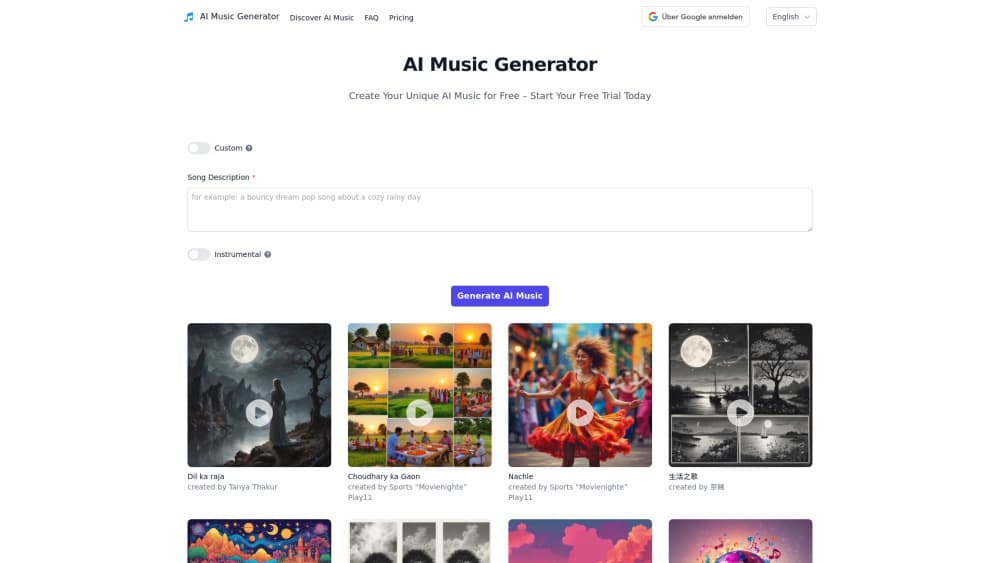
AI Music Generator is a browser tool from xaaimusic.com that turns a text prompt into a complete song, with vocals or instrumentals, genre presets and a free daily quota.
About AI Music Generator
What Is AI Music Generator
AI Music Generator is a web app from XA AI Music that writes songs from a written description. The text to music step takes a few seconds of typing: say what the track should sound like, pick a style, and the model returns a finished piece that can carry singing and instruments together. Nothing gets installed, so a laptop and a browser are enough.
Most people come here with one of two jobs. They need background music for a video, or they want a song about a specific person or moment and can't sing or play an instrument. The output is a whole track, not a loop pack, and you can feed in lyrics you wrote yourself when the words matter.
The limits sit in the details. The site names Pro and Premier tiers but keeps prices inside the app, and there is no public developer page to check. Free generations reset each day, so a longer project means spreading sessions out or paying.
Getting Started
- Go to xaaimusic.com and sign up with an email address or a Google account.
- Open the creation screen and pick a mode.
- Describe the track: mood, genre, instruments, tempo. Paste your own lyrics if you have them.
- Select a music style, then click Create and let the model render.
- Preview the result, download the take you like, and reuse the prompt for variations.
Product Information
A quick look at AI Music Generator's pricing, supported platforms, and performance.
Best for
The users, tasks, and scenarios where this tool fits best.
Users
- Video creators
- Hobbyist songwriters
- Teachers and event hosts
Tasks
- Background music for YouTube and TikTok edits
- Personalized songs as gifts
- Quick demos for lyric drafts
- Intro and outro stings for podcasts
Scenarios
- A weekend video project with no budget
- Testing a song idea before committing studio money
- Classroom or club activities
Key features
Prompt to Finished Song
You write a description in plain language and get a rendered track back. The prompt can carry genre, mood, tempo, and instrument hints, which is how you keep a batch of songs from sounding alike. Results arrive as audio you can preview in the page before downloading.
Vocals or Instrumental Only
The generator handles both sung tracks and pure instrumental beds. That split matters for practical work: a voiceover video needs an instrumental, while a gift song usually wants a vocal. Switching between the two is a prompt choice, not a separate product.
Custom Lyrics and Style Control
You can supply your own words instead of letting the model invent them. Style selection sets the frame around those words, so a folk lyric doesn't come back as a trap beat. For anyone writing to a brief, this is the feature that decides whether the tool is usable.
Genre Presets Across Styles
Pop, classical, electronic, and jazz are the examples the site lists, and the style picker covers more ground than that. Presets do the heavy lifting for people who can't name a chord progression but know they want something warm and slow. For a casual AI music maker, that shortcut is the whole appeal.
Free Daily Quota
A free account gets a set number of generations each day. That is enough to test the tool and finish a small project, and it caps how much you can burn while learning what the model responds to. Heavy users end up on Pro or Premier.
Runs in the Browser
There is no desktop client and no mobile app, so the whole workflow lives in a tab. That keeps setup to a sign in, and it also means your session dies with a flaky connection. Export the files you want to keep.
Bark and Chirp Under the Hood
The site says the platform builds on Bark and Chirp, two open audio models known for speech and sound work. That explains the vocal character and also the ceiling: you are working with a general audio model tuned for songs, not a music-only system.
Pros and cons
Pros
- Free tier with a daily allowance, so you can judge output quality before paying.
- Full songs with vocals and instruments, not just loops or short samples.
- Custom lyrics support, which puts you in control of the words.
- Clean browser workflow: sign up, type, generate, download.
- Style presets make it approachable for people with no music training.
Cons
- Prices for Pro and Premier are not published outside the app, so budgeting takes a sign up.
- No mobile app and no documented API, which rules out phone-only workflows and developer integrations.
- The daily free cap is small for long videos or multi-track projects.
- The site publishes no license page we could find, so commercial use needs a direct question to support before you rely on it.
Frequently asked questions
It's a web app at xaaimusic.com that creates songs from text descriptions. You describe the music, choose a style, and the model returns a track with vocals, instruments, or both.
Related content
Explore related tools, skills, and articles for AI Music Generator.
AI Music Generator Alternatives

Foley
Hanamori Labs, LLC · Voice & Language · Productivity · AI AssistantFoley is a voice to-do list that turns a spoken sentence into a filed task, complete with project, date and time, then helps you plan the day around what is already there.

HireKey
HireKey · Voice & Language · Productivity · LeaningHireKey is an AI job search copilot built by a former tech recruiter. It checks role fit, tailors resumes, runs interview practice and tracks every application.

Fluence
Yay Software (Yannick Huchard) · Writing · Voice & Language · ProductivityFluence is an Android app that reads PDFs, EPUBs, Word files and web articles aloud, follows each sentence as it speaks, and answers questions about the text on the phone itself.