

Xeyria
Xeyria · Coding · Productivity
Xeyria is an AI project memory tool for VS Code. It records architecture, decisions and open questions, then returns them next session so you stop re-explaining the codebase.
About Xeyria
What Is Xeyria
Xeyria calls itself an engineering continuity platform, and that developer continuity pitch comes down to a memory layer for your repository. Install the extension, point it at a project, and it builds an index of what the code does, which files you touched, what the last commits changed and which questions are still open. Open that project tomorrow and the sidebar shows the state you left it in.
The problem it aims at is familiar. Every AI coding assistant starts cold, so the first ten minutes of a session go into describing folder structure, naming rules and that decision you already made about the auth layer. Xeyria moves that description into a store you can read, edit and delete.
What it does is context engineering rather than code generation. There is no chat panel that edits files and no agent that runs your tests. The product is a context provider plus a dashboard, so its value tracks how much of your work lives in the repo and in the questions you file. A one-file prototype gains little from it.
Getting Started
- Install the extension from the VS Code Marketplace by searching for Xeyria, then sign in once through the browser prompt.
- Open a project that is a git repository. Xeyria reads the branch history and workspace root, and it has nothing to index without them.
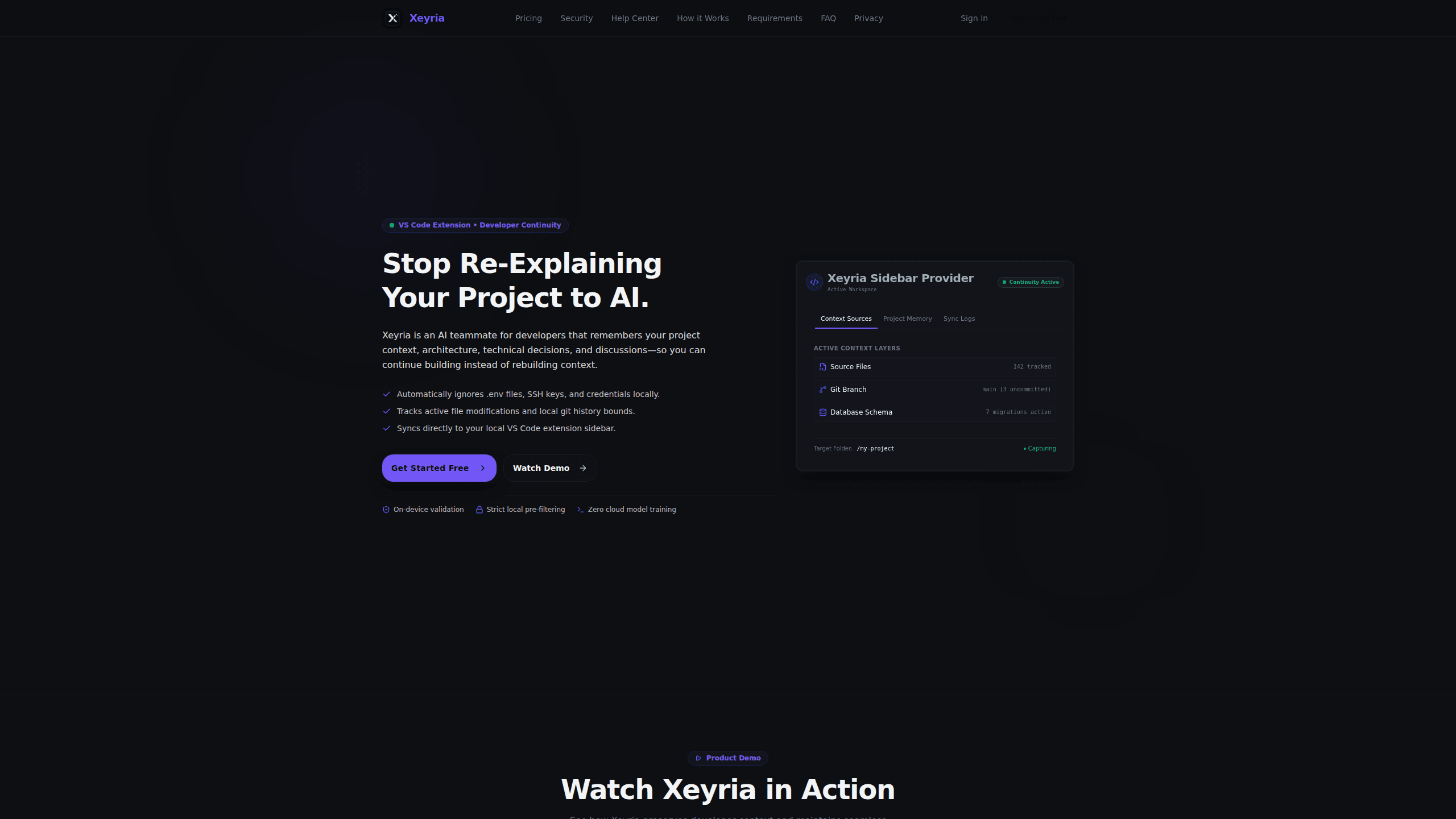
- Wait for the first sync, then check the context sources panel: tracked files, current branch, uncommitted changes and database migrations.
- Write down the decisions and open questions worth keeping, and add redaction rules if your project holds values the default filter misses.
- Work as usual. Next session, read the resume panel before you type a prompt into any assistant.
Product Information
A quick look at Xeyria's pricing, supported platforms, and performance.
Best for
The users, tasks, and scenarios where this tool fits best.
Users
- Solo developers juggling several repositories
- Developers returning after a week away
- Small teams on one codebase
- Consultants moving between client projects
Tasks
- Rebuilding context at the start of a session
- Handing a project to a teammate
- Recording why a decision was made
- Spotting a project that has stalled
Scenarios
- A side project you open twice a month
- A codebase with a real database
- A client or regulated project
Key features
A memory that outlives the chat window
Xeyria stores architecture notes, coding rules, technical decisions and unfinished tasks per project, then loads them when the workspace opens. You get a resume view instead of a blank prompt box. Storage is unlimited on every plan, free included, so the limit sits on queries rather than on what you can save.
Context pulled from files, git and schema
The indexer reads which files are active, the current branch with its uncommitted changes, and the database schema alongside its migrations. Those sources land in one panel, so a table change and the code that depends on it sit side by side. That mix is what separates this from a notes app with an AI label.
Secret filtering before anything syncs
Plaintext passwords, API keys, SSH keys and .env values are stripped on your machine before transmission. The security page states that project data is never used to train models, that traffic runs over TLS 1.3, and that stored records sit under AES-256 with tenant isolation. You can test the filter against your own repository during the free tier, which is the only test that counts.
Risk scans for projects that go quiet
A background job watches for questions left open more than 14 days, workspaces with no file changes in 7 days and documentation untouched for 30 days. Open bottlenecks escalate from medium on day 8 to high on day 16 and critical on day 31. For one developer this reads as a nudge. For a team it shows which project is drifting.
A ledger of what the product predicted
Release 0.9.2 added a prediction record with three types: forecast, risk and recommendation. Each entry moves through pending, confirmed, rejected or expired states, and database triggers block edits after creation, so the history stays honest. Judging advice against outcomes is rare in a tool this young, and it's the feature that makes the risk scoring checkable.
Controls that stay in your hands
You can pause capture for an hour or a week, delete a project's memory, or uninstall the extension and walk away with your data intact. Custom redaction rules sit on Growth and above. None of this needs a support ticket, which matters when the stored material is your source code.
Pros and cons
Pros
- The free plan includes the full extension and unlimited storage for two projects, so trying it has no clock attached.
- Context covers files, git state and database schema, wider than memory extensions that only keep notes.
- Secrets are filtered on the device before sync, and the privacy claims are specific enough to verify.
- Paid plans run from ₹299 to ₹999 a month, well under what hosted coding assistants charge for a seat.
Cons
- VS Code only. Cursor, JetBrains and Neovim users have no path in today.
- No public API or MCP endpoint, so this project memory can't feed Claude Code, Codex or your own scripts.
- Context queries are metered: 50 a month on free, 500 on Starter. A busy week can burn through the entry plan.
- The product is early. The latest release note on the site is 0.9.2 from June 2026, and annual billing is still marked coming soon.
Frequently asked questions
It keeps project context between coding sessions. Architecture notes, technical decisions, the files you were editing and the questions you left open are stored per project and shown again when you reopen the workspace, so you spend less time re-explaining the codebase to yourself or to an AI assistant.
Related content
Explore related tools, skills, and articles for Xeyria.
Xeyria Alternatives

Base Code
Base44 (Wix) · Coding · ProductivityBase Code is a shared cloud development environment from Base44. Teammates describe changes to an existing GitHub codebase in chat, preview them live and send them back as pull requests.

Google EmbeddingGemma 2
Google DeepMind · Writing · Image · CodingGoogle EmbeddingGemma 2 is a 740M-parameter open model that turns text, code, images, audio, and video frames into vectors in one 768-dimension space, running on phones and laptops.

GitGlow
GitGlow · Coding · ProductivityGitGlow is a local-first desktop Git client that lets independent developers review their own code and their AI agents' changes in one place before shipping.