

XspaceGPT
XspaceGPT · Writing
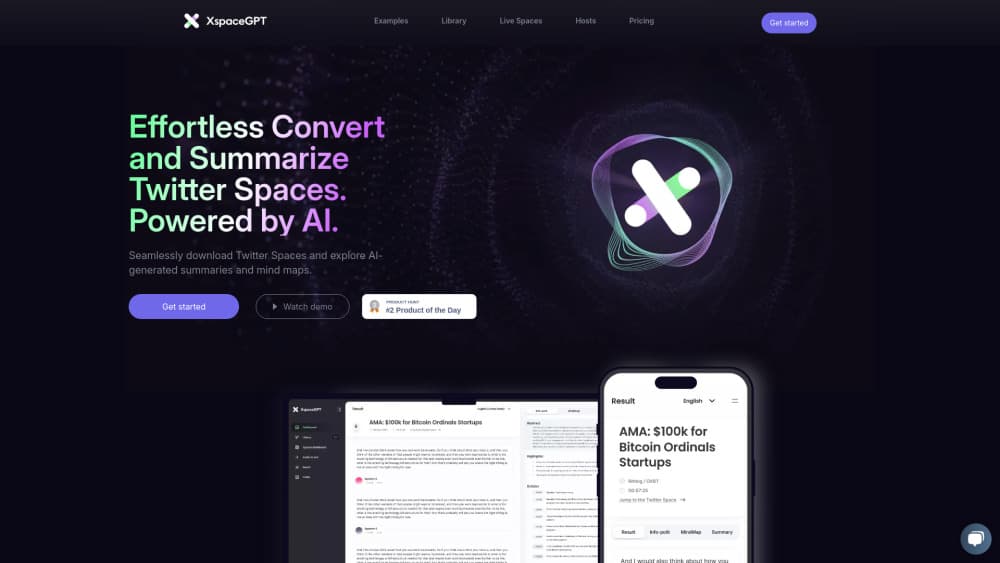
XspaceGPT turns X Spaces recordings into searchable transcripts, MP3 audio, and AI summaries with highlights, a timeline, and a mind map, so a long talk becomes something you can scan in minutes.
About XspaceGPT
What Is XspaceGPT
XspaceGPT is a web tool built for one job: taking a recorded X Space and turning it into text you can read, search, and quote. You paste a Space link or pick one from the site's library, and the service hands back audio, a transcript, and several AI views of the conversation.
The problem it solves is simple. Spaces disappear into an audio archive that nobody can skim. A three hour AMA is hard to cite, hard to search, and impossible to translate on the fly. XspaceGPT gives that recording a second life as an article-like page with an abstract, highlights, a timeline, and per-speaker summaries.
The tool is not a general meeting recorder, and it doesn't join live calls. It works on Spaces that have already been recorded, plus audio files you upload on paid plans. Output quality tracks the source audio: overlapping speakers, heavy background noise, and weak mics will show up in the transcript.
Getting Started
- Open twitterspacegpt.com and sign up with an email address or an X account.
- Paste the URL of a recorded Space, or browse the library and pick a session.
- Start the conversion and wait for the audio, transcript, and AI summary to finish.
- Read the abstract and highlights first, then jump into the full X Spaces transcript for details.
- Download the Spaces to MP3, copy text into your notes, or export through the Notion option when it ships.
Product Information
A quick look at XspaceGPT's pricing, supported platforms, and performance.
Best for
The users, tasks, and scenarios where this tool fits best.
Users
- X Spaces listeners
- Researchers and analysts
- Community managers
Tasks
- Turning Twitter Spaces to text
- Building a written recap
- Archiving a recording
- Translating a conversation
Scenarios
- A weekly AMA backlog
- Research on a niche topic
- Content repurposing on a deadline
Key features
Space to Text Transcription
The core function takes a recorded Space and returns a full X Spaces transcript with speaker separation and timestamps. You get text you can search for a name, a number, or a claim, which is the main reason people use it over a plain audio download. Accuracy depends on audio quality, so clean recordings with distinct speakers produce the best results.
Layered AI Summaries
Instead of one block of text, XspaceGPT produces several views: an abstract, a content outline, key highlights, a speaker by speaker summary, and a short recap. Each one answers a different question, from "what was this about" to "what did this person actually say." The AI summary layer is powered by GPT-5 according to the company.
Timeline, Outline, and Mind Map
Long conversations get a timeline that maps topics to points in the recording, plus a mind map that shows how the discussion branches. The timeline is the practical one for skimming, since you can jump to a moment that matters. The mind map helps when you need to see the structure of an argument rather than the sequence of it.
MP3 Download and Online Playback
Every processed Space comes with an audio file you can download and a player that runs in the browser. Downloading Spaces to MP3 matters for archiving, because a deleted Space takes its audio with it. The player lets you check a quote against the source without leaving the page.
Chrome Extension Workflow
A Chrome extension lets you start a conversion from the Space page itself rather than copying links between tabs. The extension signs you in, submits the Space URL, and returns the transcript and summary. It's the fastest path if you already have the Space open and want the text before the session scrolls out of your feed.
Host Automation on Custom
The Custom plan is built for people who run Spaces, not just listen to them. It transcribes each Space automatically when the session ends, collects everything on a single host page, emails transcripts to subscribers, and sends reminders before the next Space. That turns a recurring show into an archive that grows without manual uploads.
Pros and cons
Pros
- Output goes past transcription into an abstract, highlights, timeline, and mind map, which saves a full re-listen on long sessions.
- The free downloader handles MP3 and text without an account, so you can test the quality before paying.
- Multilingual transcription and language support open up Spaces recorded outside your own language.
- The Chrome extension removes the copy and paste step when you're already on the Space page.
- Host tools on the Custom plan automate the whole post session workflow, from transcript to subscriber email.
Cons
- The Plus plan caps you at 10 Spaces a month, which is tight for anyone following several weekly shows.
- There's no documented public API, so teams that want transcripts inside their own product have no official route.
- Free usage is limited to the downloader tools, and full summaries and mind maps sit behind a paid plan.
- Transcript quality drops with overlapping speakers or noisy audio, and fixing those errors is manual work.
Frequently asked questions
It converts recorded X Spaces into three things: an MP3 audio file, a searchable transcript, and AI generated summaries that include an abstract, highlights, a timeline, a content outline, speaker summaries, and a mind map.
Related content
Explore related tools, skills, and articles for XspaceGPT.
XspaceGPT Alternatives

Google EmbeddingGemma 2
Google DeepMind · Writing · Image · CodingGoogle EmbeddingGemma 2 is a 740M-parameter open model that turns text, code, images, audio, and video frames into vectors in one 768-dimension space, running on phones and laptops.

MePersona
MePersona, Inc. · Writing · Productivity · MarketingMePersona is an AI unified inbox for creators. It learns your voice, drafts replies to fan messages from 12 platforms, and sends only what you approve.

Fluence
Yay Software (Yannick Huchard) · Writing · Voice & Language · ProductivityFluence is an Android app that reads PDFs, EPUBs, Word files and web articles aloud, follows each sentence as it speaks, and answers questions about the text on the phone itself.