

Wonda
MOBIAI LIMITED · Writing · Chatbot
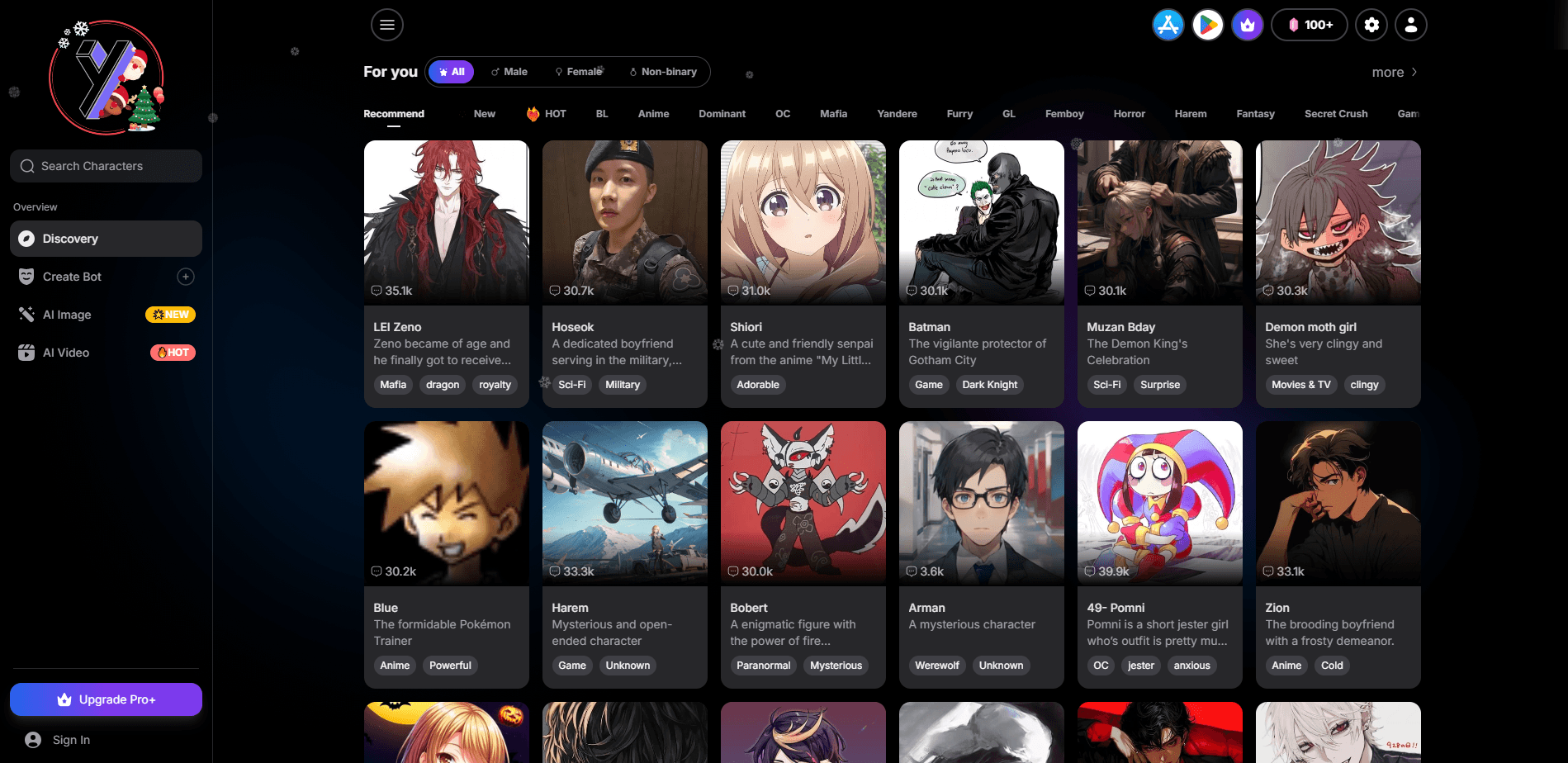
Wonda is a mobile AI app and web tool for anyone who wants to chat with custom characters, make images, and turn those images into short videos without juggling three separate tools. It works as an AI character chat platform, an AI image generator, and an AI video generator in one package. You build a character, talk to it, then generate art and clips around the same story. It runs on the web and on your phone, so the whole thing fits in a browser tab or a home screen.
About Wonda
What Is Wonda
Wonda is an AI chat and creation app that combines roleplay conversations, image generation, and short video clips in one place. The pitch is simple: pick or build a character, talk to it like a person, then create visuals for whatever world you're writing. Some users come for the AI girlfriend angle. Others just want a storyteller to bounce ideas off of. Either way, the interface is built for people who want to jump in and start.
The browser version needs no sign-up. You land on the site, tap a character, and you're chatting. Simple. That low barrier is the main draw, and it's also the catch, since a guest session won't carry your character library across devices the way a proper account would.
The bigger limits are the usual ones for this category. Output quality depends on which model you pick, wait times creep up when the servers are busy, and the free tier throttles how much you can generate in a day. There's also an app for Android with in-app purchases, so heavy users end up paying eventually.
Getting Started
- Open the Wonda site or install the Android app, no account needed to try it.
- Browse the character library, or tap Create Bot and set a name, gender, and personality for your own.
- Start a chat, switch models from the menu if the tone feels off, and let the persona feature track your identity.
- Head to the image generator, pick a template like a portrait or a cartoon style, and write a prompt.
- Take that image into the video tool, choose a motion template, and export a short clip.
Product Information
A quick look at Wonda's pricing, supported platforms, and performance.
Best for
The users, tasks, and scenarios where this tool fits best.
Users
- Hobbyist storytellers
- Anime and manga fans
- Casual creators
Tasks
- Roleplay conversations
- Portrait and scene art
- Short video clips
Scenarios
- Late-night story sessions
- Character design drafts
- Quick visual experiments
Key features
Roleplay Chat With 200,000+ Characters
Wonda's character library is the centerpiece, and it's huge. You can search by mood or genre, then start talking right away, no setup in between. The range runs from friendly companions to spicier setups, so most tastes find a fit, provided you're comfortable with the platform's unfiltered stance and whatever content that decision invites.
The Persona Feature
Before you chat, you set your own details: name, gender, personality. Wonda keeps those in mind, so the character responds to you consistently instead of treating every message like a fresh start. It sounds small, but it's the difference between a real back-and-forth and talking to a wall.
Switchable AI Models
You get more than ten models to choose from, and you can swap mid-conversation. Some lean creative and loose, better for storytelling. Others stay logical and follow instructions closely. If a reply feels off, changing models is faster than rewriting your prompt. That's the point.
Uncensored Image Generation
The image tool takes text prompts and spits out 4K visuals, including NSFW art if that's what you're after. Beyond plain prompting, there's a template library with styles like headshot, Pixar, and Ghibli, plus filters for aging and baby versions. Templates are the fast path when you want a look without describing it.
Image-to-Video Clips
Take a still image and turn it into a short 1080p clip. The templates cover common effects like animating an old photo, a gender swap, or a romance-style scene. It's built for quick moments rather than long footage. Treat the AI video generator as a way to extend a scene, not to produce a film.
Long-Term Memory
Wonda tracks key details across a conversation and carries them forward. For long stories, that means you're not repeating your setup every few messages. It's the feature that makes extended roleplay practical rather than exhausting. Big difference.
Pros and cons
Pros
- Chat, image, and video live in one place, so you're not pasting prompts between apps.
- No sign-up on the web version, which makes trying it instant.
- The character library is unusually large, with over 200,000 options.
- Model switching lets you adjust tone and smarts without starting over.
- Persona and memory keep long conversations coherent.
Cons
- The free tier limits how much you can generate, so heavy use runs into paywalls.
- No public API, which rules it out if you wanted to build on top of it.
- The Android app relies on in-app purchases, and pricing isn't laid out clearly up front.
- Output quality swings depending on the model you pick and how busy the servers are.
Frequently asked questions
Yes, the core features are free, including chat, image generation, and video. The catch is volume: the free tier caps how much you can make, and the app leans on in-app purchases once you pass that line. Is the free tier enough to judge it? For a few sessions, yes.
Related content
Explore related tools, skills, and articles for Wonda.
Wonda Alternatives

Google EmbeddingGemma 2
Google DeepMind · Writing · Image · CodingGoogle EmbeddingGemma 2 is a 740M-parameter open model that turns text, code, images, audio, and video frames into vectors in one 768-dimension space, running on phones and laptops.

MePersona
MePersona, Inc. · Writing · Productivity · MarketingMePersona is an AI unified inbox for creators. It learns your voice, drafts replies to fan messages from 12 platforms, and sends only what you approve.

Fluence
Yay Software (Yannick Huchard) · Writing · Voice & Language · ProductivityFluence is an Android app that reads PDFs, EPUBs, Word files and web articles aloud, follows each sentence as it speaks, and answers questions about the text on the phone itself.