
Yomu
Yomu · Writing
Yomu AI is an academic writing assistant that drafts sections, autocompletes sentences, formats citations in 700+ styles, and runs originality checks in one editor.
About Yomu
What Is Yomu AI
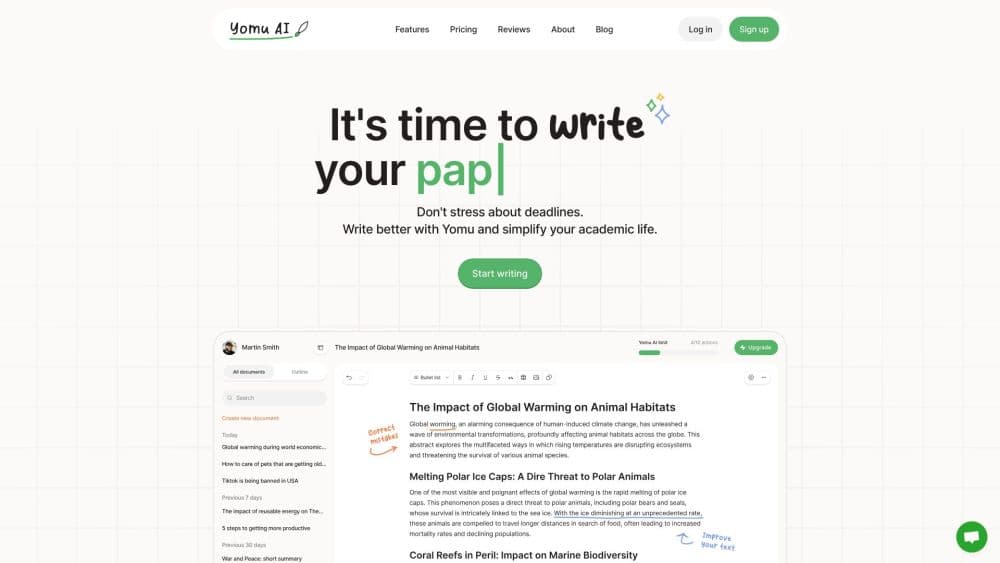
Yomu AI is a writing workspace built for essays, research papers, literature reviews, and theses. It runs in the browser and pairs a standard document editor with a set of academic helpers: an autocomplete that suggests the next sentence, a document assistant that can draft a whole section, a citation generator fed by Sourcely, and a plagiarism checker with AI detection. Everything stays in one window, so you don't move text between a drafting app and a citation tool.
The company came out of Sourcely, a reference finder that students used to locate sources. Users kept asking for help turning those sources into finished prose, which is the gap Yomu fills. Its launch value is the writing side: getting a rough section on the page in minutes, then tightening it with academic feedback rather than a generic grammar pass. That also makes it a workable AI essay writer for a first draft, provided you read it back critically.
The limits matter as much. Yomu writes like a well-read student, not like a subject specialist. It can put a section on the page, but the argument and the evidence still have to come from you, and the citations it finds need checking before they go into a submitted paper. Plan quotas also decide how much premium model access you get, and the expensive models run out first.
Getting Started
- Create an account at app.yomu.ai. You can start a fresh document, upload a PDF, or paste in an outline you already wrote.
- Set up the paper. Add a title, pick a citation style, and let Yomu read any source files you uploaded so it can answer questions about them.
- Draft with help. Start typing to trigger autocomplete, or open the document assistant and ask it to write a section from a short instruction.
- Fix the sourcing. Use the cite command to search academic sources, save them to your library, and apply a citation style in one step.
- Review and polish. Run a Get Feedback pass for proofreading, tone, or source quality, then check originality before you submit.
Product Information
A quick look at Yomu's pricing, supported platforms, and performance.
Best for
The users, tasks, and scenarios where this tool fits best.
Users
- University students writing essays and term papers
- Graduate students working on literature reviews
- Non-native English writers in English-medium programs
- Instructors and writing tutors
Tasks
- Turning a rough outline into readable paragraphs
- Formatting references in a specific style
- Checking a draft for accidental overlap
- Reading a long PDF efficiently
Scenarios
- The night before a deadline when the introduction is still empty
- Switching a paper between APA and Chicago after a journal change
- Building a source base for a long thesis
- Running a final read-through after a supervisor's comments
Key features
Inline Autocomplete
Yomu completes sentences as you type, similar to a code editor suggesting the next line. The suggestions arrive in your own document, so you accept them with a keystroke or keep writing past them. It works best for the mechanical stretches of a paper, like restating a definition or extending a transition, and it needs you to steer it when the argument has to change direction.
Document Assistant for Whole Sections
Instead of generating one sentence at a time, the assistant drafts a full section from a short instruction. You can ask for a background paragraph, an opposing view, or a summary of what came before, then edit the result inside the document. This is where the tool saves the most time, and also where the output needs the most scrutiny, since a confident-sounding paragraph can still rest on a weak claim.
Citation Lookup in 700+ Styles
The cite command searches academic sources through Sourcely and inserts a formatted reference. More than 700 citation styles are supported, covering the common APA, MLA, Chicago, IEEE, and Harvard formats plus niche journal styles. You can merge adjacent citations, filter sources by publication venue, and switch the whole document to a different style without editing each entry.
Source Library
Every source you cite can be saved to a personal library, organized into folders, and pulled into another document later. You can also import an existing .bib file, which matters if you already keep a reference manager. For a thesis spread over several files, the library is what keeps the bibliography consistent instead of drifting between chapters.
Plagiarism and AI Detection Checks
Yomu runs an originality check that compares your text against published material and flags overlapping passages. It also shows a likelihood estimate for AI-generated text. The company frames both as review tools rather than compliance tools, and the ethics statement asks users to treat the scores as a prompt to revise, not as a way around a school's policy. Read the report as a warning light, not a certificate.
Get Feedback and Ask AI
Get Feedback runs a focused review you can choose in advance: proofreading, tone, claim confidence, source quality, or a peer review pass. Each returns a scored report with strengths, weaknesses, and suggested edits you preview before applying. Ask AI is the lighter option: highlight a passage, describe the change in plain language, and keep the result if it reads better.
Chat with PDFs, Images, and Web Search
The chat panel works on uploaded documents, images, and web results, and runs on a mix of frontier models. The default chat model doesn't consume credits, which makes everyday questions cheap. For a literature review, that means you can ask what a paper's sample size was, compare two methods, or ask for a plain-English explanation of jargon without leaving the editor.
Pros and cons
Pros
- Writing, citation, and originality tools sit in one editor, so a paper doesn't bounce between three or four apps.
- The 700+ citation styles and the merge-and-switch behavior remove real formatting drudgery.
- Section-level drafting from a short instruction is genuinely faster than prompting a general chatbot and pasting the result back.
- The free tier runs the default chat model without spending credits, which makes trying the workflow low risk.
- The source library carries references across documents, which is where long projects usually fall apart.
Cons
- Drafted sections sound plausible but can carry weak or unverified claims, so every generated paragraph needs a fact check before it goes into a submission.
- The Pro plan caps you at 1,000 AI actions a month, and the better models burn those credits faster, so heavy users end up on the $17 plan.
- It's a browser tool with no mobile app, which makes quick edits on a phone awkward.
- The plagiarism and AI detection scores are estimates, and some universities treat any AI assistance as a violation, so the feature can't settle a compliance question for you.
Frequently asked questions
Yomu AI is an academic writing assistant. It drafts parts of essays and research papers, completes sentences as you type, finds and formats citations, and checks your draft for overlap with published sources. It's built for students and researchers rather than for marketing copy or fiction.
Related content
Explore related tools, skills, and articles for Yomu.
Yomu Alternatives

Google EmbeddingGemma 2
Google DeepMind · Writing · Image · CodingGoogle EmbeddingGemma 2 is a 740M-parameter open model that turns text, code, images, audio, and video frames into vectors in one 768-dimension space, running on phones and laptops.

MePersona
MePersona, Inc. · Writing · Productivity · MarketingMePersona is an AI unified inbox for creators. It learns your voice, drafts replies to fan messages from 12 platforms, and sends only what you approve.

Fluence
Yay Software (Yannick Huchard) · Writing · Voice & Language · ProductivityFluence is an Android app that reads PDFs, EPUBs, Word files and web articles aloud, follows each sentence as it speaks, and answers questions about the text on the phone itself.