

YouTube Title Generator
SEO Roast · Marketing
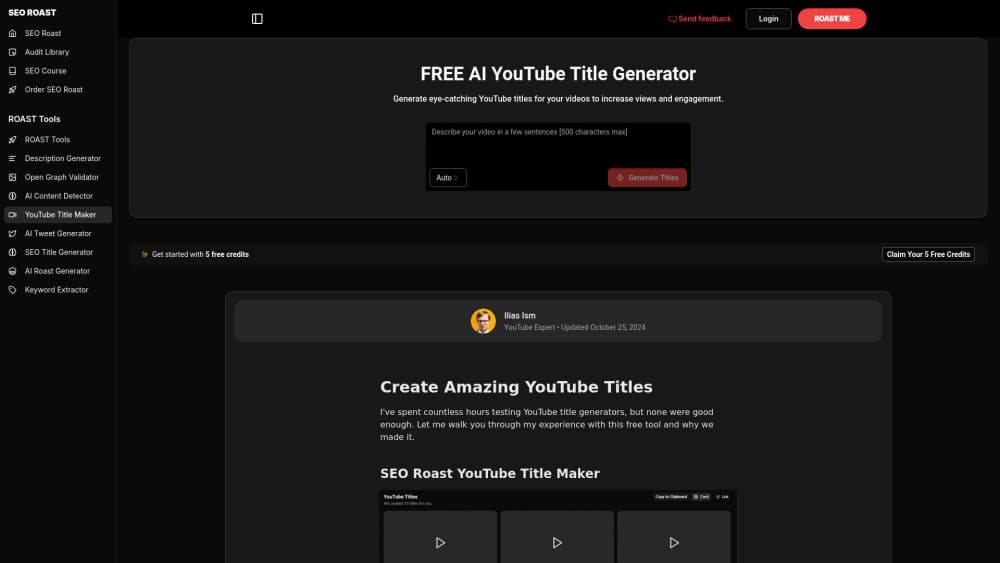
YouTube Title Generator is a free AI tool from SEO Roast that turns a video topic into clickable, keyword-aware titles so creators can lift views and click-through rates.
About YouTube Title Generator
What Is YouTube Title Generator
YouTube Title Generator is a free, browser-based tool from SEO Roast, the SEO platform founder Ilias Ism built for SaaS and software teams. You describe your video in a keyword or a short phrase, and it returns a set of title options built to earn clicks. No install, no account needed to try it.
The pitch comes down to one idea: your title decides whether anyone watches. YouTube hosts hundreds of hours of new footage every minute, and viewers scan results in seconds. A flat title gets skipped no matter how good the video is. A generator that reads what already trends in your niche can copy the shape of what wins and push your angle past it.
Two things are worth knowing up front. It's a single-purpose tool, so it helps with titles and leaves description, tags, and thumbnails to you. And it sits inside the wider SEO Roast platform, so creators who want the audits, courses, and community get more out of it than someone hunting for a lone title spinner.
Getting Started
- Open the YouTube Title Generator page on the SEO Roast site.
- Type the topic of your video as a keyword or a short phrase.
- Set the audience or country you're targeting if the tool asks for it.
- Run the generator and read through the title options it returns.
- Copy the title that fits your video, or take it into the SEO Roast workspace and keep refining.
Product Information
A quick look at YouTube Title Generator's pricing, supported platforms, and performance.
Best for
The users, tasks, and scenarios where this tool fits best.
Users
- YouTube creators
- Small channel owners
- Content marketers running video
- Freelance editors and thumbnail designers
Tasks
- Naming a new upload
- Rewriting a video that underperforms
- Brainstorming a content calendar
- Testing click-through angles
- Finding a keyword angle
Scenarios
- Publishing on a deadline
- Launching a new channel
- Fixing a back catalogue
- Matching a title to a Short
Key features
Titles built from trending topics
The generator leans on what's already popular in your subject area rather than a blank prompt. You get title shapes that reflect real search and view behavior, which is the whole reason to use a dedicated YouTube title maker up against a generic AI writer. It's a fast read on what the platform rewards right now.
Keyword-aware suggestions
Each title option weaves in the words people type into YouTube search, so the video can surface in results instead of only on the subscription feed. This is the part that ties a YouTube SEO title to discovery. The keyword work happens in the background while you focus on the hook.
Click-through focused phrasing
The tool pushes titles toward curiosity and payoff, the two things that drive clicks in a crowded feed. You still see plain, descriptive options mixed in, so you're not forced into pure clickbait. The point is a title that earns the click and still delivers on what the video shows.
Batch title ideas per topic
One topic returns several angles, not a single output. That matters when you want to test, when a client wants options, or when you're planning a series and need titles that don't repeat each other. You compare and pick instead of settling for the first result.
No signup to start
You can reach the page and generate titles without an account. That low barrier suits creators who just want to try it before committing to anything. Accounts only enter the picture if you want the paid SEO Roast features around it.
Country and audience targeting
The generator accounts for the market you're aiming at, since the same title lands differently across audiences and languages. That helps channels that publish in more than one region or language avoid titles that read as off to a local viewer.
Pros and cons
Pros
- It's free to try with no signup, so there's no cost to test it on a real video.
- The suggestions reflect trending topics and search terms, not just a rewrite of your input.
- You get several title angles per topic, which suits testing and client work.
- It pairs with the wider SEO Roast platform, so a founder can go from title to audit and training in one place.
- A clean single-purpose tool means there's no clutter between you and a title.
Cons
- It only covers titles; descriptions, tags, and thumbnails are still on you.
- The strongest value sits behind the paid SEO Roast platform, so the free slice is narrow on its own.
- Suggested titles still need a human pass, since a clickable title can misread your brand voice.
- There's no public API, so you can't wire it into an automated publishing pipeline.
Frequently asked questions
It writes clickable, keyword-aware titles for a YouTube video from a topic or keyword you enter. Instead of only rewording your input, it draws on trending and popular topics in your subject area and returns several options you can pick from. You review them, then copy the one that fits your video.
Related content
Explore related tools, skills, and articles for YouTube Title Generator.
YouTube Title Generator Alternatives

ngram 2.0
ngram · Video · Marketingngram 2.0 is an AI video generator for teams. It turns a prompt, a screen recording, or a product URL into a narrated explainer, product demo, or AI avatar video, and every scene stays editable.

shippedit.me
Krawlup · Marketing · Businessshippedit.me now redirects to Krawlup, a web platform that audits SEO, AEO and page speed every week, then hands the fixes to AI coding agents over MCP.

MePersona
MePersona, Inc. · Writing · Productivity · MarketingMePersona is an AI unified inbox for creators. It learns your voice, drafts replies to fan messages from 12 platforms, and sends only what you approve.