

Youtube to transcript
Youtube to transcript · Writing · Marketing
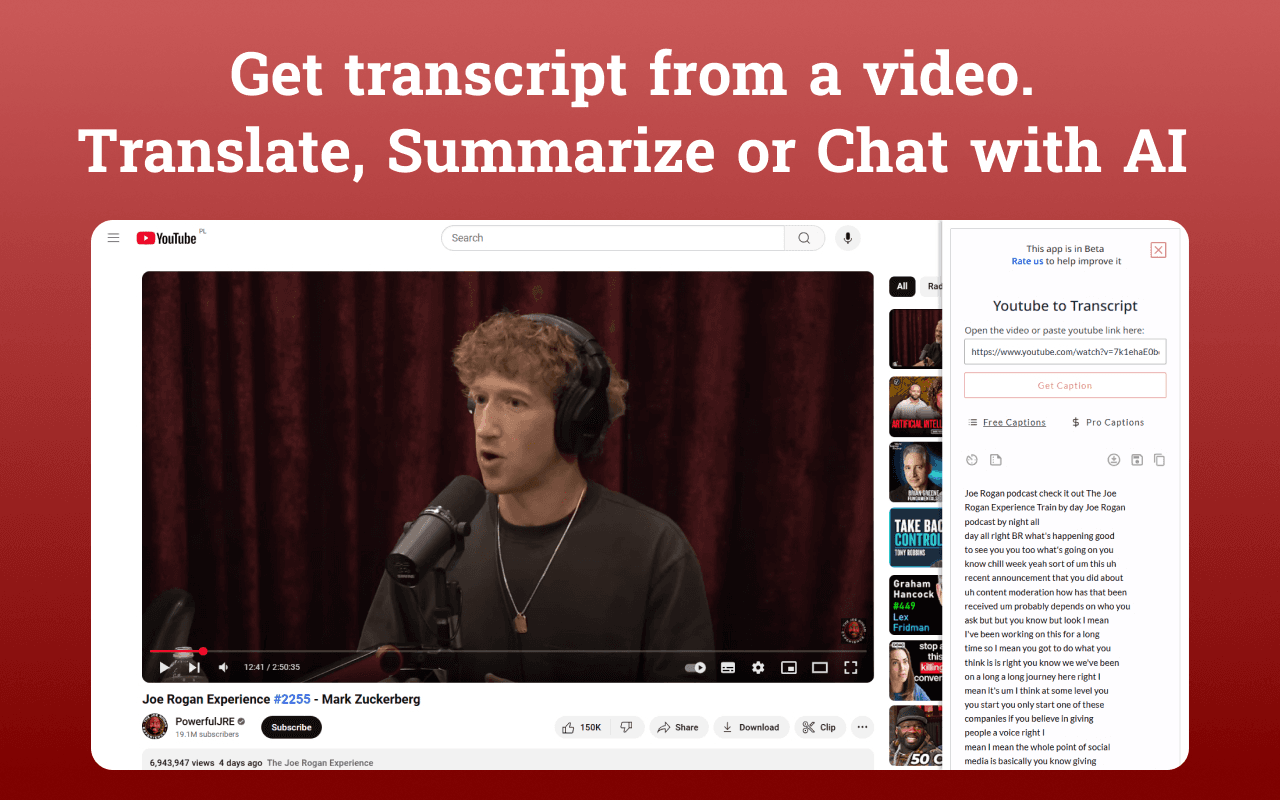
Youtube to transcript is a Chrome extension that shows the full text of any YouTube video in a panel next to the player. You open a video, read the transcript on the same page, and click any line to jump the player to that moment. It works without an account, and it fits students, researchers, and anyone who wants the words of a video without rewatching it.
About Youtube to transcript
What Is Youtube to transcript
Youtube to transcript is a browser extension that extracts the caption track of a YouTube video and displays it as readable text on the video page. Instead of opening a new tab or running the video through a separate site, the transcript loads in a side panel that stays in sync with the player, and it reads both the captions a creator uploaded and the ones YouTube generates automatically, so most public videos work.
The main problem it solves is time. A one-hour lecture or interview takes an hour to watch. The same text takes a few minutes to scan. The extension also strips noise tokens like [Music] and [Applause], so the copy you paste into notes reads as speech rather than caption markup. Because it runs in the browser, you install nothing beyond the extension itself, and you never create an account or sign up.
The clearest limit is coverage. If a video has no caption track, the extension has nothing to show, and creators can turn captions off. Private, age-restricted, or members-only videos also need you to be signed in with the right access. It's built for Chrome and Chrome-based browsers such as Edge, Brave, Arc, Opera, and Vivaldi, which means Safari and Firefox users are left out even if the tool would otherwise run fine on their browser.
Getting Started
- Install the extension from the Chrome Web Store. It takes effect right away, with no account or settings to configure.
- Open any YouTube video in Chrome or a Chromium-based browser.
- Click the extension icon, or open the transcript panel that appears next to the player.
- Scroll the transcript, and click any line to jump the player to that exact moment.
- Copy the full transcript with one button, or select the part you need and paste it into your notes.
Product Information
A quick look at Youtube to transcript's pricing, supported platforms, and performance.
Best for
The users, tasks, and scenarios where this tool fits best.
Users
- Students
- Researchers
- Writers and note-takers
- Busy viewers
Tasks
- Turning a lecture into study notes
- Pulling quotes from a talk
- Skimming a long video
- Following a video in another language
Scenarios
- Reviewing course material before an exam
- Checking a claim you half-remember
- Working through a stack of talks and interviews
- Capturing the wording of a video for a document
Key features
In-page transcript panel
Youtube to transcript puts the full transcript in a panel next to the player. You never leave the video or open a second tab. The text and the player stay in sync, so you read and watch in the same view. It's the core of the extension, and it's why the tool feels faster than copy-paste workflows. No switching. No lost place.
Click a line to jump
Every line in the panel is clickable. Click one, and the player moves to that exact moment. This turns an hour-long video into something you can navigate in seconds, and it's especially useful when you need to confirm a quote in context or revisit a single step without scrubbing the timeline by hand.
One-click full copy
One button copies the entire transcript to your clipboard as plain text. There's no manual selecting and no cleanup step. The text is ready for notes, documents, or an AI tool that writes a summary.
Clean text output
The extension strips noise tokens such as [Music], [Applause], and [Laughter]. What you read and copy is the actual speech, not the caption markup. Your notes stay readable.
Broad caption support
It reads both creator-uploaded captions and YouTube's auto-generated ones, so most public videos have something to show. When a video offers captions in several languages, the extension reads the track the video provides, which means a talk with translated subtitles shows that translated text in the panel without any extra setup from you.
Lightweight install
Youtube to transcript runs entirely in the browser. There's nothing to configure, no account to create, and no email to give. Install it, open a video, and read. The barrier to first use is very low.
Pros and cons
Pros
- Transcript appears on the video page, so you don't juggle tabs or separate sites.
- Clicking a line jumps the player to that moment, which speeds up verification.
- The copy button produces clean text without caption noise tokens.
- No account, sign-up, or email is needed, and the extension is free.
- Works across Chrome and Chromium-based browsers like Edge, Brave, and Opera.
Cons
- It shows nothing when a video has no caption track or captions are disabled.
- Private, age-restricted, and members-only videos need you to be signed in with access.
- It's unavailable on Safari and Firefox, so those users are left out.
- Only YouTube videos are supported, with no support for other video platforms.
Frequently asked questions
Youtube to transcript is a Chrome extension that shows the full transcript of a YouTube video in a panel next to the player. You open a video, read the text on the same page, and click any line to jump to that moment, with no account required.
Related content
Explore related tools, skills, and articles for Youtube to transcript.
Youtube to transcript Alternatives

Google EmbeddingGemma 2
Google DeepMind · Writing · Image · CodingGoogle EmbeddingGemma 2 is a 740M-parameter open model that turns text, code, images, audio, and video frames into vectors in one 768-dimension space, running on phones and laptops.

MePersona
MePersona, Inc. · Writing · Productivity · MarketingMePersona is an AI unified inbox for creators. It learns your voice, drafts replies to fan messages from 12 platforms, and sends only what you approve.

Fluence
Yay Software (Yannick Huchard) · Writing · Voice & Language · ProductivityFluence is an Android app that reads PDFs, EPUBs, Word files and web articles aloud, follows each sentence as it speaks, and answers questions about the text on the phone itself.