

Zennbox
Zennbox · Leaning
Zennbox is an AI knowledge management platform built to work as a second brain for students, researchers, and creators. It pulls your scattered links, PDFs, YouTube videos, and screenshots into one searchable library, then uses built-in AI to summarize long content, explain tricky passages, and help you draft notes while you read. The resource management platform also handles AI note taking inside the same window. Instead of juggling separate apps for saving, reading, and writing, you get a single workspace that runs on the web, on Android, and through a browser extension.
About Zennbox
What Is Zennbox
Zennbox is a digital resource platform that combines saving, reading, and writing in one place. It targets a problem most people know well: your useful material lives everywhere at once. A "Watch Later" playlist here, a folder of unread PDFs there, a pile of screenshots somewhere else. Sound familiar? According to the Zennbox team, that fragmentation carries a real cost, since bouncing between tools and tabs breaks focus and forces you to rebuild your train of thought.
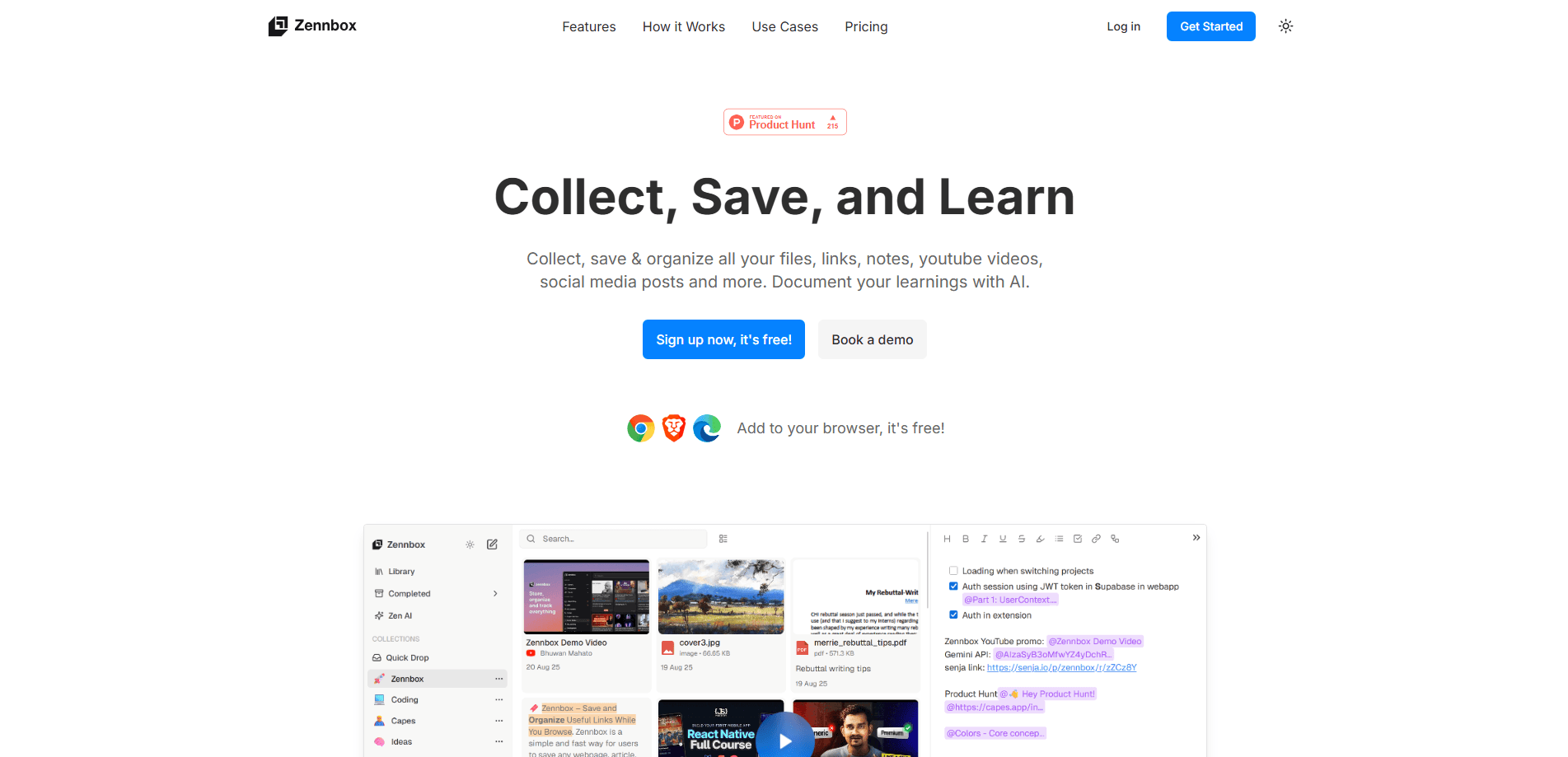
The platform's pitch is that capture, processing, and creation shouldn't need three separate subscriptions. Why? Because the real problem isn't the content. It's how you manage it. Instead of storing files and leaving you to deal with them later, Zennbox reads alongside you. It works as a lightweight AI research assistant and helps you save and organize bookmarks without scattering them across browsers. It generates AI summaries of long articles and videos, explains highlighted paragraphs in plain language, and gives you an editor to write in without leaving the page. The split window layout puts your source material on the left and your notes on the right, so a lecture video and your summary of it sit side by side.
There are limits worth knowing up front. Zennbox is a fairly young product, so its integrations and feature set are still filling out, and the browser extension is the main capture route rather than a native desktop app. Its AI features lean on cloud processing, which matters if you handle sensitive documents. That's a real trade-off.
Getting Started
- Create a Zennbox account on the web app and sign in to reach your library.
- Install the Zennbox browser extension so you can save links, articles, and videos with a single click as you browse.
- Save your first items: a YouTube video, a PDF, or a web article, optionally adding a highlight and a note while you're still on the page.
- Open the split window workspace to read a source on one side and draft your notes on the other.
- Use the AI tools to summarize a long piece, explain a difficult paragraph, or polish the draft you're writing.
Product Information
A quick look at Zennbox's pricing, supported platforms, and performance.
Best for
The users, tasks, and scenarios where this tool fits best.
Users
- Students
- Researchers
- Content creators
Tasks
- Summarizing long articles and videos
- Drafting notes while you read
- Collecting research in one library
Scenarios
- Reviewing course material before an exam
- Early project research
- Sorting a backlog of "read later" links
Key features
Unified Resource Library
Zennbox stores links, PDFs, videos, and social posts in one library instead of splitting them across apps. You can tag and organize saved items, then search across everything you've collected. Everything sits in one place. The point is to end the situation where the thing you need is stuck in a folder you forgot about. So what does that change in practice?
Browser Extension Capture
The Zennbox browser extension handles saving while you're still on the page. You can save a YouTube video, an article, or a PDF with one click, and highlight a passage or add a note without copy-pasting it into another document. Capture friction is the main reason people lose good material. One click fixes that. That's why this is the feature that makes the rest useful.
Split Window Workspace
The split window puts a stored resource on the left and a document editor on the right. Watch a lecture on one side while writing summaries on the other, or read a paper while drafting an argument beside it. It's a simple layout. It works. And it removes the constant Alt-Tab between your source and your notes.
AI Summaries and Explanations
Zennbox runs generative AI over your library. It produces short summaries of long articles and videos, and if a paragraph doesn't click, you can highlight it and ask for a plain-language explanation. The AI note taking layer lives right inside your saved items. You don't have to leave the library to think about what's in it. Think of it as research help that has already seen everything you've saved. One caveat: summarization is only as good as the source, so it's a triage tool rather than a replacement for reading closely.
In-Library Writing Assistant
Beyond summarizing, Zennbox includes a writing assistant that can polish grammar and tone while you draft. Because it sits inside the same workspace as your sources, you can move from reading to writing without exporting anything. No exports. No switching apps. That matters most when your notes are lengthy and you don't want to break flow to switch tools.
Cross-Device Access
Zennbox runs as a web app for deeper work, an Android app for reading on the move and offline access, and a browser extension for capture. The same library follows you across devices, so a link saved on your phone is available when you sit down at a laptop. No syncing gymnastics required.
Pros and cons
Pros
- Combines saving, reading, and writing in one workspace, which cuts down on the number of apps and subscriptions you need.
- The browser extension makes capture fast enough that you'll actually save things instead of losing them.
- AI summaries and explanations help you triage a large backlog of saved material before reading it in full.
- The split window layout genuinely reduces tab-switching, which is where a lot of study time disappears.
- Available on web and Android, with the same library syncing across devices.
Cons
- Zennbox is a young product, so its integrations list and feature set are still developing, and you may find gaps compared with more established tools.
- There's no native desktop app, so you're working through the web app or the browser extension on a computer.
- AI features rely on cloud processing, which is a real consideration if you store confidential documents.
Frequently asked questions
Zennbox is used to collect, organize, and learn from digital material in one place. You save links, PDFs, videos, and notes to a single library, then use AI summaries and a built-in editor to turn what you've saved into something you actually understand.
Related content
Explore related tools, skills, and articles for Zennbox.
Zennbox Alternatives

Kaggle AI
Google · Coding · LeaningKaggle AI is a community platform where people build, test, and compare machine learning models against shared data. It combines data science competitions, tens of thousands of public datasets, and free cloud notebooks with GPU and TPU access, so anyone with a browser can train a model without buying hardware. Google owns the platform, and joining costs nothing.

Bunch
Bunch AI · Leaning · BusinessBunch is an AI leadership coaching app that turns a few spare minutes a day into real management practice. It hands you one short, personalized tip each day, tracks how you respond, and lets you compare notes with peers inside private groups. The pitch is simple: you lead better by practicing a little, often, instead of sitting through a weekend seminar. Think of it as a leadership training app you actually open.

AI Mock Interview
SQLPad · Coding · LeaningAI Mock Interview is a practice tool built into SQLPad that simulates real job interviews and gives you instant feedback on both what you say and how you say it. You pick a role template or upload a job description, answer questions out loud in real time, and then review a transcript with notes on structure, clarity, and grammar. It's aimed at data professionals prepping for SQL, Python, data engineering, machine learning, and system design roles, and it works entirely in the browser. No install needed.