
Zikhara AI
Zikhara LLC · AI Detection · Business
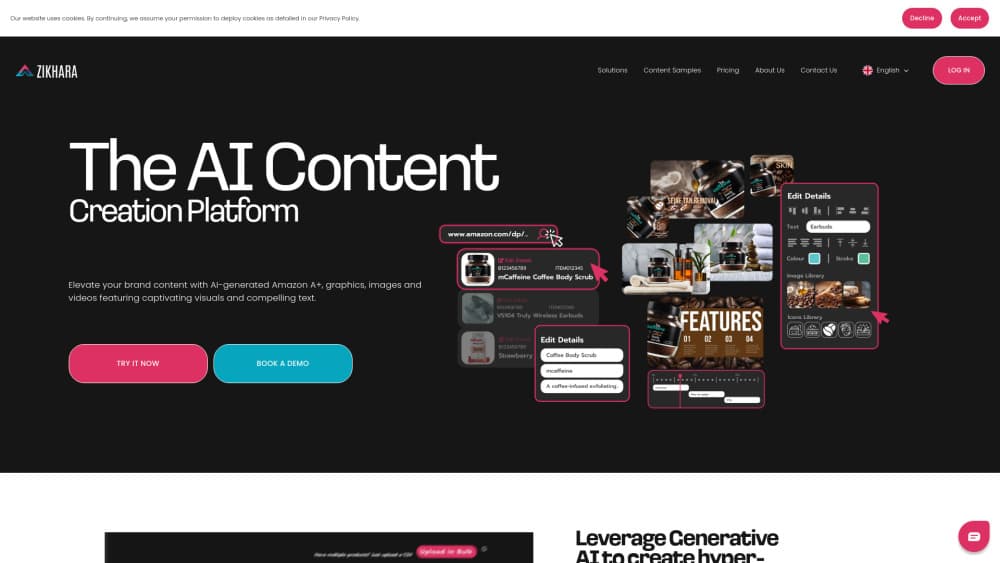
Zikhara AI is an Amazon listing generator for sellers and agencies. It turns a few product photos into titles, bullets, images and A+ content, then publishes the result to Seller Central.
About Zikhara AI
What Is Zikhara AI
Zikhara AI is a web app that builds and repairs Amazon product pages. It's aimed at sellers who don't have a copywriter, a designer or a spare week for every new ASIN. Upload smartphone photos of a product, pick a marketplace, and the tool returns a listing with a title, five bullets, backend search terms, infographics and A+ modules.
The other half of the product is cleanup. Connect a Seller Central account and Zikhara AI pulls in your existing catalog, scores each ASIN with its own CDQ metric and lists what's missing. Common findings are a listing with three bullets instead of five, no lifestyle image and no A+ section at all. Better Amazon SEO follows once those gaps close. Fixes apply from the dashboard with one click per module, which is where most Amazon listing optimization work actually happens after launch.
The limits are worth knowing before you pay. Everything runs on Amazon, so Walmart, Etsy and Shopify sellers get nothing from it. Output quality follows photo quality, which means badly lit shots still need a reshoot. Credits reset each month and don't roll over, so oversized catalogs need the Pro tier or top-ups.
Getting Started
- Create an account at zikhara.ai. The trial doesn't ask for a card.
- Link Seller Central if you want to import a live catalog, or start a listing from scratch.
- Upload a few product photos and choose the marketplace: US, India or UK.
- Check the generated copy, images and A+ blocks, then regenerate any piece you don't like.
- Publish to Seller Central from the same screen.
Product Information
A quick look at Zikhara AI's pricing, supported platforms, and performance.
Best for
The users, tasks, and scenarios where this tool fits best.
Users
- Solo Amazon sellers
- Growing brands
- Agencies and enterprise teams
Tasks
- Launching a new ASIN
- Repairing an underperforming listing
- Opening a second marketplace
- Producing lifestyle images on a small budget
Scenarios
- Testing a new product category
- Pre-season catalog refresh
- Managing several client stores
Key features
Listing Generation From Product Photos
The core workflow takes two to five product shots and returns a publish-ready page: title, bullets, description, backend keywords and supporting visuals. You pick the marketplace first, so the copy matches the storefront language and search habits. The vendor claims a full listing takes about a minute, and the review step is where most of your time actually goes.
Catalog-Wide CDQ Audits
CDQ is Zikhara's own content depth score, and it drives the whole cleanup side of the product. Import a catalog and every ASIN gets a number plus a gap list: missing infographics, short bullets, absent A+ content. Zikhara reports an average CDQ of 94+ on listings it generates, and those figures come from the company, not an independent test.
One-Click Fixes for Weak Listings
Instead of rewriting a page from zero, you regenerate the parts that scored badly. A text update costs 3 credits, an image update 12 and an A+ update 14, so a repair job usually costs less than a fresh build. The tool leaves sections you don't select untouched, which matters when a listing already ranks and you don't want to disturb it.
Images and Infographics Without a Studio
Zikhara AI generates lifestyle scenes and feature infographics from plain phone photos, then lets you regenerate or transform a single image for 1 credit. For a small seller, that removes the cost of a photographer and a designer from the launch budget. Results still depend on the source shot, so a clean, well-lit photo produces far better output than a cluttered one.
A+ Content Builder
A+ modules come out of the same generation run, built from the product images and copy already in the project. You get comparison blocks, feature callouts and banner layouts without opening a design tool. Editing happens in the dashboard, and changes publish with the rest of the listing.
Publishing Inside Seller Central
The publish step pushes titles, bullets, images and A+ content straight to a connected Seller Central account. Live marketplaces are the US, India and the UK, with Mexico and Brazil marked as coming soon. Because compliance checks run before publishing, fewer submissions come back rejected for restricted claims or missing attributes.
Pros and cons
Pros
- One pass produces copy, images and A+ content, and a full listing costs 29 credits.
- CDQ scoring turns a vague brief into a list of specific fixes.
- Compliance checks before publishing cut the risk of listing suppression.
- Direct publishing removes spreadsheet export and re-upload work.
- The $29.99 Starter plan with 110 credits is enough to test three listings.
Cons
- Amazon only, so sellers on other marketplaces need a different tool.
- Credits reset monthly and unused ones don't carry over, which punishes seasonal sellers.
- Infographic quality tracks the source photo, and poor shots still need a reshoot.
- No documented public API, so bulk automation depends on the dashboard and the Chrome extension.
Frequently asked questions
It generates and repairs Amazon listings with AI. You upload product photos or import an existing catalog, and the tool writes titles, bullets and backend keywords, creates images and A+ content, then publishes to Seller Central.
Related content
Explore related tools, skills, and articles for Zikhara AI.
Zikhara AI Alternatives
Isgen AI
Isgen · AI DetectionIsgen AI is a web-based AI detector that scores text for machine authorship and shows you which sentences and phrases push the number up. It's built for teachers, editors, students, and writers. Their question is simple: did this draft come from ChatGPT, GPT-5, Claude, Gemini, DeepSeek, or another model? You paste or upload content, run a scan, and get a Human, AI, and Mixed breakdown in seconds. There's also a companion editor that scores text while you write it.
Humanizeai Tools
Humanizeai Tools · Writing · AI DetectionHumanizeai Tools is a web-based AI humanizer that rewrites machine-generated text so it sounds like a person wrote it, which is the whole point of the category it belongs to. Paste a draft from ChatGPT, Claude, or Gemini, run it through the tool, and it swaps out the phrases and sentence patterns that AI detectors flag. If your goal is to make AI text sound human before you publish it, this is the kind of tool built for exactly that. It suits students, bloggers, and marketers who need copy that reads naturally and clears tools like GPTZero, Copyleaks, and Winston AI after a single pass.

Hidemyai
Hidemyai · Writing · AI DetectionHidemyai is an AI content humanizer. It rewrites text from ChatGPT, Jasper, and similar tools so the result reads like a person wrote it. You paste your draft, pick a document type and tone, and the service returns a version meant to bypass AI detectors such as Originality.ai, Turnitin, and ZeroGPT. It targets writers, marketers, and students who lean on AI drafts but can't ship copy that sounds robotic. The promise is simple: make AI content undetectable.