
Zyft: Compare Prices & Scanner
Zyft Holdings Pty Ltd · Business
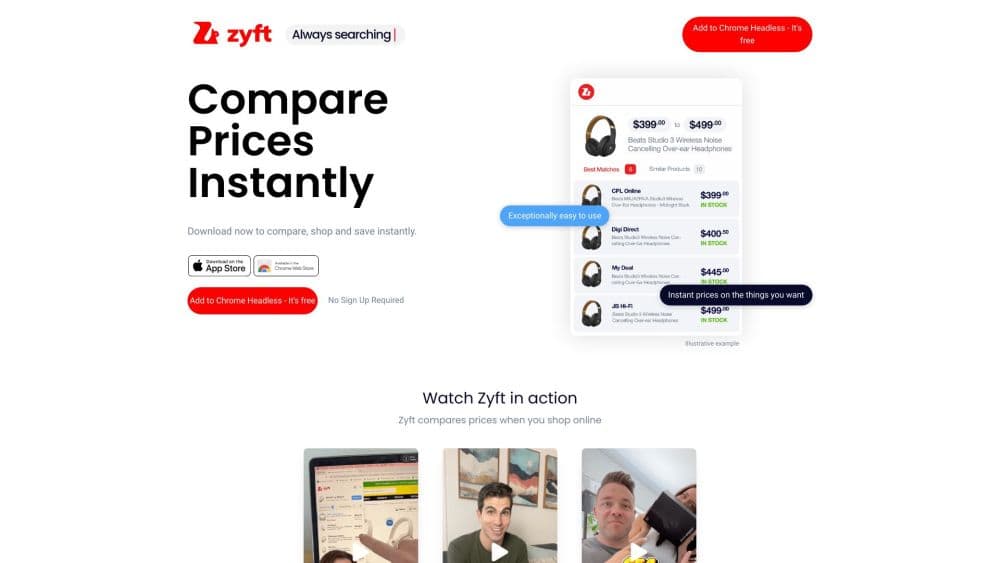
Zyft is a free AI price comparison app and browser extension that scans a barcode, a product search, or a shared link and ranks live prices from more than 50,000 Australian retailers, lowest first.
About Zyft: Compare Prices & Scanner
What Is Zyft
Zyft is a price comparison app and barcode scanner for Australian shoppers. The tool built for the Australian market. It watches a product across tens of thousands of local retailers and shows you what each one charges, sorted from cheapest to dearest. The company says the search runs on its own AI, which matches the exact model and colour you're looking at instead of a vague guess at something similar.
You can use it two ways. The mobile app handles barcode scanning in a shop, product search, and price drop alerts. The browser extension (Chrome on desktop, Safari on iPhone, iPad, and Mac) sits on retail sites and pulls comparisons in while you browse, so you don't open a second tab. Zyft also does the reverse: share a product link from any browser into the app, and it runs the same comparison.
Two limits matter. Coverage is Australian retail only, so a shopper in the US or the UK gets little from it. And the comparison is not the final word on cost. Zyft's own terms say results ignore shipping, delivery charges, and member or VIP pricing, so a cheaper sticker price can still lose out once postage is added.
Getting Started
- Install the Zyft app from the App Store or Google Play, or add the extension from the Chrome Web Store. Both are free and there's no subscription to unlock.
- Create an account if you want price drop alerts, since alerts live in the app rather than the extension.
- Scan a barcode, type a product name into search, or share a product URL into the app. Zyft returns the retailer list with live prices and stock status.
- Tap the store you want and finish the purchase on that retailer's site. Zyft hands you off rather than selling anything itself.
- Follow an item to set a target price. You get one notification when a retailer hits it, and the alert stays in your list until you remove it.
Product Information
A quick look at Zyft: Compare Prices & Scanner's pricing, supported platforms, and performance.
Best for
The users, tasks, and scenarios where this tool fits best.
Users
- Households watching the weekly grocery bill
- Parents buying big-ticket items like prams, car seats, or nursery furniture
- People who buy online and can't stop opening tabs
- Deal hunters who like planning ahead
Tasks
- Checking a price while standing in a store
- Finding the same item across electronics, appliances, or beauty
- Tracking a product until it goes on sale
- Browsing daily discounts
Scenarios
- The weekly shop
- A big purchase you've been putting off
- Buying from a phone in a car park
Key features
Barcode Scanner
Point the phone camera at a product barcode and Zyft returns the retailers selling that item with their prices. It's the fastest path from "how much is this here" to "who else has it and for how much", and it works in shops where you can't search by name because the item has no obvious model number. The app also lets you click through to a retailer site to buy, or hold the phone up at the counter to request a price match.
AI Product Matching
The comparison leans on Zyft's own AI to decide whether two listings are the same product. That matters because retail listings are messy: the same TV shows up with different model suffixes, bundled extras, or slightly different titles. Zyft says the matching keeps improving as it sees more products, and the results are ranked by price alone rather than by which retailer pays for placement.
Brand-Free Ranking
Results come back lowest price first. Zyft states plainly that ranking isn't sold, which separates it from shopping portals that mix sponsored listings into the top of the page. Some links are affiliate links, and the company discloses that in its terms, so the money can come from a click without changing the order you see.
Price Drop Alerts
You can follow a specific item at a specific retailer and set a target price. Zyft sends one alert the first time that price is met, then keeps the item on your list so you can watch it further or reset the target. Alerts are app-only and capped at 50 items, which is enough for a watch list but not for catalogue-wide tracking.
Browser Extension
On desktop Chrome and Safari for iOS and macOS, the extension runs quietly on retail pages and shows comparison results without you asking. You click a product, and a few seconds later you see which other retailers stock it and at what price. Safari users on iPhone and iPad get the same behaviour inside the mobile browser, which matters because many shoppers browse on a phone but still want a big-screen style comparison.
Deals Hub
If you want to compare prices online without a scanner, the search bar covers the same ground. The Deals Hub is a daily feed of retailer sales, discounts, and editor-picked offers, filterable by category, brand, price, or retailer. It's a browsing surface rather than a search tool: useful when you have no specific product in mind and want to see what's discounted today.
Share to Compare
Sharing a product URL from any browser into the Zyft app triggers the same comparison the extension would run on desktop. That closes a gap for people who browse on a phone in an app that doesn't support extensions, or who get a link from a friend and want the prices before replying.
Pros and cons
Pros
- Free to use, with no paid tier to unlock the core comparison, alerts, or Deals Hub.
- Price ranking is genuinely lowest first, so you don't have to pick through sponsored results to find the cheap one.
- Works in-store and online from the same app, which most comparison tools don't manage.
- The Safari extension covers iPhone and iPad, not just desktop browsers.
- Alerts are capped at 50 items, which is a practical limit for a personal watch list rather than a paywall.
Cons
- Australian retailers only. If you shop with overseas stores, Zyft won't see them.
- Results ignore shipping, delivery fees, and member pricing, so the cheapest listed price isn't always the cheapest total.
- Alerts can't be created from the extension, and some retailers aren't enabled for alerts yet.
- The comparison depends on retailer data feeds, so a stale price or wrong stock status can slip through.
Frequently asked questions
Zyft compares prices for the same product across Australian retailers. Scan a barcode in a shop, search a product name, or share a link, and it lists who sells the item and at what price, cheapest first. You then buy from the retailer directly.
Related content
Explore related tools, skills, and articles for Zyft: Compare Prices & Scanner.
Zyft: Compare Prices & Scanner Alternatives

Knocket
Knocket (Tencent RTC team) · Productivity · Business · ChatbotKnocket is a free live chat and contact page tool that lets visitors message you from your website, app, or a shareable link, with every reply handled from Telegram or one inbox.

shippedit.me
Krawlup · Marketing · Businessshippedit.me now redirects to Krawlup, a web platform that audits SEO, AEO and page speed every week, then hands the fixes to AI coding agents over MCP.

Ayven
Alknoma · Productivity · BusinessAyven is an AI control centre by Alknoma that turns a plain-language goal into a dated plan, hands the work to your people and AI agents, and asks for your approval only when the call is yours.