

0xCal
Bartek Pichalski · AI Assistant
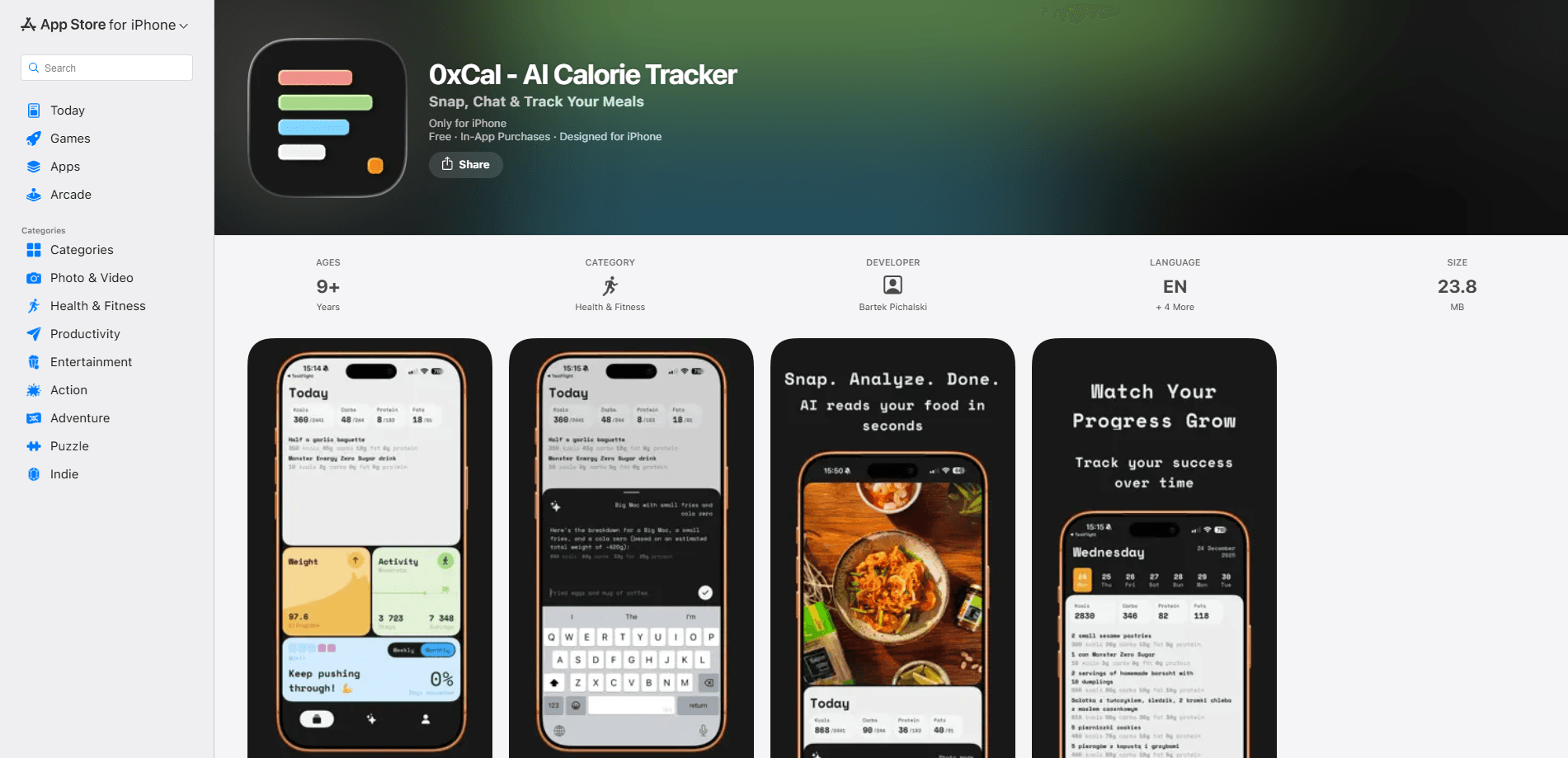
0xCal is an AI calorie tracker for iPhone that turns food logging into a short conversation. You tell it what you ate in plain words, or snap a photo of your plate, and it estimates calories, protein, carbs, and fat within seconds. Think of it as an AI calorie counter you can talk to. A single subscription unlocks everything, there's no account to create, and the whole app stays under 30MB. It's built for people who quit food diaries because tapping through a database for every meal felt like a chore.
About 0xCal
What Is 0xCal
0xCal is a calorie tracking app for iPhone that logs your meals by chat or photo instead of a food database. The core idea is simple: most people abandon calorie counting because logging a meal takes longer than eating it. You type "grilled chicken salad for lunch" the way you'd text a friend, and the app returns calories, protein, carbs, and fat without you searching for anything. No database. No barcode. No forms.
The app leans on Apple hardware to do part of the work. Sounds simple. On iPhones with a LiDAR sensor, it measures the plate while you photograph it, so portion size comes from the scene rather than a rough guess by eye. Every entry arrives as a list of ingredients with their own weights, and you can correct any row, swap a guess for a real product from the built-in catalog, or add a forgotten item like "and some butter" to rebuild the estimate. It works as both an AI food scanner and a plain macro tracker, depending on how you log.
The biggest limits are worth knowing up front. 0xCal runs on iPhone only, needs iOS 18 or newer, and after a free trial it's a single paid subscription with no free tier. Its accuracy figures come from the developer's own testing, so treat them as a claim rather than an independent finding. If you want a free calorie tracker with a huge food database, this isn't that.
Getting Started
- Download this calorie counter for iPhone from the App Store and open it. There's no sign-up form to fill out, and no account is required to start.
- Answer a few onboarding questions about your goal, height, and current weight so the app can set a daily calorie and macro target.
- Log your first meal. Type it in your own words, take a photo, or scan a barcode, then review the ingredient rows it returns.
- Fix anything that looks off. Correct a weight, add a missed item, or pick the exact packaged product from the catalog.
- Turn on widgets or the Apple Health sync if you want to log from the home screen and see weight trends alongside your activity data.
Product Information
A quick look at 0xCal's pricing, supported platforms, and performance.
Best for
The users, tasks, and scenarios where this tool fits best.
Users
- Busy professionals tracking weight loss
- Fitness enthusiasts watching protein and macros
- People who've bounced off heavy diet apps
Tasks
- Logging a restaurant meal fast
- Fixing an estimate you don't trust
- Tracking intermittent fasting
- Building a repeatable food list
Scenarios
- Quick breakfasts before work
- Meal prep weeks where you eat the same dishes
- Keeping a light footprint on your phone
- Privacy-minded tracking
Key features
Chat-based food logging
The thing 0xCal hangs its hat on. You describe a meal in normal sentences and the app returns calories and macros, no database search or barcode step required. It reads casual phrasing like "two eggs and sourdough toast with butter" and splits it into items you can edit. The point is speed. Logging should feel like texting, not filling out a form. Want to try a meal without typing at all? Just point the camera at it.
Photo and LiDAR portion measurement
When you'd rather not type, snap a photo of the meal. On iPhones with LiDAR, the depth sensor measures the plate and sends that measurement along with the image, so the portion is read from the scene instead of estimated by eye. Home cooking and restaurant plates both work. It's the difference between a guessed portion and a measured one. That matters more than it sounds.
Ingredient-level breakdowns
Every entry opens as a list of ingredients with individual weights, not one opaque number you can only accept or delete. Push the fries from 117g to 160g and the total follows. That's the point. If the chat misses something, adding "and some butter" rebuilds the estimate rather than replacing it. That editability is what makes the numbers trustworthy enough to act on.
Food catalog and pantry
The first pass on any food is a model estimate, and the app labels it as one. You can leave it, or search the catalog and swap the guess for the actual jar, box, or bottle with the nutrition label attached. Once a food is in your pantry, later meals attach to it instead of guessing again. Correcting a food once is the whole idea.
Intermittent fasting app built in
0xCal doubles as an intermittent fasting app, with plans such as 12:12, 14:10, and 16:8, plus a custom option. You start a fast, watch it run, and review your history afterward. There's also a fasting shield that uses Screen Time to block food apps until your fast ends. Fasting and food logging live in one place, which saves juggling two apps.
Weight tracking and Apple Health sync
Log your weight over time and view progress on a graph, for either loss or gain goals. The app syncs calorie data and weight measurements with Apple Health, so your nutrition sits next to your activity from an Apple Watch. If you already track workouts there, the picture stays in one place instead of scattered.
Widgets and a lightweight, ad-free design
Home screen widgets let you log meals without opening the app. The interface is built around a dark mode tuned for OLED screens, with no ads and no upsell banners. Small app. Clean screens. At around 25MB, it's a fraction of the size of many trackers, and the developer's pitch is that fewer features done well beats a bloated dashboard.
Pros and cons
Pros
- Logging a meal by chat is genuinely faster than database search, which is the main reason people quit calorie counting.
- Ingredient-level entries stay editable, so you can fix a bad estimate instead of throwing the whole log out.
- LiDAR plate measurement on supported iPhones removes the usual guesswork around portion size.
- Around 25MB, no ads, no account required, and a dark mode that's actually pleasant to use.
- Fasting plans and Apple Health sync cover the health data most trackers handle separately.
Cons
- No free tier. After the trial you pay a single subscription, so there's no way to keep using it for free.
- iPhone only, and it needs iOS 18 or newer, which rules out older devices and all Android phones.
- No API, so you can't pipe the data into your own scripts or dashboards.
- The reported accuracy (85.6% average) comes from the developer's own testing against 110 foods, not an independent study.
Frequently asked questions
It's an AI calorie tracker for iPhone that logs meals by chat, photo, or barcode and returns calories, protein, carbs, and fat. You describe what you ate in plain language, and the app estimates the numbers, breaks them into ingredients, and lets you correct anything. That's basically it.
Related content
Explore related tools, skills, and articles for 0xCal.
0xCal Alternatives

Iplan AI
Iplan AI · Productivity · AI AssistantIplan AI is an AI travel planner that turns a few trip details into a full day-by-day itinerary in seconds. You answer questions about your destination, interests, budget, and travel companions, and the tool builds a plan you can edit, share, and carry with you on any device. It targets travelers who want a solid draft without spending hours in spreadsheets and browser tabs. Think of it as an itinerary generator that does the tedious part for you.

Screenhelp
Screenhelp · Productivity · AI AssistantScreenhelp is an AI screen assistant that turns a single keyboard shortcut into real-time help. You press Ctrl+Shift+Space, it captures what's on your screen, and it streams an answer into a private panel in about two seconds. Think of it as an AI screenshot helper you trigger on demand. It runs on Mac, Windows, and the web, starts free with 30 answers a month, and stays invisible during screen sharing on Zoom, Teams, and Google Meet.

Rainbow
Rainbow · AI AssistantRainbow is an AI weather forecast app built around short-term precipitation nowcasting. Its engine pushes min-by-min rain and snow predictions up to four hours ahead, blending live satellite and radar feeds into hyperlocal forecasts. The app adds live rain radar, a seven-day outlook, precipitation alerts, home-screen widgets, and a hurricane tracker, and it runs on both Android and iOS with a free tier plus paid upgrades.