

123RF
123RF (Inmagine) · Image
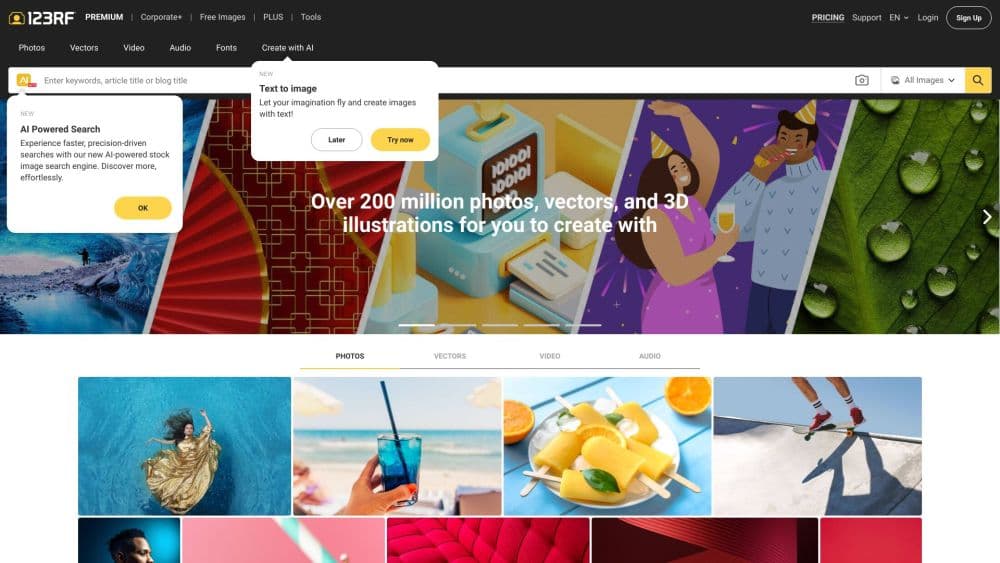
123RF AI Search Engine is an AI stock photo search tool from 123RF. It reads long natural language queries and uploaded images to surface royalty free photos, vectors, and video.
About 123RF
What Is 123RF AI Search Engine
123RF AI Search Engine is the search layer inside 123RF, a stock content marketplace that Inmagine launched in 2005. Instead of matching a few keywords, it takes a full sentence or a rough idea and pulls licensed images, vectors, and video from a library of more than 230 million assets. Type a blog headline or a description of the mood you want, and the results follow the concept rather than the exact words.
The tool does two jobs. The first is text search that understands intent, so a vague brief like "calm morning routine" returns usable photos. The second is reverse image search: you drop a reference picture into the search bar, and it finds visually similar assets by reading color, style, and composition. That second path matters when you have the look in mind but can't name it in words.
The AI Search Engine is the entry point, not the whole product. Behind it sits a larger AI Suite for image generation, background removal, and upscaling. That breadth is the main appeal. The suite and the full library sit behind paid plans.
Getting Started
- Open 123rf.com and create a free account with an email address.
- Type a long natural language query or a short keyword into the search bar.
- Or click the camera icon in the search bar and upload a reference image for a reverse search.
- Browse the results, then click an image to check the license and download options.
- Download free assets, or move to a PLUS subscription or a credit pack for full access.
Product Information
A quick look at 123RF's pricing, supported platforms, and performance.
Best for
The users, tasks, and scenarios where this tool fits best.
Users
- Designers
- Marketers
- Bloggers and content creators
Tasks
- Finding an image from a reference
- Writing prompts as search queries
- Generating fresh visuals
- Matching brand consistency
Scenarios
- A deadline build
- A brand refresh
- A slide deck or campaign
Key features
Natural Language Search
The AI Search Engine takes long form text, even whole blog titles, instead of a tight keyword string. It reads the intent behind a sentence and returns concept-driven results, so you don't have to guess the exact term a stock library uses. That lowers the barrier for people who know the picture they want but not the words for it.
Reverse Image Search
Click the camera icon in the search bar and upload a picture. The tool breaks down the image and reads its colors, style, and composition to find similar assets, no keywords needed. It's the fastest route when you have a visual reference but can't describe it, and it helps keep new picks consistent with existing brand visuals.
Paired AI Image Generator
The search sits next to an AI image generator that shares the same reference workflow. You can upload a reference image, then use a similarity scale to control how closely a generated result should match the original. Style options like Stock Photo, Cinematic, Food, Macro, and Bokeh steer the output, so a generated image can sit next to licensed ones without a jarring mismatch.
A 230 Million Asset Library
Results come from a collection of over 230 million photos, vectors, videos, audio, and fonts. Because search and download live on the same platform, you move from idea to licensed file without switching sites. Standard licensing covers digital and print use, which keeps most everyday projects inside one purchase.
Free Tier to Full Library
A free account lets you search the whole library and download free assets, which is enough for casual use. Moving up unlocks unlimited downloads or credit-based access to the wider collection and the AI Suite. The split is clear: search and the free images are open, while the depth of the library and the AI tools reward a subscription or credits.
Pros and cons
Pros
- As a stock photo search engine, its long form and reverse image search cut the time spent guessing keywords and scrolling through near misses.
- Search, generation, and licensing live on one platform, so the path from idea to downloadable asset stays short.
- The free tier covers search plus free downloads, which suits occasional users who don't want a subscription.
- A 230 million asset library across photos, vectors, video, audio, and fonts covers most creative needs in one place.
Cons
- The full library and the AI Suite sit behind paid plans, so the free version is a taste rather than a full toolkit.
- Unlimited PLUS downloads still carry a daily cap, which can slow down a large batch download session.
- Reverse image search works best with a clear reference picture, and a busy or low quality upload returns weaker matches.
- There's no documented public API, so teams that want to wire the search into their own tools have no official path.
Frequently asked questions
It's the AI powered search tool inside 123RF, a stock content marketplace. It takes natural language text or an uploaded image and returns royalty free photos, vectors, and video from a library of over 230 million assets.
Related content
Explore related tools, skills, and articles for 123RF.
123RF Alternatives

Google EmbeddingGemma 2
Google DeepMind · Writing · Image · CodingGoogle EmbeddingGemma 2 is a 740M-parameter open model that turns text, code, images, audio, and video frames into vectors in one 768-dimension space, running on phones and laptops.

Tractionwave
TractionWave · Image · MarketingTractionWave is an AI attention heatmap tool for static ads. Upload a PNG or JPG and it returns predicted attention, ranked hotspots, and fixes before you spend budget.

Imejis.io
Imejis.io · Image · MarketingImejis.io is an AI design studio for agents and marketing teams. Describe an image in plain words, and it writes the copy, builds the layout, reflows it to every size, then exports a finished file.