

A1.art
Jishi Design Tech HK Limited · Image
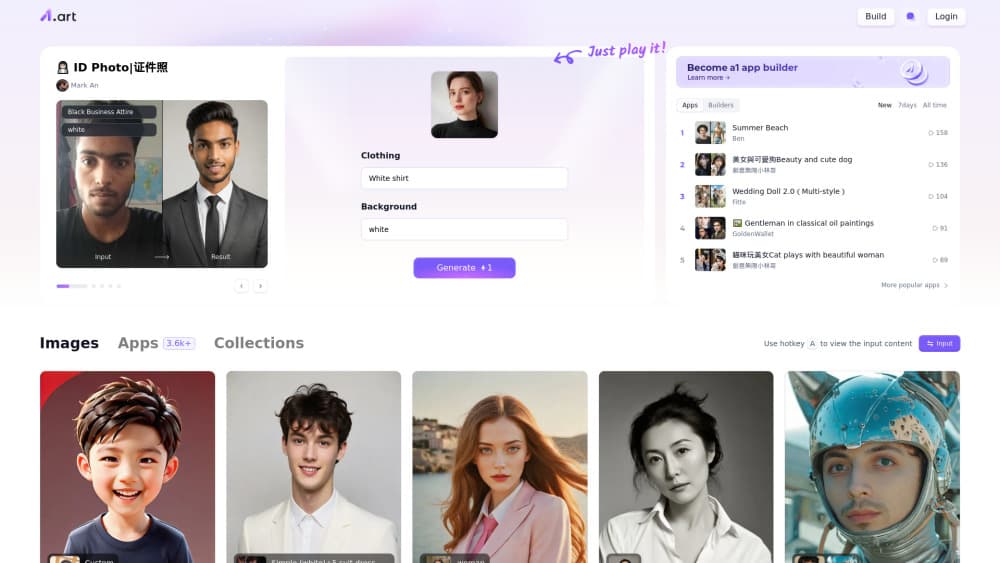
A1.art is a web and mobile platform where you run ready-made AI apps instead of writing prompts. Pick a style template, upload a photo or type a line, and it returns art in seconds.
About A1.art
What Is A1.art
A1.art is an AI art generator and AI photo generator built around a catalog of small apps, each one tuned for a single look. Portraits, anime shots, pet posters, tattoo mockups, holiday cards. You open an app, feed it a picture or a sentence, and it handles the prompt work for you.
The product comes from Jishi Design Tech, the team behind the Jishi Design collaboration tool. That background shows in how the site works: it's organized like a gallery with a feed, a leaderboard of trending apps, and a publish button, not like a bare prompt box.
The catch is that the free credits are limited and run out fast once you start testing different styles. Polished, watermark-free results sit behind the paid tiers, so the free plan works best as a trial rather than a daily driver.
Getting Started
- Sign up with an email or a social account on a1.art, or install the Android or iOS app.
- Browse the app list or the community feed and open a style template that matches what you want.
- Upload a photo or type a short description, then hit Run.
- Review the draft. If it's close, spend credits on a refined, watermark-free version.
- Download the file or publish it to the feed so other people can run your app.
Product Information
A quick look at A1.art's pricing, supported platforms, and performance.
Best for
The users, tasks, and scenarios where this tool fits best.
Users
- Social media creators
- Hobbyists who like trying styles
- Small brand and shop owners
Tasks
- Turning a selfie into a themed portrait
- Building an avatar or pet poster
- Making short clips from a still image
- Publishing a filter for other people
Scenarios
- Last-minute profile refresh before a trip or a job change
- Testing a visual direction for a small campaign
- Filling a content calendar for a niche account
Key features
Style template catalog
The core of the product is thousands of style templates, packaged as ready-made apps and grouped by theme. Each one bundles a model, a prompt and settings, so the output is consistent no matter who runs it. It's the fastest route from an idea to a usable image.
Text to image and photo to image in one place
You can start from a written description or from an uploaded picture. Photo-driven apps keep the subject's face and pose and rebuild the styling around it, which is what most casual users actually want.
Image to video and face swap video
Several apps animate a still photo into a short clip, and a separate set swaps a face into existing footage. These are the tools people search for after they've seen the results on social feeds. Expect short durations and modest resolution rather than production-grade footage.
AI app builder
You can assemble your own generator from Flux components, save it, and share it publicly. Other users run it with their own photos, and popular apps climb the leaderboard. It's closer to remixing than to coding.
Community feed and leaderboard
Every published app and generated image can appear in the feed, with run counts and creator names attached. That's how most people find new styles, and it doubles as light market research on what's trending this week.
Finishing service for clean output
The free run gives you a draft with a watermark. Paid credits unlock a sharper, unwatermarked render of the same image, which matters if the file is going into a print or a client deck.
Pros and cons
Pros
- No prompt engineering required, since each app already carries its settings.
- Deep catalog, with new styles added as trends move.
- Photo-driven apps are forgiving: one decent selfie usually returns something usable.
- Runs in a browser and on both mobile platforms, so you can start on a phone and finish on a laptop.
- The community feed doubles as inspiration and as a way to test an app before spending credits.
Cons
- Free credits are scarce, and testing several styles can burn through them in one session.
- Unwatermarked downloads sit behind the paid tiers, so free output is fine for a test but not for publishing.
- Style quality varies by creator, and some apps return flat results on low-light photos.
- Video output is short and low resolution, which rules out anything beyond social clips.
Frequently asked questions
It's free to start, with a small credit grant on signup and daily free credits for basic runs. Paid access comes in two tiers with a 20% discount if you pay yearly, and the lower tier starts around $12 per month.
Related content
Explore related tools, skills, and articles for A1.art.
A1.art Alternatives

Google EmbeddingGemma 2
Google DeepMind · Writing · Image · CodingGoogle EmbeddingGemma 2 is a 740M-parameter open model that turns text, code, images, audio, and video frames into vectors in one 768-dimension space, running on phones and laptops.

Tractionwave
TractionWave · Image · MarketingTractionWave is an AI attention heatmap tool for static ads. Upload a PNG or JPG and it returns predicted attention, ranked hotspots, and fixes before you spend budget.

Imejis.io
Imejis.io · Image · MarketingImejis.io is an AI design studio for agents and marketing teams. Describe an image in plain words, and it writes the copy, builds the layout, reflows it to every size, then exports a finished file.