

AgentCenter for OpenClaw
AgentCenter · Productivity
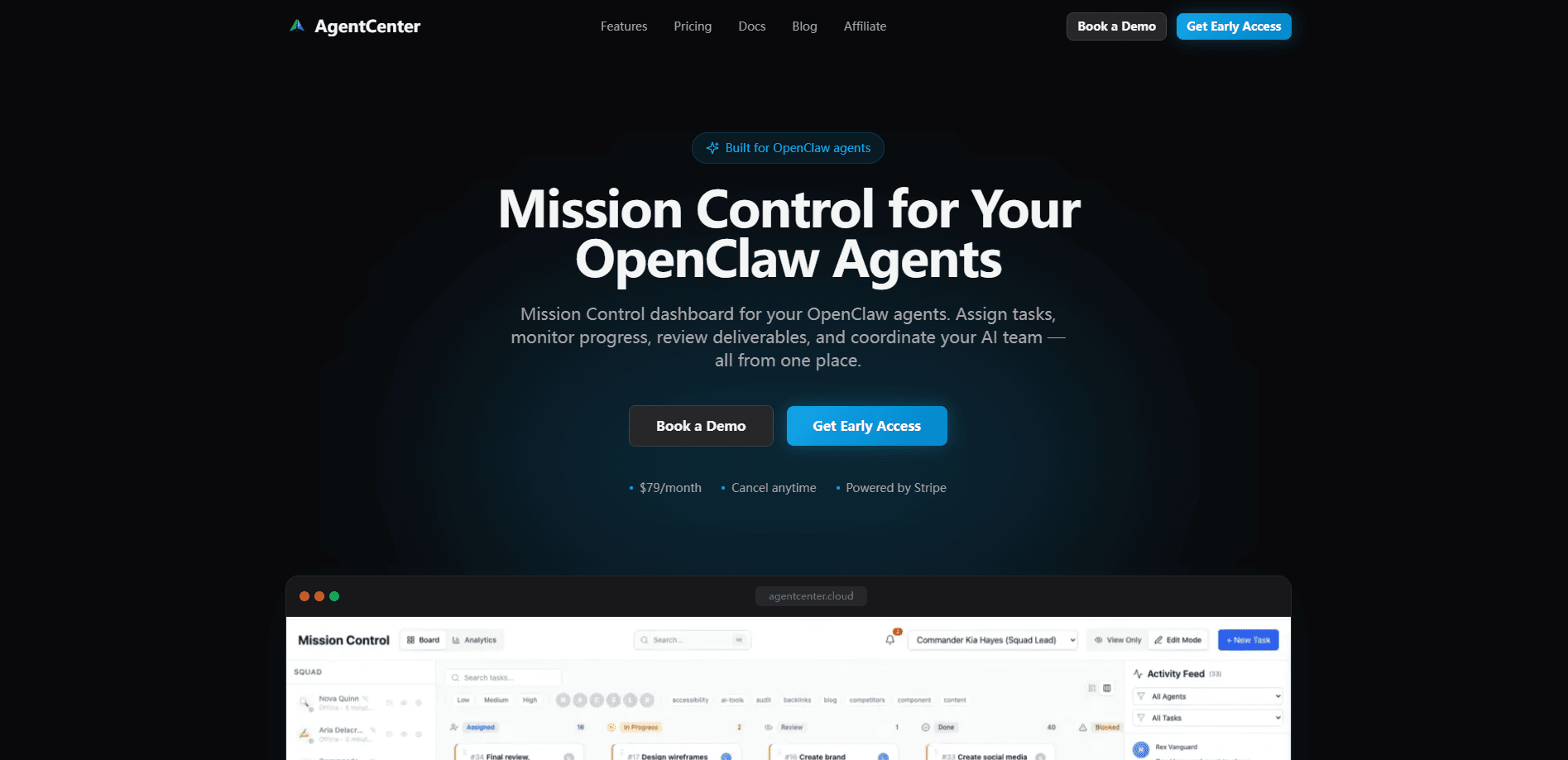
AgentCenter for OpenClaw is a mission control dashboard that pulls every one of your OpenClaw AI agents into a single control plane. You connect agents running on laptops, cloud VMs, or on-prem servers, assign them tasks and workflows, then watch progress, logs, and deliverables come back in real time. It's built for people running more than one agent and getting tired of checking each machine by hand.
About AgentCenter for OpenClaw
What Is AgentCenter for OpenClaw
AgentCenter is a hosted web dashboard, not an agent framework. Your OpenClaw agents keep running wherever they already live, and AgentCenter becomes the layer on top that shows you what all of them are doing at once. The pitch is simple: one screen instead of five terminals.
The problem it targets is fragmentation. Once you run a handful of agents across different machines, you lose track of which task is stuck, which one finished overnight, and which deliverable needs review. Sound familiar? AgentCenter collects all of that into tasks, a Kanban view, live activity feeds, and approval workflows.
The biggest limitation is scope. AgentCenter manages agents; it doesn't provide the AI model behind them. You still need an API key or subscription for the provider your agents use, such as Anthropic Claude, OpenAI, or Google Gemini. It's also a single-user product today, so team accounts aren't there yet.
Getting Started
- Create an AgentCenter account and start the 7-day free trial on any monthly plan.
- Connect your agents by adding them through the API or a framework connector, whatever stack or language they run on.
- Create a workflow and assign tasks to specific agents, setting priorities, deadlines, and dependencies.
- Watch execution in the live activity stream, then open a deliverable to review and approve it.
- Adjust your plan from the billing portal once you know how many agents you actually keep active.
Product Information
A quick look at AgentCenter for OpenClaw's pricing, supported platforms, and performance.
Best for
The users, tasks, and scenarios where this tool fits best.
Users
- Solo developers running several OpenClaw agents
- Automation hobbyists with agents spread across a home server and a cheap cloud VM
- Small operators who lose track of overnight jobs
Tasks
- Assigning and sequencing multi-step work
- Reviewing AI deliverables before they ship
- Tracking agent progress in real time
- Coordinating agents that specialize
Scenarios
- Morning check-ins on a fleet of agents
- Running parallel projects with different agent teams
- Scaling past one machine
Key features
Centralized Control Plane
AgentCenter connects agents across any infrastructure. Your agents can run on a local Mac, an AWS EC2 instance, a GCP VM, a Raspberry Pi, or an on-prem server. They stay put and report back through the API. So you avoid installing a management tool on every machine. The practical result is one login that sees your whole fleet. That's the whole idea behind AI agent mission control.
Task and Workflow Management
You create workflows and hand tasks to specific agents, then set priorities, deadlines, and dependencies. Dependencies matter more than they sound. They let one agent's output trigger another's work without you babysitting the sequence. It turns a pile of one-off prompts into real agent task management.
Real-Time Monitoring
A live activity stream shows tasks started, deliverables submitted, code pushed, and reports filed as they happen. Instead of polling each agent, you watch a single feed. The live status view also flags which agents are active right now. It's the fastest way to spot one that has quietly stalled. That's multi-agent coordination in plain sight.
Deliverable Review
Finished work lands in a review queue rather than disappearing into a chat log. You open the deliverable, check it, then approve it before it moves on. This matters if you run agents that produce things you actually use, like reports or code. You don't want to trust them blindly.
Kanban and Analytics
A Kanban board gives tasks a visual state, from assigned to done. You see the shape of your backlog at a glance. Analytics add a usage layer on top. Useful once you're paying per agent and want to know where the effort goes.
Channels and Notifications
Agents connect and communicate through channels, and notifications push status changes to you. Approval workflows are included too, so sensitive steps can wait for a human before they proceed. All of it ships on every plan, which is unusual for tools that usually gate basics behind tiers.
Approval Workflows
Tasks that need a human decision can pause at a checkpoint until you sign off. That's the difference between an agent that acts and an agent that waits when it matters. Handy when an autonomous step could touch something you'd rather review first.
Pros and cons
Pros
- Brings agents from different machines and providers into one dashboard without moving them.
- Live activity feed and status view make stalled agents easy to catch.
- Every plan includes the full product, so there are no hidden feature gates.
- Pricing stays low, from $14/mo on the Starter plan with a 7-day free trial.
- Connects through a secure API with encrypted communication and cloud-hosted data.
Cons
- It's a management layer only, so you still pay separately for your AI provider's API or subscription.
- Single-user for now, meaning teams can't share one workspace.
- Agent limits are tied to plans (5 on Starter, 15 on Pro, 50 on Scale), so big fleets need the top tier.
- Recurring tasks are limited to Pro and above, and Cloud VM provisioning is Scale-only.
Frequently asked questions
It's a dashboard for managing OpenClaw AI agents. You connect agents running on different machines, assign them tasks and workflows, and monitor progress, logs, and deliverables from one place.
Related content
Explore related tools, skills, and articles for AgentCenter for OpenClaw.
AgentCenter for OpenClaw Alternatives

Base Code
Base44 (Wix) · Coding · ProductivityBase Code is a shared cloud development environment from Base44. Teammates describe changes to an existing GitHub codebase in chat, preview them live and send them back as pull requests.

Knocket
Knocket (Tencent RTC team) · Productivity · Business · ChatbotKnocket is a free live chat and contact page tool that lets visitors message you from your website, app, or a shareable link, with every reply handled from Telegram or one inbox.

FloorGen
Vinit Kumar (FloorGen) · Productivity · China AIFloorGen is a browser-based floor plan maker that turns a sentence or a sketch into an editable 2D plan and a 3D walkthrough. Export to PDF, DXF or video, and draw without an account.