

AgentQL
TinyFish · Coding
AgentQL is an AI query language and parser from TinyFish. It finds page elements by meaning, so scrapers and browser agents keep working when a site's HTML changes.
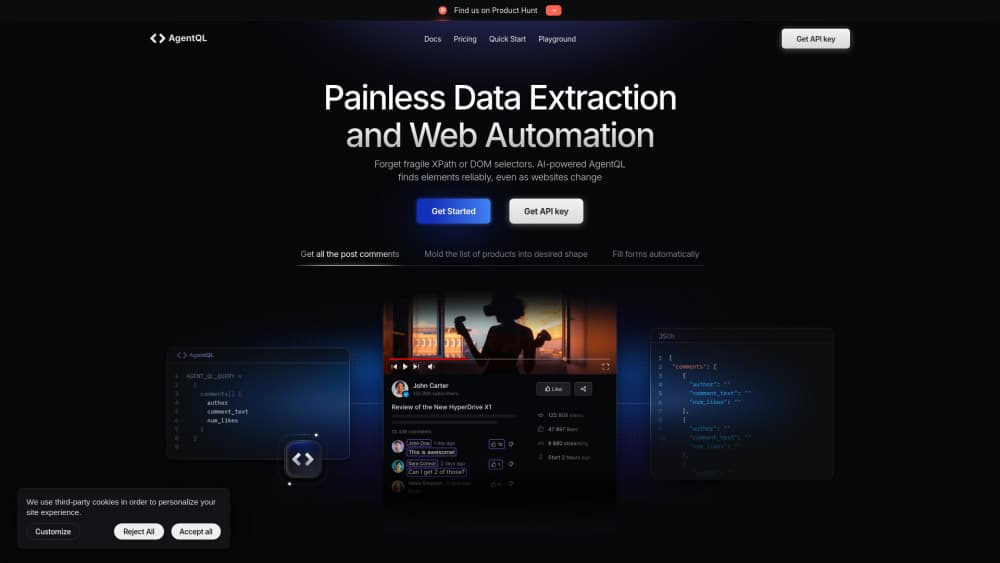
About AgentQL
What Is AgentQL
AgentQL is a query language plus a parser built for AI web scraping and page control. Instead of writing XPath or CSS selectors, you describe the fields you want in near-English, something like products[] { name price }, and the service returns JSON in that shape. The AI layer reads the context around each element, so the query still matches after a redesign moves the markup around.
The product covers two jobs. For scraping, query_data returns structured records from a page. For automation, query_elements and get_by_prompt hand back Playwright locators you can click, type into, or scroll. That second path is Playwright scraping with actions attached. TinyFish ships Python and JavaScript SDKs, a REST endpoint that skips the browser, a Chrome debugging extension, and an MCP server for agent frameworks.
The tradeoff is dependence on a hosted service. Every query goes through AgentQL's API with your key, so costs scale per call after the free allowance, and you need a network connection at run time. Canvas-heavy interfaces, unusual layouts, and sites with aggressive bot defenses can still trip it up. Treat results as good but not guaranteed, and spot check production runs.
Getting Started
- Create an account at agentql.com and copy an API key from the developer portal.
- Install the SDK with
pip install agentqlornpm install agentql. - Write a query listing the fields you need, adding type hints such as
price(integer)where the format matters. - Call
query_datafor extraction orquery_elementsfor interaction inside a Playwright script. - Test the query in the playground or the browser extension before you run it at scale.
Product Information
A quick look at AgentQL's pricing, supported platforms, and performance.
Best for
The users, tasks, and scenarios where this tool fits best.
Users
- Python and JavaScript developers
- Data and growth teams without a scraping engineer
- AI agent builders
Tasks
- Price and listing monitoring
- Lead and directory collection
- Form filling and checkout flows
- Feeding clean page data to a language model
Scenarios
- A redesign breaks your scraper
- One query across several similar sites
- Research on pages behind a login
Key features
Semantic Selectors
AgentQL matches elements by meaning and surrounding context rather than DOM position. A field called product_price finds the price even when the class name changes or the block moves down the page. That makes queries stable across A/B tests and slow layout drift, and it lets the same query work on sites built by different teams.
Schema by Query
The query doubles as your output contract. Nest objects, mark lists with brackets, and add hints like price(integer) or product_price(include currency symbol) to control formatting. You get JSON shaped exactly as written, so structured data extraction needs no cleaning step downstream.
Playwright Integration
The Python and JavaScript SDKs wrap Playwright pages, adding query_data, query_elements, and get_by_prompt methods. You keep the full browser API for navigation, screenshots, and file uploads. Locators returned by a query behave like normal Playwright locators, so existing test helpers still apply.
Browserless REST API
A REST endpoint returns page data from a URL without launching a browser. That suits scheduled jobs and serverless functions where a Chromium download is impractical. You send a URL plus a query and get structured results back in one request.
Browser Debugger
A Chrome extension opens a side panel on any page where you can draft a query and see matched elements highlighted in real time. It shortens the loop between writing a selector and knowing whether it works, which matters most on messy pages.
MCP Server
The open source MCP server exposes AgentQL extraction to assistants and agent runtimes that speak the Model Context Protocol. Install it with npx, add an API key, and the agent can fetch structured data from a URL as a tool call. No glue code needed.
Pros and cons
Pros
- Queries read like the data you want, so new team members can edit them without selector expertise.
- Self-healing matching cuts the maintenance that eats most scraping budgets.
- The free Starter plan includes 50 API calls per month, enough to validate a use case before paying.
- Playwright support covers both extraction and interaction in one script.
- REST API and MCP server cover browserless jobs and agent workflows.
Cons
- Metered calls add up: $0.02 per call on Starter and $0.015 on Professional after the included volume, so a 100,000 page crawl costs real money.
- Remote browser hours are billed separately at $0.12 or $0.10 per hour, which makes long automation sessions more expensive than they first appear.
- Every query depends on the hosted API, so there's no offline mode and an outage stops your pipeline.
- AI matching isn't deterministic: odd layouts can return partial or shifted fields, so production jobs need validation and retries.
Frequently asked questions
It handles two jobs: extracting structured data from web pages and driving browser automation. Teams use it for price monitoring, lead collection, form filling, and feeding clean page data to AI agents.
Related content
Explore related tools, skills, and articles for AgentQL.
AgentQL Alternatives

Udon
Udon · Coding · ProductivityUdon turns an Apple Silicon Mac into a home server you run from a browser, with container controls, file shares, and an optional AI sysadmin.

offstage
offstage cloud · Coding · Productivityoffstage gives AI coding agents and CI jobs a real Mac: a fresh macOS account on Apple silicon, driven over an API and billed by the second.

BotBus
Chengdu Tuyang Tusen Technology Co., Ltd. · Coding · ProductivityBotBus lets you control AI coding agents from your phone and watch: approve commands, start tasks and read results while the code stays on your desktop.