

AI Accounting Apps
AI Accounting Apps · Business · Other
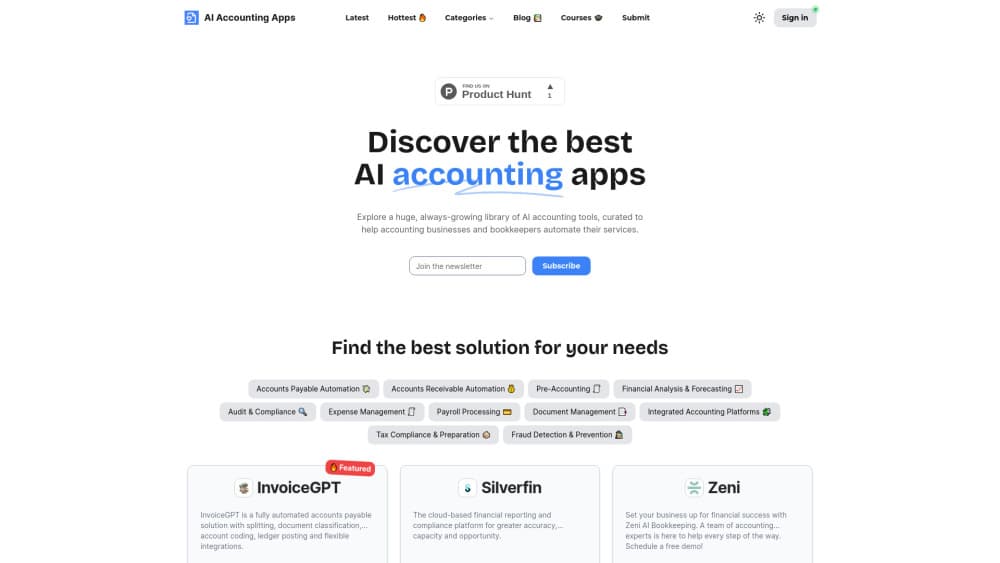
AI Accounting Apps is an independent directory of 319 AI accounting tools across 13 categories, with editor-reviewed profiles, pricing signals and free finance calculators.
About AI Accounting Apps
What Is AI Accounting Apps
AI Accounting Apps is an accounting software directory that catalogs AI accounting software by the job it does. The index covers 319 tools across 13 categories, from AP automation and bank-statement conversion to tax software and intelligent ledgers. It's built for accountants, bookkeepers and finance teams who need to pick a tool without sitting through eight weeks of vendor demos.
The site reads like a reference shelf rather than a store. Every listing gets an editor-written profile with capabilities, pricing signals, integrations and alternatives, all printed in the same shape so two tools can be compared side by side. Featured placements are labeled, and the desk says ranking can't be bought.
Two limits matter before you start. The index doesn't sell or run the software it lists, so trials, contracts and data handling stay between you and the vendor. Coverage skews toward English-speaking markets, which means local rules and e-invoicing networks outside the UK, US and EU get thinner treatment.
Getting Started
- Open the site and pick a category that matches the job, such as AP automation software or a bank statement converter.
- Read two or three profiles in that category and compare capabilities, pricing signals and integrations.
- Check the free calculators for quick figures on margin, depreciation, ROI or break-even.
- Email the editorial desk if a tool you use is missing, or submit a listing if you build one.
Product Information
A quick look at AI Accounting Apps's pricing, supported platforms, and performance.
Best for
The users, tasks, and scenarios where this tool fits best.
Users
- Accountants at small practices
- Bookkeepers
- Finance leads at growing companies
- Founders of accounting tools
Tasks
- Shortlisting software for a firm
- Checking pricing before a sales call
- Quick finance math
- Keeping up with the market
Scenarios
- Busy season starts in three weeks and your current bank statement tool keeps failing
- A new firm needs a starter stack
- A vendor wants to reach accountants without buying ads
Key features
A 319-tool index across 13 categories
The directory covers 319 tools organized by workflow rather than by vendor size. Categories include AP automation, bank-statement converters, fraud detection, tax software, e-invoicing and financial analysis. Sorting by job means you start from the task you need done, not from a brand you already know.
Editor-written profiles in one comparable shape
Each listing carries a summary, capabilities, pricing signals, integrations and alternatives, written by the editorial desk. The same fields appear in the same order on every profile, which makes head-to-head reading possible without a spreadsheet. The desk says it logs in and trials tools before a profile ships.
Pricing signals before you talk to sales
Profiles note what a tool costs and how it charges, whether that's per invoice, per client or a monthly seat. You won't always get a full price list, but you'll get enough to rule a tool in or out. That shortens the gap between interest and a quote.
Free calculators with no email gate
Six finance calculators cover margin and markup, depreciation, ROI, break-even, EBITDA and the current ratio. They run in the browser and return numbers without a signup form. For a quick client question, that's faster than opening a spreadsheet.
Clear labels on paid placement
Featured slots and verified badges are marked on the profile itself. The desk states that ranking can't be bought and that a human reviews a listing before it goes live. You can see which tools paid for exposure and which didn't.
A blog that tracks the market
Longer essays cover where AI accounting stands in 2026, along with AP automation, tax preparation and bank reconciliation. Posts are dated and tied to the same categories as the index. Reading one gives context for the profiles you're about to compare.
Listing and update process for vendors
A vendor pays €59 once through Stripe, emails the tool URL, a description and a logo, then gets a review within 24 hours. Updates are free for the life of the listing. The desk refunds the fee if it decides a tool doesn't fit.
Pros and cons
Pros
- Free to browse, with no account needed for the index or the calculators.
- Every profile uses the same fields, so comparisons don't require note-taking.
- Paid placements are labeled, which makes the editorial order easier to trust.
- The category structure matches how accountants split work, from AP to tax.
- A €59 one-off listing with free lifetime updates is cheap for a vendor next to ad spend.
Cons
- Profiles summarize vendor claims and desk notes, so they don't replace a trial with your own client data.
- The 319 tools aren't tested against a fixed benchmark, which makes accuracy claims hard to rank.
- Coverage leans on UK, US and EU tools, so firms in other markets will find gaps.
- Index updates arrive in batches, so a brand-new tool can take a while to appear.
Frequently asked questions
Yes. Browsing the index, reading profiles and using the calculators costs nothing and doesn't require an account. Only vendors pay, and only when they want a listing.
Related content
Explore related tools, skills, and articles for AI Accounting Apps.
AI Accounting Apps Alternatives
Liveplan
Palo Alto Software · BusinessLivePlan is business plan software that helps founders and small business owners turn an idea into a funder-ready plan. It combines AI-assisted writing, market research with cited sources, and connected financial forecasting so your income statement, cash flow, and balance sheet move together when you change one number. Over 1.5 million businesses have used it to plan, forecast, and track performance against real accounting data. That's a lot of founders. It's also a signal the tooling survived contact with real lenders.

Swms
Swms AI · Writing · Productivity · BusinessSwms is an AI safety compliance tool that turns a plain description of a job into ready-to-use safety documents. Describe your project, trade, and known hazards, and it writes a safe work method statement, job hazard analysis, safe work procedure, RAMS, or safety data sheet in seconds. It also ships with Oscar, a chat assistant that answers workplace safety questions in any language. Teams in construction, mining, transport, and warehousing use it to cut the paperwork that usually eats into a workday.

Rows
Rows (Superhuman) · Productivity · BusinessRows is an AI spreadsheet and data analysis tool that imports live data from more than 50 sources, then lets you work with it using plain language instead of SQL queries or nested formulas. You can pull numbers out of PDFs, connect ad platforms, databases, and bank accounts, and ask the AI to build reports, merge datasets, or set up models that recalculate themselves. It runs in the browser, works like a spreadsheet, and now sits under the Superhuman umbrella.