

Rows
Rows (Superhuman) · Productivity · Business
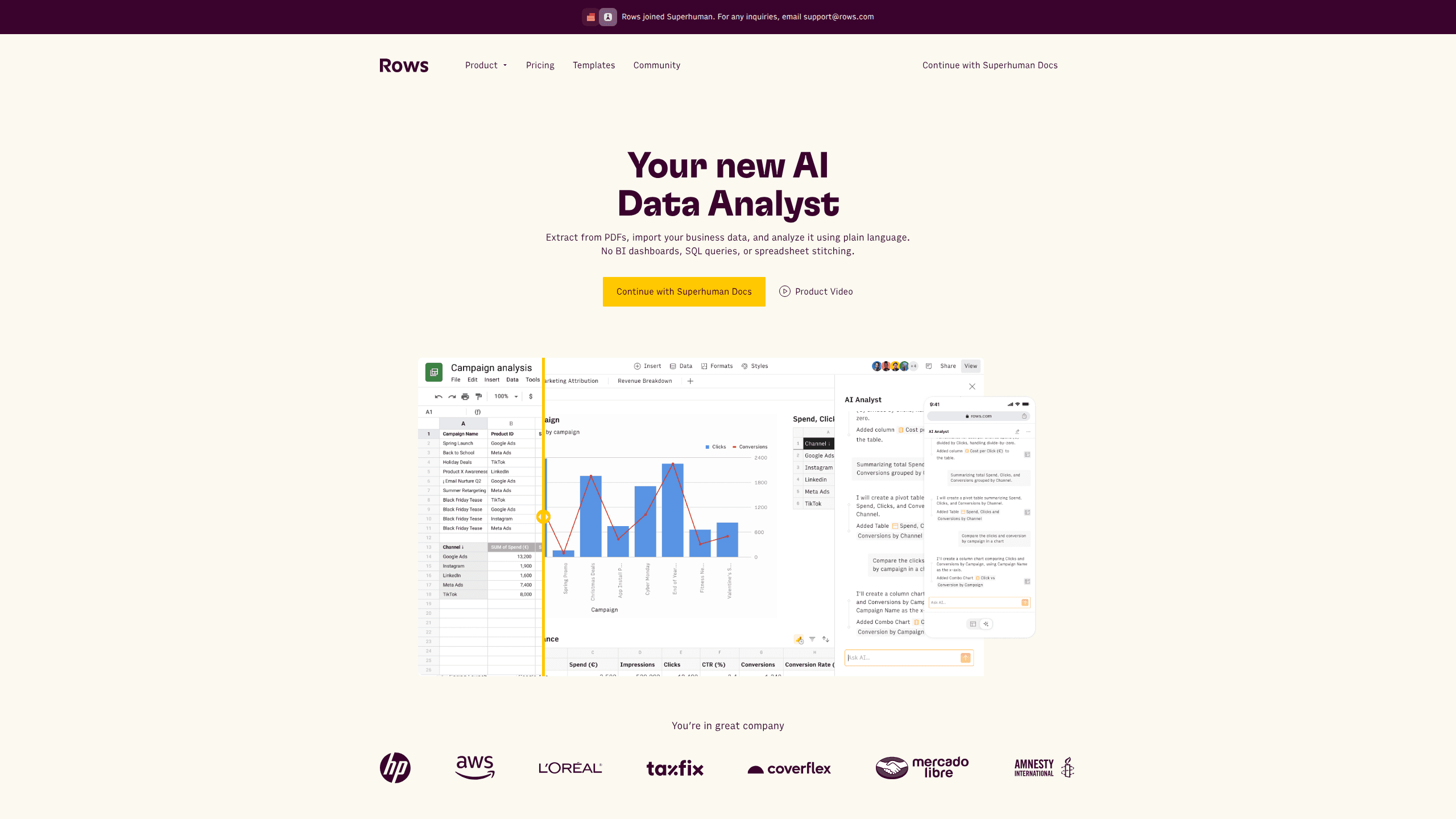
Rows is an AI spreadsheet and data analysis tool that imports live data from more than 50 sources, then lets you work with it using plain language instead of SQL queries or nested formulas. You can pull numbers out of PDFs, connect ad platforms, databases, and bank accounts, and ask the AI to build reports, merge datasets, or set up models that recalculate themselves. It runs in the browser, works like a spreadsheet, and now sits under the Superhuman umbrella.
About Rows
What Is Rows
Rows is a browser-based spreadsheet built around an AI analyst. Instead of memorizing functions or writing queries, you describe what you want. "Give me last month's ad spend by channel" is enough. The tool handles extraction, merging, and formatting on its own.
The product targets a familiar pain. Most people have their data scattered across a dozen tools, and stitching that together usually means exports, copy-paste, and a formula you'll forget how to edit next week. Rows keeps the spreadsheet you already know and layers automation on top.
The main limit is scope. Rows isn't a replacement for a full BI platform, and some features depend on your plan. Automation frequency is tiered, so heavy daily pipelines on the Free or Plus plan don't fit. It's also a web product. No offline desktop version exists.
Getting Started
- Create your account on the Rows website and pick a plan, starting with the free tier if you want to test the AI features.
- Import data by connecting a source or uploading a file, or use the RowsX browser extension to grab tables from a web page.
- Ask the AI to extract, clean, or merge your data, or build a live report from the imported tables.
- Share the result with your team or embed the report and dashboard wherever you need it.
Product Information
A quick look at Rows's pricing, supported platforms, and performance.
Best for
The users, tasks, and scenarios where this tool fits best.
Users
- Marketing and growth analysts
- Operations and finance staff
- Founders and side-project builders
Tasks
- Extracting tables from PDFs and invoices
- Building live reports from multiple sources
- Modeling and planning
Scenarios
- Weekly marketing reporting
- Early project research
- Embedding numbers in docs or sites
Key features
AI Data Analysis in Plain Language
You describe the question and Rows AI does the work, whether that's creating a report, merging two datasets, or running a deeper analysis across columns. There's no SQL editor to learn, which matters most for people who live near data but aren't data engineers. The tradeoff is that very specific statistical work may still send you back to a code tool. For routine reporting, it holds up.
Importing from 50+ Sources
Rows connects to social platforms, data warehouses, advertising tools, back-office systems, and bank accounts through built-in integrations. Each connection pulls live data rather than a one-time snapshot, so your report stays current. The RowsX extension adds another path. It turns tables from almost any website into data with one click. No scraping code required.
Automatic Data Refresh
Data tables can refresh on a schedule, from once a minute on the top tiers to once a day on Plus. That means a dashboard reflects the current numbers instead of whatever was true when you last exported a CSV. The catch is that refresh frequency depends on your plan. Slow-moving setups get the cheapest option.
AI Extraction from Documents
Point Rows at a PDF and it pulls out the table you need, which is handy for invoices, statements, and reports that only exist as files. Manual retyping and the errors that come with it disappear. Messy documents still deserve a quick spot check.
Models and Calculators
You can ask the AI to build models and calculators that behave like spreadsheet logic but update on their own as inputs change. Pricing tools, forecasts, and scenario planners become something you assemble by description rather than by wiring cells together. It suits planning work where the formula skeleton would otherwise take an afternoon. That adds up fast.
Sharing and Embedding
Reports and interactive dashboards render well on any device and can be embedded elsewhere, so a chart can live inside a Notion doc or a calculator inside a website. Guests can be added to review and comment, with the number of guest seats tied to your plan. That turns a private spreadsheet into something a whole team, or the public, can read.
Collaboration and API Access
Real-time collaboration lets teammates work in the same sheet and leave feedback as you go. On the developer side, the Rows API supports programmatic access and custom endpoints, with call limits that scale by tier. It's the piece that lets Rows fit into a larger workflow rather than sitting off to the side.
Pros and cons
Pros
- Plain-language analysis removes the SQL and formula barrier for non-technical users.
- Live connections to more than 50 data sources keep reports current without manual exports.
- The RowsX extension turns web tables into usable data quickly.
- Embedding and sharing make the output easy to circulate beyond your own account.
- A free forever plan with no credit card makes it cheap to test the AI workflow.
Cons
- Automation frequency is tiered, so daily or per-minute refreshes push you toward the paid plans.
- It's web only, which is a problem if you need an offline desktop spreadsheet.
- AI extraction from messy PDFs can need a manual review pass before the numbers are trustworthy.
Frequently asked questions
Rows is used to import, combine, and analyze data from many sources without writing code. People build reports, extract tables from documents, and create calculators, all inside a spreadsheet interface driven by AI.
Related content
Explore related tools, skills, and articles for Rows.
Rows Alternatives

Swms
Swms AI · Writing · Productivity · BusinessSwms is an AI safety compliance tool that turns a plain description of a job into ready-to-use safety documents. Describe your project, trade, and known hazards, and it writes a safe work method statement, job hazard analysis, safe work procedure, RAMS, or safety data sheet in seconds. It also ships with Oscar, a chat assistant that answers workplace safety questions in any language. Teams in construction, mining, transport, and warehousing use it to cut the paperwork that usually eats into a workday.

Wordly AI Translation
Wordly · Voice & Language · ProductivityWordly AI Translation is a real-time AI translation and captioning platform built for meetings, conferences, and events. It delivers live translation, captions, transcripts, and summaries in more than 60 languages, and attendees join by scanning a QR code or opening a link instead of using dedicated headsets. The platform works with Zoom, Microsoft Teams, Google Meet, and Webex, and it's designed for organizations that want multilingual access without hiring human interpreters for every session. Simple as that.

Compose AI
Compose AI, Inc. · Writing · ProductivityCompose AI is a personal AI writing assistant that autocompletes your sentences as you type, across most tools you already use in the browser. It works as a Chrome extension, so it follows you into Gmail, docs, and web forms instead of forcing you into a separate editor. It doubles as an email writing assistant for the inbox you live in all day. Just install it once. The pitch is simple: write faster and type less, with the extension claiming to cut writing time by around 40 percent. It leans on a personalization layer that learns your voice over time, and the team says it's used by 10,000+ teams and 400,000 people.