

AI Color Match
Polarr, Inc. · Image
AI Color Match is a free web tool from Polarr that copies the color and tone of any reference image onto your photo in one click, then exports a JPEG, a Lightroom profile or a LUT.
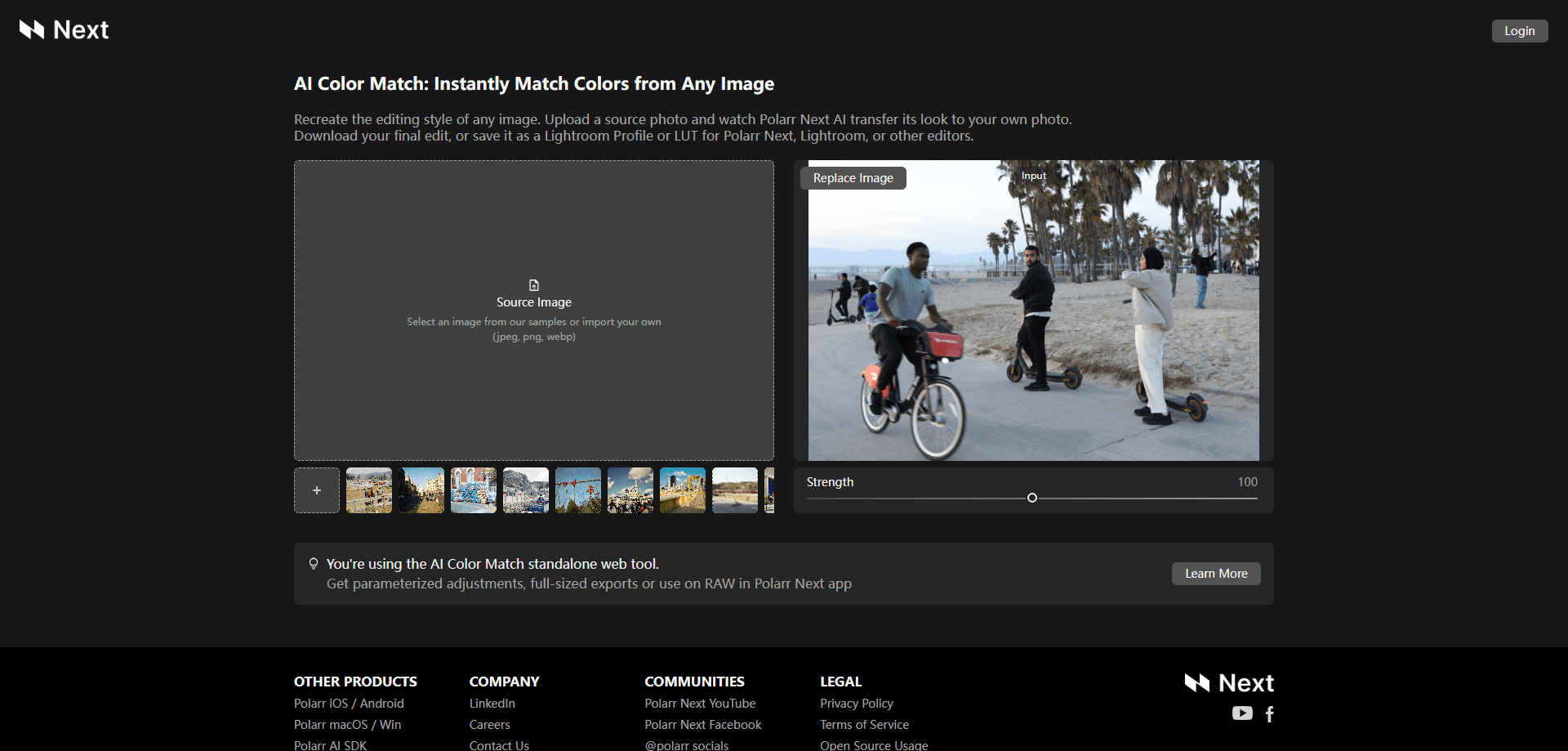
About AI Color Match
What Is AI Color Match
AI Color Match is Polarr's browser-based color grading tool. You give it two images: the photo you want to fix and a reference whose look you like. The AI reads the colors, contrast and tone of the reference, then rebuilds your photo to match it. No sliders, no curves, no guessing at white balance.
The appeal is speed. Matching a look across a shoot by hand takes practice and time, because you are reading color by eye and translating that into numbers. AI Color Match skips that step. It does the read for you and hands back a photo that already carries the reference's mood.
The tool is free to use in a browser, without an account for a basic edit. When you want more than the web version gives, you take the result further: the exported look travels as a Lightroom Profile or a LUT you can reuse on other photos, and full-size exports or RAW support come with the Polarr Next app. That's the honest split. The web tool is a quick, free matcher. The paid app is where the workflow lives.
Getting Started
- Open colormatch.polarr.com in Chrome or any modern browser, no download required
- Pick a reference image from the built-in samples or import your own as a JPEG, PNG or WebP
- Upload the source photo you want to recolor, then let the AI transfer the look
- Nudge the Strength slider if the match reads too strong or too subtle
- Download the result as a JPEG, or save the look as a Lightroom Profile or LUT for reuse in Lightroom, Polarr Next or another editor
Product Information
A quick look at AI Color Match's pricing, supported platforms, and performance.
Best for
The users, tasks, and scenarios where this tool fits best.
Users
- Photographers who want a color grade in seconds instead of a full editing session, with the look exportable as a reusable profile
- Content creators on a phone or laptop
- Editors learning color
- Lightroom and Polarr Next users
Tasks
- Color matching a single photo
- Building a reusable LUT
- Making a set consistent
- Fixing flat color
- Creating a Lightroom Profile
Scenarios
- You found an image on social whose color you love and want that exact mood on your own photo
- A client shoot needs a unified grade across dozens of frames taken under different light
- You are on a laptop away from your desktop editor and need a fast color fix in the browser
- You are testing a look before committing to a full edit, so you match a reference first and export it as a LUT
- You shoot in mixed light and want one reference to pull a scattered set toward a single tone
Key features
One-Click Color Transfer
The core of the tool is a single action. You hand over a source photo and a reference, and the AI applies the reference's color and tone to your image. There's no manual color wheel, no tone curve to drag and no white balance to dial in. The company's pitch on the site is simple: recreate the editing style of any image. For a user, that means a look you saw and liked turns into your photo with one movement.
Reference Image Library and Your Own Uploads
You don't need a reference ready to try it. AI Color Match ships with a set of sample images, so you can pick a look and watch it land on your photo before you import anything. It's also a fast way to build a Lightroom preset you keep, because any look you match can leave as a reusable profile. When you have a specific target in mind, you upload your own reference. Both paths accept common web formats, JPEG, PNG and WebP, so phone screenshots and downloaded inspo images all work.
Strength Control for the Match
A full transfer isn't always what you want, and the tool knows it. A Strength slider lets you pull the effect back or push it further, so you can match a look exactly or keep a hint of your original grade. That control is what separates a usable match from a heavy filter. Set it low for a subtle tone shift, or high when you want your photo to fully take on the reference's mood.
Export as JPEG, Lightroom Profile or LUT
The result doesn't have to live as a one-off JPEG. AI Color Match exports the matched look as a Lightroom Profile or a LUT, which are reusable color recipes. A LUT is a file that maps colors from one range to another, and editors use them to apply a look in a single step. Save one here, and you can reuse that style across other photos, in Lightroom, in Polarr Next or in another editor that reads LUTs. That's what turns a one-time match into a tool you keep.
Free Web Tool with No Setup
The whole thing runs in a browser, and basic use is free. There's no installer, no plugin and no required plugin chain. You open a page, drop in two images and leave with a graded photo. For anyone who wants a color match now, without committing to a paid editor or a learning curve, that low barrier is the point.
Built on Polarr's Editing Engine
AI Color Match comes from Polarr, a company that has built photo and video editing software since 2015. The matched look isn't a random wash; it feeds into the same editing model the company uses elsewhere. When you carry an exported LUT or profile into Polarr Next, you land in a full editing environment with full-size exports and RAW support, so the free web tool and the paid app share one color pipeline.
Pros and cons
Pros
- Matches a reference's color and tone in one click, with no curves or color wheels to touch
- Free to use in a browser, no account needed for a basic edit
- Exports reusable Lightroom Profiles and LUTs, so a single match becomes a style you can apply to other photos
- Strength slider lets you dial the transfer from subtle to full
- Runs on JPEG, PNG and WebP, so phone images and downloads both work
- Comes from Polarr, a long-standing editing company, and connects to the Polarr Next app for RAW and full-size work
Cons
- The free web tool is a matcher, not a full editor, so fine-tuning default adjustments still means opening another app
- Full-size exports and RAW files require the Polarr Next app, not the browser version
- There's no documented public API, so you cannot script color matching into your own pipeline yet
- The output quality depends on the reference you pick, and a busy or unusual reference can pull your photo in an odd direction
Frequently asked questions
AI Color Match is a free web tool from Polarr that copies the color and tone of any reference image onto your own photo. You upload a reference and a source photo, the AI transfers the look, and you can export the result as a JPEG or save the style as a Lightroom Profile or LUT. It runs in a browser, so there's nothing to install.
Related content
Explore related tools, skills, and articles for AI Color Match.
AI Color Match Alternatives

Google EmbeddingGemma 2
Google DeepMind · Writing · Image · CodingGoogle EmbeddingGemma 2 is a 740M-parameter open model that turns text, code, images, audio, and video frames into vectors in one 768-dimension space, running on phones and laptops.

Tractionwave
TractionWave · Image · MarketingTractionWave is an AI attention heatmap tool for static ads. Upload a PNG or JPG and it returns predicted attention, ranked hotspots, and fixes before you spend budget.

Imejis.io
Imejis.io · Image · MarketingImejis.io is an AI design studio for agents and marketing teams. Describe an image in plain words, and it writes the copy, builds the layout, reflows it to every size, then exports a finished file.