

AI Disturbance Overlay
AI Disturbance · Image
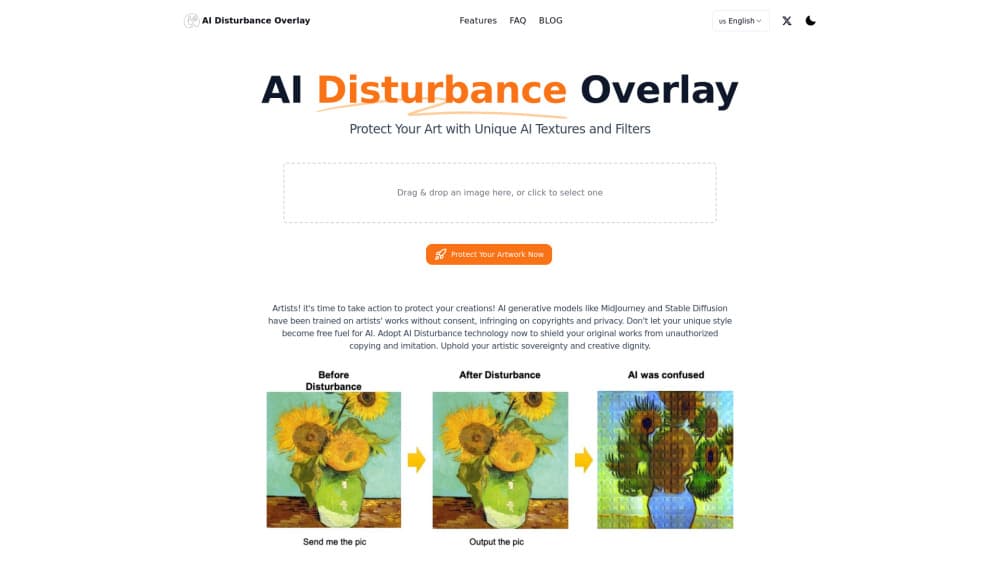
AI Disturbance Overlay is a free browser tool that adds invisible noise to digital art so AI models can't copy your style, while viewers still see the original.
About AI Disturbance Overlay
What Is AI Disturbance Overlay
AI Disturbance Overlay is an online tool built for artists who want to publish their work without feeding it to AI image generators. You upload a piece through your browser, and the tool adds faint AI disturbance texture and filter layers that humans barely notice but that confuse the models trained to learn and mimic art styles. In practice, that makes it one of the few free anti-AI filter options aimed squarely at protecting artwork from AI training runs rather than just watermarking it.
The problem it targets is specific. Tools like Midjourney and Stable Diffusion learned from huge libraries of scraped artwork, often without any consent from the people who made it, and a style that took years to build can now be reproduced by anyone with a keyboard in seconds. This tool gives that style a defense layer before the image ever goes public.
It isn't a magic shield. Protection depends on the model and on how the image is later handled, and no overlay can guarantee a style will never be imitated. Think of it as raising the cost of copying, not locking the door.
Getting Started
- Open the AI Disturbance Overlay site in a modern browser and head to the WorkBench.
- Upload the digital artwork you want to protect. JPG, PNG, and WebP files all work.
- Pick a disturbance texture or filter and adjust how strong the effect should be.
- Run the process, then preview the protected version to confirm it still looks right to the eye.
- Download the finished image and post it wherever you share your work.
Product Information
A quick look at AI Disturbance Overlay's pricing, supported platforms, and performance.
Best for
The users, tasks, and scenarios where this tool fits best.
Users
- Digital illustrators
- Comic and manga artists
- Photographers sharing online
Tasks
- Pre-publishing protection
- Batch prep of a series
- Style defense on signature work
Scenarios
- Posting new work to Instagram or X without inviting AI scraping.
- Publishing a commission you don't want reproduced in someone else's generator.
- Building a public portfolio where the style itself is the product.
Key features
Invisible Disturbance Textures
The core of the tool is a set of AI disturbance texture and filter layers that shift how a machine reads an image without changing how a person sees it. The noise is tuned to the gap between human vision and the way AI models process pixels. To you, the piece looks the same. To a model trying to learn the style, the signal is muddied.
Browser-Based Workflow
There's nothing to install. You upload through the browser, adjust the settings, and download the result. That matters for artists who work across devices or don't want another desktop app eating disk space. The trade-off is that very large files depend on your connection and the tool's processing queue.
Screenshot and Re-Processing Resistance
Protection is meant to survive the messy ways images travel online. If someone screenshots the piece or runs it through filters, the disturbance is designed to stay in place rather than wash out. It won't stop a determined copyist with heavy editing tools, but it handles the common cases.
Style-Specific Protection
You choose how aggressive the effect is, which lets you match protection to the value of the piece. A casual sketch might only need a light pass; a signature illustration worth guarding closely can take a stronger layer at the cost of a slightly more textured look. Is that trade-off worth it? For most working artists, yes.
Useful Links
- Glaze: a research-backed AI art protection tool from the University of Chicago that cloaks a style. - Mist: a lighter anti-AI filter designed for faster runs on smaller files. - IbisPaint: a mobile drawing app, useful for finishing a piece before you protect it.
Pros and cons
Pros
- Free to use, so cost isn't a barrier to protecting your portfolio.
- Runs in the browser, meaning no download or setup.
- Keeps artwork visually intact for human viewers.
- Built specifically around how AI art models learn styles.
Cons
- No guarantee against imitation, since protection depends on the model and version.
- Strong settings can add visible texture, which hurts clean, minimal styles.
- No public API, so it can't be wired into an automated publishing pipeline.
- Processing may take a while on large or high-resolution files.
Frequently asked questions
Yes. The tool runs through its WorkBench in the browser at no cost, and there's no paid tier listed. You can protect images without paying or handing over billing details.
Related content
Explore related tools, skills, and articles for AI Disturbance Overlay.
AI Disturbance Overlay Alternatives

Google EmbeddingGemma 2
Google DeepMind · Writing · Image · CodingGoogle EmbeddingGemma 2 is a 740M-parameter open model that turns text, code, images, audio, and video frames into vectors in one 768-dimension space, running on phones and laptops.

Tractionwave
TractionWave · Image · MarketingTractionWave is an AI attention heatmap tool for static ads. Upload a PNG or JPG and it returns predicted attention, ranked hotspots, and fixes before you spend budget.

Imejis.io
Imejis.io · Image · MarketingImejis.io is an AI design studio for agents and marketing teams. Describe an image in plain words, and it writes the copy, builds the layout, reflows it to every size, then exports a finished file.