
AI Hug
AI Hug · Image · Video
AI Hug is a free online AI tool that turns two photos into a short hug video, useful for long-distance families and social posts.
About AI Hug
What Is AI Hug
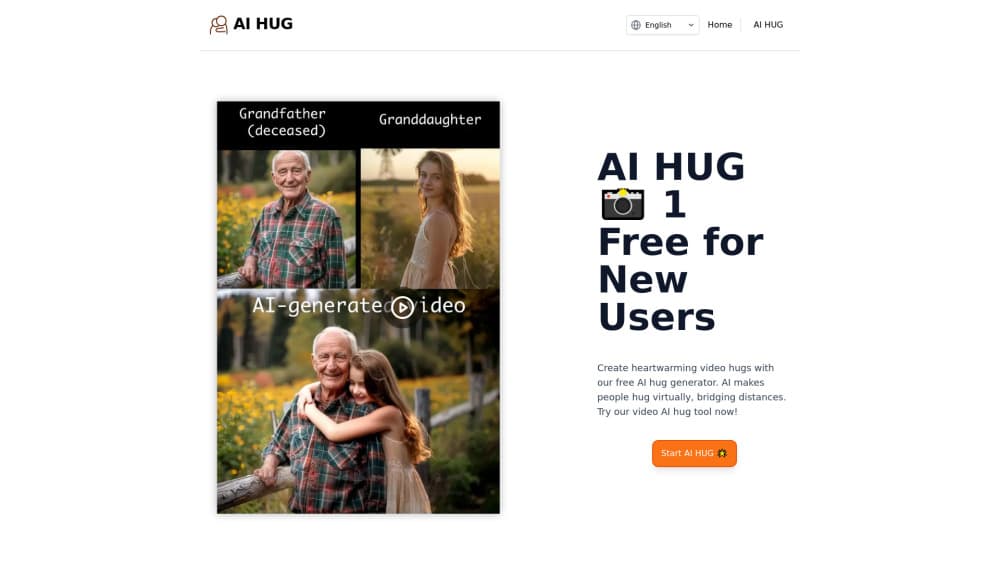
AI Hug is a browser-based AI hug video maker. It animates two still photos into a short video of the people in them hugging. You upload pictures of two people, the system maps their faces and body positions, and it generates a clip that shows them embracing. There's nothing to install. It runs on the web at ai-hug.org, so it works the same on a phone, tablet, or laptop.
It solves a fairly specific problem. Plenty of people have photos of themselves with a partner, a parent, or a friend they don't see often. They just don't have a video of the two of them together like that. AI Hug fills that gap for anyone who wants a moving keepsake without filming anything, and that's a fairly narrow but genuinely emotional use case.
The main catch is that the output is generated, not real. It's an animation built from photos, so faces and hands can look a little off, especially if the source images are blurry, dim, or shot from odd angles. The tool works best with clear, well-lit pictures where each person is visible. So what should you expect on a first run? Quality varies by image pair, and a rough result doesn't mean the tool failed. Try a different set.
Getting Started
- Open ai-hug.org in any browser. No account is required to try the free option.
- Pick two photos, one per person, and make sure both faces are clear and well lit.
- Upload the pair and choose a hug style or duration if the page offers options.
- Wait for the AI to process the images and generate the short hug video.
- Preview the result, then download it or share it to social media.
Product Information
A quick look at AI Hug's pricing, supported platforms, and performance.
Best for
The users, tasks, and scenarios where this tool fits best.
Users
- Long-distance couples
- Families living apart
- Social media creators
- Anyone making a gift
Tasks
- Making a hug video from photos
- Creating a virtual hug for a message
- Turning old family photos into video
Scenarios
- Sending a comforting clip to a friend going through a hard time.
- Marking an anniversary or long-distance milestone with something more personal than a text.
- Posting an emotional short video to social platforms, where hug content tends to travel fast.
Key features
Photo to Hug Video
The core feature takes two still images and renders a short clip of the people in them hugging. You upload each photo separately so the system can isolate both faces and body positions. Then it builds the animation in one pass. This is the whole AI photo to video step. It's the point of the tool, and you can judge the result in about the time it takes to upload the images.
Web-Based, No Install
Everything runs in the browser. There's no app to download and no desktop software to configure, so you can try it on a phone or a shared computer. That also means you don't need to hand over storage space or deal with platform-specific versions, which keeps the whole process light for anyone who just wants a quick result.
Free Entry Point
The site offers a free way to create your first hug video, which is enough to see what the output looks like before deciding whether it's worth paying for more. Given how variable AI video results can be, testing first matters more here than with most tools.
Multiple Hug Styles
Depending on what the page offers at the time, you can pick from different hug styles and durations. That's useful when the same two photos need to work for a warm family clip and a lighter, playful one for social media, since a single rigid animation would only fit one mood.
Direct Sharing
Once a clip is generated, you can download it and post it straight to social platforms. It's built for sharing, not for editing or professional production, which keeps the workflow short.
Pros and cons
Pros
- Free to try, so you can test the output before spending anything.
- Runs in a browser with no install or setup.
- Turns photos you already have into a shareable video.
- Simple three-step flow: upload, generate, download.
- Good fit for emotional, personal clips rather than polished production.
Cons
- Results vary a lot by image quality, so blurry or dim photos may look off.
- Generated hugs aren't real footage, so faces and hands can appear unnatural.
- Fewer editing controls than a full video editor, which limits fine-tuning.
- Pricing above the free tier isn't always clearly posted, so check before you commit.
Frequently asked questions
AI Hug creates short videos of two people hugging from their photos. People use it for personal keepsakes, long-distance messages, and social media posts.
Related content
Explore related tools, skills, and articles for AI Hug.
AI Hug Alternatives

Google EmbeddingGemma 2
Google DeepMind · Writing · Image · CodingGoogle EmbeddingGemma 2 is a 740M-parameter open model that turns text, code, images, audio, and video frames into vectors in one 768-dimension space, running on phones and laptops.

Tractionwave
TractionWave · Image · MarketingTractionWave is an AI attention heatmap tool for static ads. Upload a PNG or JPG and it returns predicted attention, ranked hotspots, and fixes before you spend budget.

Imejis.io
Imejis.io · Image · MarketingImejis.io is an AI design studio for agents and marketing teams. Describe an image in plain words, and it writes the copy, builds the layout, reflows it to every size, then exports a finished file.