
AI Image Generator
AI Image Generator (open-source project) · Image
AI Image Generator is a free browser-based text to image tool that turns written prompts into custom AI art. You type a description, generate an image, and browse a public gallery for ideas.
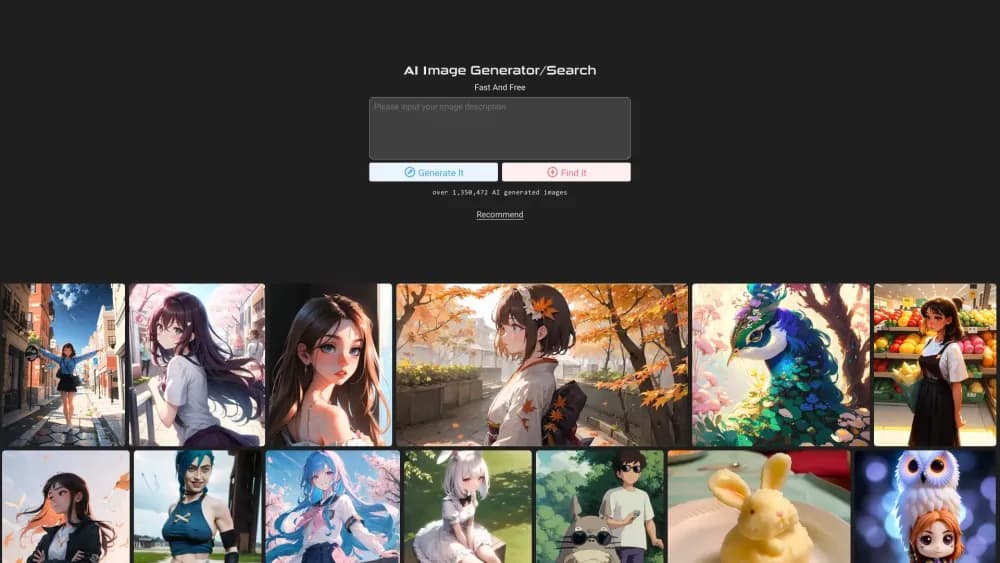
About AI Image Generator
What Is AI Image Generator
AI Image Generator is a web tool that creates images from text descriptions. You describe a scene, a subject, or a style, and the site renders a new picture from that prompt. It runs entirely in the browser, so there's nothing to install and no design skill needed.
The project is small and openly documented. Its code is published on GitHub as an open-source generator built on the DALL-E and Stable Diffusion APIs, with a Vue front end and a Python back end. The same site hosts a public gallery that has passed 2 million generated images, which doubles as a source of prompt ideas.
The limits are worth knowing upfront. Prompt quality drives output quality, and vague or overloaded prompts produce messy results. There's also no account system, no saved library tied to your identity, and no commercial license spelled out on the site.
Getting Started
- Open ai-img-gen.com in any modern browser.
- Type a text prompt describing the image you want, including subject, style, and lighting.
- Pick an aspect ratio such as 1:1, 16:9, or 9:16.
- Hit generate and wait while the model renders your picture.
- Download the result or open the gallery to study prompts you can reuse.
Product Information
A quick look at AI Image Generator's pricing, supported platforms, and performance.
Best for
The users, tasks, and scenarios where this tool fits best.
Users
- Beginners
- Hobbyists and AI art fans
- Content creators
Tasks
- Generating images from text
- Exploring prompt ideas
- Producing quick concept art
- Downloading royalty-free starting points
Scenarios
- Writing a blog or social post and needing a matching visual fast.
- Sketching a story, game, or product idea before building it out.
- Practicing prompt writing by copying gallery examples and tweaking the wording.
- Filling a personal project with custom art when a subscription tool isn't worth it.
Key features
Text to image generation
This AI picture generator has one core job. You write a prompt, the generator sends it to the DALL-E or Stable Diffusion model behind the site, and an original image comes back. The closer your description matches what you have in mind, the better the result tends to look.
Free browser access
Everything runs online, so you don't install a thing. Open the site on Windows, macOS, Linux, iOS, or Android and start generating. That makes it easy to try from a phone or a shared computer when a desktop app isn't an option.
Aspect ratio controls
Before you generate, you choose a shape such as 1:1, 3:4, 4:3, 9:16, or 16:9. Picking the right ratio up front saves cropping later. That matters for a square avatar, a vertical story, or a widescreen banner alike.
Public image gallery
The site hosts a gallery with more than 2 million AI images, each paired with the prompt that produced it. That's a searchable idea bank. You can browse until a look catches your eye, then copy the phrasing and adapt it to your own project.
Open-source codebase
The full client and server code sits on GitHub under an open license, split into a Vue front end and a Python back end. Developers can read how it works, run their own copy, or plug in their own model API key.
Multi-language interface
The interface switches across English, Spanish, Portuguese, French, Russian, Indonesian, Simplified Chinese, Traditional Chinese, and Japanese. That helps users who want prompts and menus in their first language rather than English only.
Pros and cons
Pros
- Free to use with no sign-up, so you can generate images right away
- Runs entirely in the browser on desktop and mobile with nothing to install
- Backed by DALL-E and Stable Diffusion rather than a single in-house model
- Public gallery doubles as a prompt library with more than 2 million examples
- Open-source code lets developers inspect, self-host, or extend it
Cons
- Output quality depends heavily on prompt wording, so vague prompts waste attempts
- No user accounts or personal library, so images aren't saved to your profile
- No public API, which blocks automated or high-volume production pipelines
- The site doesn't state a clear commercial-use license for generated images
- Slower or busier periods can make generation wait times unpredictable
Frequently asked questions
It turns written descriptions into original images. You type a prompt, the tool renders a picture from it, and you can download the result or look at public examples for inspiration.
Related content
Explore related tools, skills, and articles for AI Image Generator.
AI Image Generator Alternatives

Storytailor®
Storytailor Inc. · Writing · Image · LeaningStorytailor is an AI story generator for kids that turns a drawing or a small idea into a personalized children's book you can read, listen to, and play out together.

X Ray Interpreter
X-ray Interpreter · ImageX Ray Interpreter is a web-based AI radiology tool that turns X-rays, CT scans, MRI, ultrasound, and PET images into plain-language reports. You upload a scan, get a preliminary X-ray interpretation in moments, then ask follow-up questions if something needs explaining. It works as a second opinion and a learning aid, not as a medical diagnosis.

Aieasypic
AIEasyPic · ImageAIEasyPic is an AI image generator that turns plain text prompts into finished artwork in seconds. You can also train custom models on your own photos, swap faces in existing images, and create short video clips from text, all from a browser. It suits casual creators who want quick visuals and hobbyists who want to build a personal model without touching any code.