

AI Mock Interview: Job Prep
Sidessh More · Business
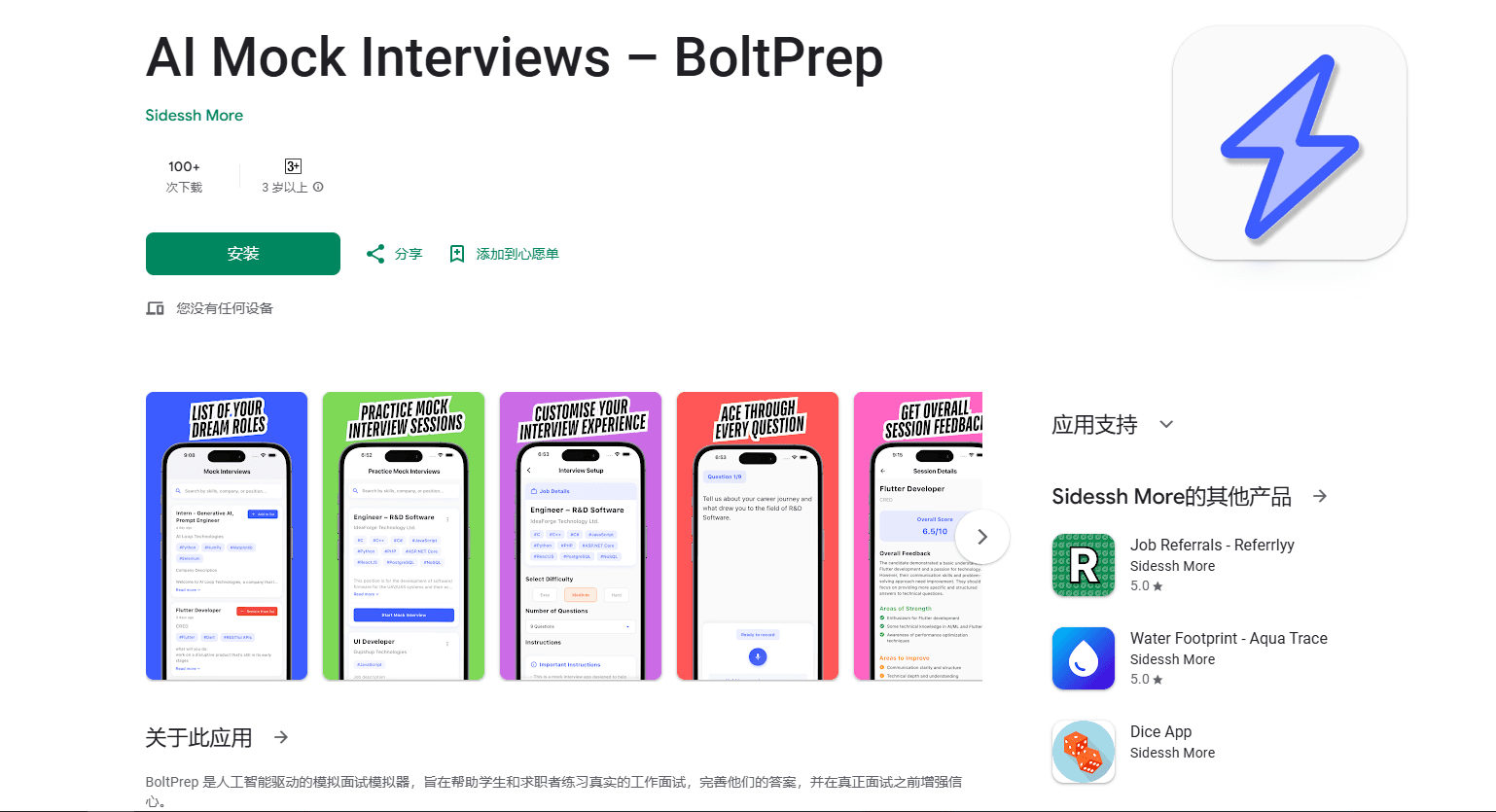
AI Mock Interview: Job Prep (BoltPrep) is an Android app that generates role-specific interview questions, records your spoken answers, and returns scored feedback with tips after every session.
About AI Mock Interview: Job Prep
What Is AI Mock Interview: Job Prep
AI Mock Interview: Job Prep, also known as BoltPrep, is an Android app by developer Sidessh More that turns interview practice into a spoken rehearsal. It works as a mock interview simulator, standing in for the practice partner most candidates never line up. You describe the role you're targeting, the app builds questions for that exact position, and you answer out loud the way you would in a real interview. It's built for students heading into campus placements and for professionals chasing senior roles.
The problem it targets is specific. Plenty of candidates know their material but freeze when they have to say it aloud under pressure. BoltPrep creates that pressure in a low-stakes setting, then hands you an objective read on how you came across. It isn't a course and it doesn't coach you live, so the value depends on how often you actually sit down and speak.
The main limits are worth knowing up front. It runs on Android only, it's a small indie project rather than a polished enterprise tool, and the feedback comes from an AI model, not a human hiring manager. The app also collects personal info, audio, and files, so you're trusting it with recordings of your voice.
Getting Started
- Install AI Mock Interview: Job Prep from the app store and open it. No long onboarding is required.
- Set the target role by pasting a job posting URL or entering the job details by hand.
- Let the app generate interview questions tailored to that company and position.
- Answer by speaking out loud and tap to stop when you're done with each question.
- Read the session report, which scores your performance and lists strengths, weak spots, and sample answers.
Product Information
A quick look at AI Mock Interview: Job Prep's pricing, supported platforms, and performance.
Best for
The users, tasks, and scenarios where this tool fits best.
Users
- Students and freshers
- Career switchers
- Senior candidates
Tasks
- Rehearsing answers out loud
- Building role-specific questions
- Tracking improvement
Scenarios
- The night before an interview
- Interview season at college
- Preparing for a specific company
Key features
AI Mock Interviews
The core loop generates interview questions matched to a role you name. Every session simulates the flow of a real interview rather than a fixed list, so you can't coast on memorized answers. You can target a specific company or role, which keeps the practice close to the job you actually want.
Voice-Based Answer Recording
You answer by speaking, and the app captures your voice instead of typed text. That matters because most interview nerves show up in delivery, not knowledge. For anyone who wants voice interview practice rather than silent reading, this is the part that does the work. Practicing aloud in the app mirrors how you'll actually respond in the room, and pauses or rambling become visible instead of hidden behind a keyboard.
Instant AI Feedback
After each session you get a report with an overall score, strengths, areas to improve, and sample answers. The sample answers are the clearest part: they show how a stronger reply might sound without forcing you to guess. Feedback lands right after you finish, so you can fix a weak answer while it's fresh.
Custom Job Role Simulations
You can paste a job posting URL or enter the job details by hand. The app then builds the interview around that position instead of generic prompts. For people applying to several roles at once, this keeps practice from blending together and lets you drill the one that matters most.
Interview Analytics
The app tracks your scores across sessions and shows how they change over time. Patterns in your performance become easier to spot, like a recurring weak spot in behavioral answers. That data is the reason to come back, since improvement only shows up when you review more than a single attempt.
Pros and cons
Pros
- Runs on Android and sets up fast, so you can start a session without a lengthy onboarding.
- Voice-first practice reflects how real interviews work, where delivery often decides the outcome.
- Feedback includes sample answers, which give a concrete target instead of vague advice.
- Role-specific questions come from a pasted job URL or manual details, so practice matches the job.
- Session analytics make progress measurable across repeated attempts.
Cons
- Limited to Android, so iPhone users can't use it.
- Ads appear in the free version, which can interrupt a practice run.
- Feedback comes from an AI model, so it can miss the nuance a human interviewer would catch.
- The app collects personal info, audio, and files, which some users may not want to share.
Frequently asked questions
It generates interview questions for a role you name, records your spoken answers, and returns a scored report with improvement tips. Think of it as a rehearsal space for speaking your answers out loud.
Related content
Explore related tools, skills, and articles for AI Mock Interview: Job Prep.
AI Mock Interview: Job Prep Alternatives
Liveplan
Palo Alto Software · BusinessLivePlan is business plan software that helps founders and small business owners turn an idea into a funder-ready plan. It combines AI-assisted writing, market research with cited sources, and connected financial forecasting so your income statement, cash flow, and balance sheet move together when you change one number. Over 1.5 million businesses have used it to plan, forecast, and track performance against real accounting data. That's a lot of founders. It's also a signal the tooling survived contact with real lenders.

Swms
Swms AI · Writing · Productivity · BusinessSwms is an AI safety compliance tool that turns a plain description of a job into ready-to-use safety documents. Describe your project, trade, and known hazards, and it writes a safe work method statement, job hazard analysis, safe work procedure, RAMS, or safety data sheet in seconds. It also ships with Oscar, a chat assistant that answers workplace safety questions in any language. Teams in construction, mining, transport, and warehousing use it to cut the paperwork that usually eats into a workday.

Rows
Rows (Superhuman) · Productivity · BusinessRows is an AI spreadsheet and data analysis tool that imports live data from more than 50 sources, then lets you work with it using plain language instead of SQL queries or nested formulas. You can pull numbers out of PDFs, connect ad platforms, databases, and bank accounts, and ask the AI to build reports, merge datasets, or set up models that recalculate themselves. It runs in the browser, works like a spreadsheet, and now sits under the Superhuman umbrella.