

AI Renamer
AI Renamer · Productivity
AI Renamer is a Mac and Windows desktop app that reads your images and documents, then suggests meaningful file names. It handles batch renaming with local or cloud AI models.
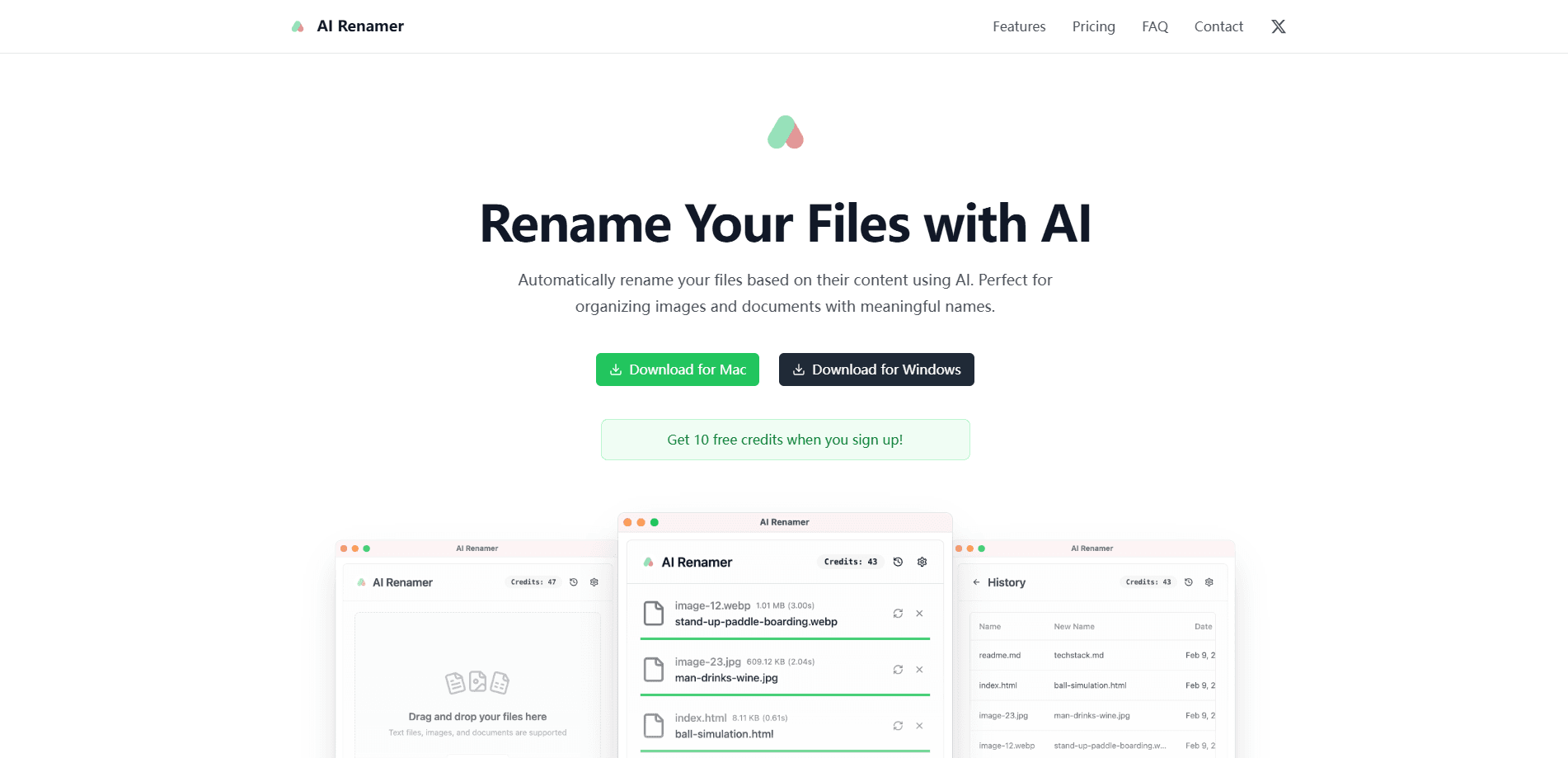
About AI Renamer
What Is AI Renamer
AI Renamer is a desktop utility that renames files based on what's actually inside them. Instead of asking you to write regular expressions or number files by hand, it looks at the content of an image or a document and proposes a name that describes it. Point it at a folder of camera dumps and you get labels that mention the subject or the scene instead of IMG_2043.
The problem it targets is a familiar one. Renaming files by hand is tedious, so most people skip it, and once every file is named DSC_0001 the whole folder stops being searchable. AI Renamer turns that manual chore into a batch job and lets you review the suggestions before anything changes on disk.
The tradeoff worth knowing up front: it's a desktop app, and it can run models either on your machine or through a cloud service you connect. If you want to keep sensitive files off the internet, the local option covers that. The quality of the names depends on which model you point it at. It leans toward images, but it also handles PDFs and plain text files.
Getting Started
- Download the desktop app from airenamer.app and install it on Mac or Windows.
- Sign up to claim 10 free credits, no credit card required.
- Connect a model. Use a local option like Ollama or LM Studio, or plug in an OpenAI key.
- Drag files into the app, preview the suggested names, and apply the batch rename.
Product Information
A quick look at AI Renamer's pricing, supported platforms, and performance.
Best for
The users, tasks, and scenarios where this tool fits best.
Users
- Photographers sitting on years of unsorted shoots
- Families managing phone photos and cloud backups
- Privacy-minded users with sensitive documents
- Freelancers and small teams handling client media
Tasks
- Renaming a folder of images
- Standardizing document names
- Sorting assets by content
- Processing files offline
Scenarios
- Cleaning up a camera card after a trip
- Preparing a client media pack
- Organizing a research archive
- Working with files you can't upload
Key features
Custom Instructions
You can add your own instructions to guide the model, so naming follows your patterns and formatting rules instead of a fixed default. This matters when a team or a client already has a naming convention and you need the tool to match it, not the other way around.
Smart Recognition
The app analyzes file content to build meaningful names. It reads image subjects and EXIF metadata, and it can pull context from documents as well. Ollama file renaming and EXIF image renaming both run through this same content pass. Names reflect what a file shows or contains, which is the difference between a label you understand and a serial number you don't.
Batch Processing
Rename many files at once with consistent naming. A drag and drop interface keeps the flow simple, and a preview step lets you check the suggestions before applying them. Most of the time saved here comes from not touching files one by one.
File Support
AI Renamer works across common file types. It covers images like JPG, PNG, GIF, and WEBP, plus documents including PDF and TXT files. You get one tool for a mixed folder instead of juggling separate utilities per format.
Local Model Support
You can run your own models for privacy and flexibility. Ollama and LM Studio are supported for local work, and OpenAI or a custom model can be connected when you want cloud quality. That choice between offline and cloud is the core of how you control where your files go.
Mac and Windows Desktop App
It ships as a desktop application for both major platforms. The experience stays consistent across macOS and Windows, so a team on mixed hardware uses the same tool without retraining.
Pros and cons
Pros
- Local model support through Ollama and LM Studio keeps files on your own machine.
- Batch processing with a preview step adds a safety check before names change on disk.
- Works on both Mac and Windows with a consistent interface.
- Free credits let you test the AI naming on your own files before paying.
- Custom instructions adapt the tool to an existing naming convention.
Cons
- It's desktop only. There's no web app, so you can't rename files from a browser or a phone.
- The quality of the names depends on the model you connect. A weak local model gives weaker suggestions than a cloud one.
- Local processing needs a capable machine. Running larger models offline can be slow on an older laptop.
- There's no public API, so you can't wire it into an automated pipeline.
Frequently asked questions
It analyzes file content and metadata to generate a name. For images it looks at the subject and EXIF data, and for documents it reads the text content to find context. You review the suggestions before they're applied.
Related content
Explore related tools, skills, and articles for AI Renamer.
AI Renamer Alternatives

Base Code
Base44 (Wix) · Coding · ProductivityBase Code is a shared cloud development environment from Base44. Teammates describe changes to an existing GitHub codebase in chat, preview them live and send them back as pull requests.

Knocket
Knocket (Tencent RTC team) · Productivity · Business · ChatbotKnocket is a free live chat and contact page tool that lets visitors message you from your website, app, or a shareable link, with every reply handled from Telegram or one inbox.

FloorGen
Vinit Kumar (FloorGen) · Productivity · China AIFloorGen is a browser-based floor plan maker that turns a sentence or a sketch into an editable 2D plan and a 3D walkthrough. Export to PDF, DXF or video, and draw without an account.